Accedi al tuo account
or
L'utente con questa email esiste già
By clicking 'Download File,' you agree to our Terms and conditions and Privacy policy
excel_online_edit
Salva documento come
Seleziona un file da salvare
docx DOCX
pdf PDF
odt ODT
txt TXT
dotx DOTX
pdfa PDF/A
ott OTT
rtf RTF
docxf DOCXF
oform OFORM
html HTML
fb2 FB2
epub EPUB
xlsx XLSX
pdf PDF
ods ODS
csv CSV
xltx XLTX
pdfa PDF/A
ots OTS
pptx PPTX
pdf PDF
odp ODP
potx POTX
pdf PDF/A
otp OTP
png PNG
jpg JPG
close

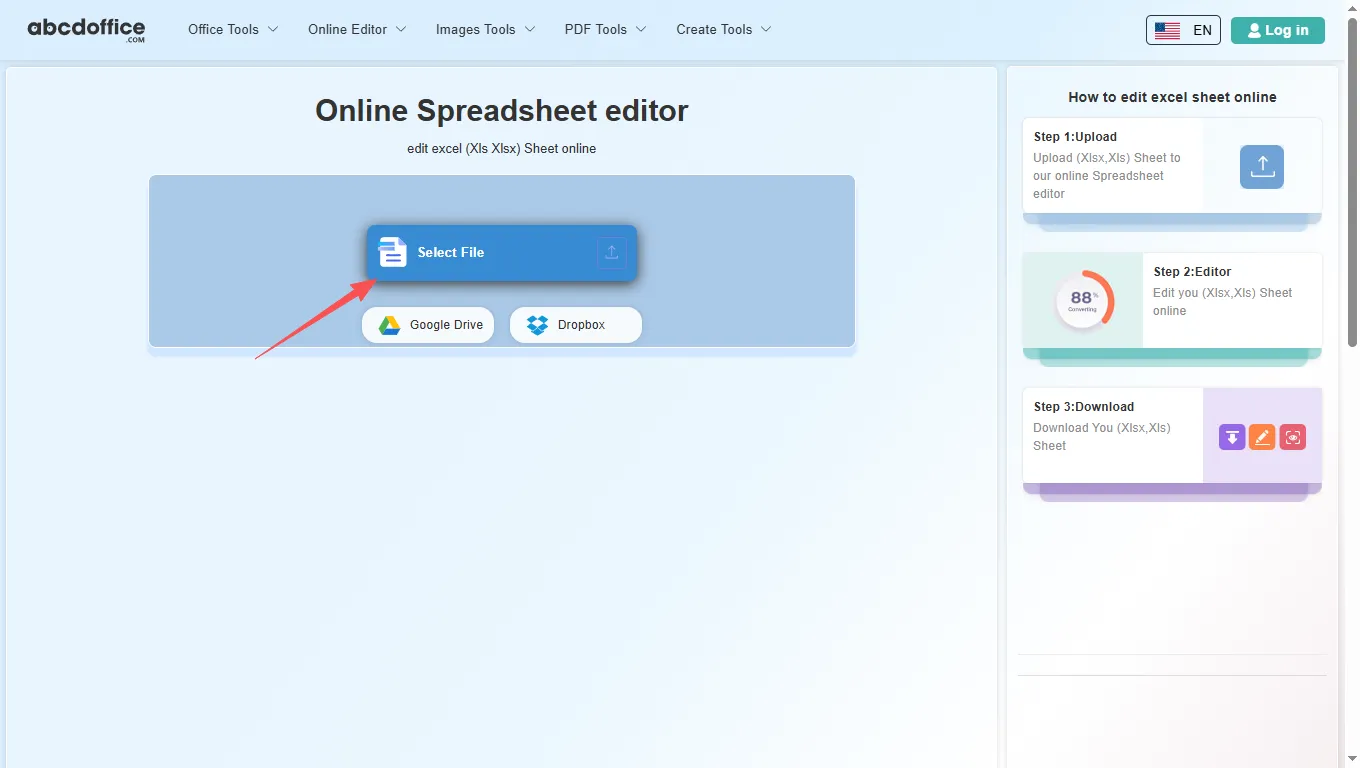
Editor di Fogli di Calcolo Online

Modifica fogli Excel (Xls Xlsx) online

scicon Select File upload_btn add_upload
1
google-drive Google Drive
dropbox Dropbox
oppure trascina il PDF qui
Non chiudere il browser. Attendi fino a quando i tuoi file vengono caricati e elaborati! Potrebbe richiedere alcuni minuti. :)
File
Open Source Statement
close
Come modificare fogli Excel online
Passaggio 1: Carica
Carica il foglio (Xlsx,Xls) nel nostro editor online di fogli di calcolo
add file
Edit
Passaggio 2: Editor
Modifica il tuo foglio (Xlsx,Xls) online
Passaggio 3: Download
Scarica il tuo foglio (Xlsx,Xls)
add file

Ce que cet éditeur Excel en ligne gratuit prend en charge

ABCD Office est un éditeur Excel en ligne dans votre navigateur — ouvrez XLSX ou XLS sur abcdoffice.com, modifiez les cellules et les formules avec un éditeur Excel en ligne complet, puis exportez sans installer Microsoft Excel.

Formats de fichiers

Téléchargez et modifiez des fichiers .XLSX et .XLS. Les feuilles de calcul XLS héritées utilisent le même flux de travail d'éditeur Excel en ligne que les XLSX modernes sur abcdoffice.com.

Modifier dans le navigateur

Un véritable éditeur Excel en ligne — changez les valeurs, les formules, les graphiques et le formatage dans la barre d'outils. L'éditeur Excel en ligne s'ouvre automatiquement après la fin du téléchargement.

Options d'exportation

Cliquez sur Télécharger pour enregistrer depuis l'éditeur Excel en ligne au format XLSX, ou exportez au format PDF pour le partage et l'impression.

Pas d'installation

Utilisez cet éditeur Excel en ligne gratuitement sur bureau ou mobile sur abcdoffice.com. Aucun abonnement Microsoft Office ou Microsoft 365 requis pour les modifications standard des feuilles de calcul.

Comment modifier des feuilles de calcul Excel en ligne sur ABCD Office

abcdoffice.com/excel-editor.html est la page de l'éditeur Excel en ligne — téléchargez un fichier XLSX ou XLS existant, modifiez dans le navigateur, puis téléchargez. Pas de mode aperçu uniquement et pas de flux de création de classeur vide ici.

Modifier

Éditeur Excel en ligne — modifiez des fichiers XLSX et XLS gratuitement

Vous avez reçu un budget, une liste de factures ou un rapport sous forme de fichier Excel et avez besoin d'un éditeur Excel en ligne pour mettre à jour les chiffres, corriger les formules ou ajuster les colonnes avant de le renvoyer.

  • Éditeur Excel en ligne pour les modifications quotidiennes — budgets, feuilles de temps, listes d'inventaire et fiches de données clients.
  • Éditeur Excel en ligne qui fonctionne lorsque Office n'est pas installé sur un ordinateur scolaire, de travail ou partagé.
  • Téléchargez depuis votre appareil, Google Drive ou Dropbox sur abcdoffice.com — puis exportez au format XLSX ou PDF.
01
Schritt 1: Öffnen Sie den Spreadsheet-Editor auf abcdoffice.com

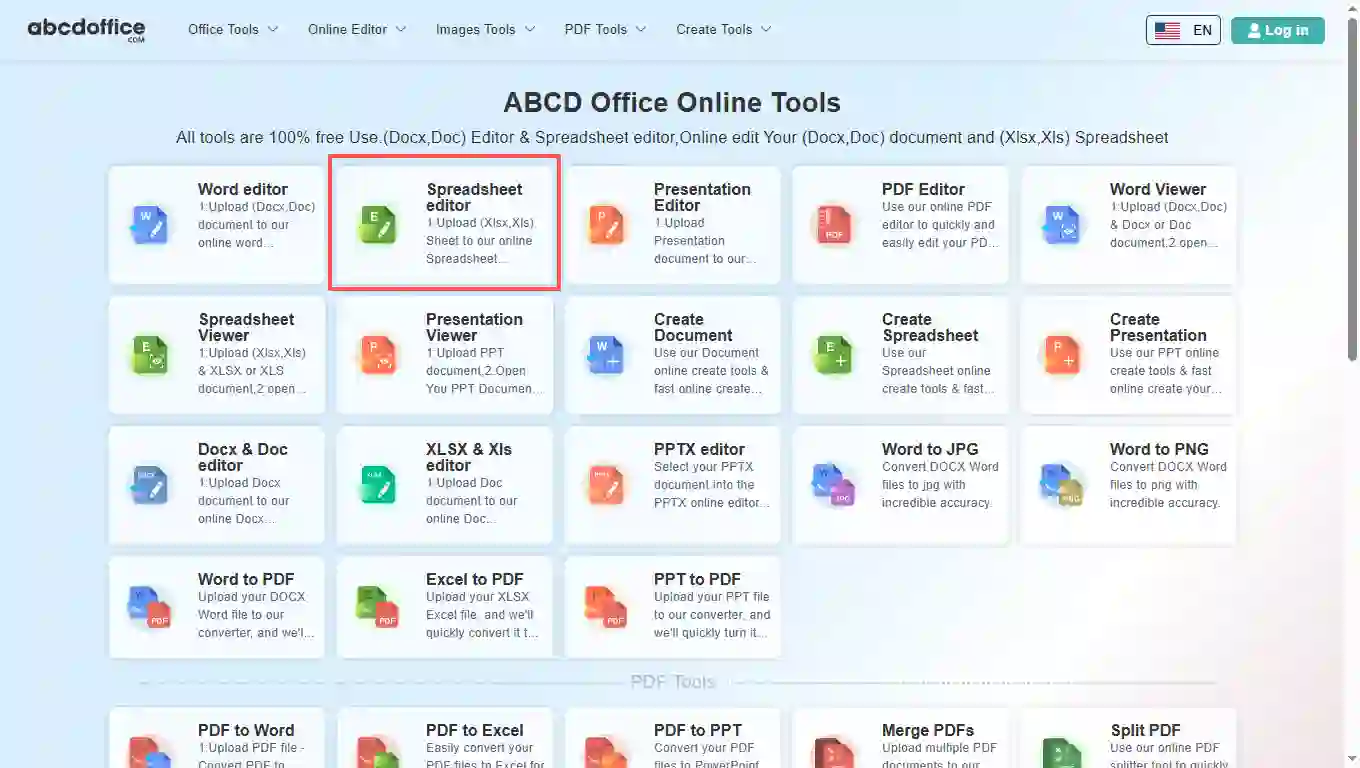
Ouvrez abcdoffice.com dans votre navigateur. Sur la grille d'outils de la page d'accueil, cliquez sur Éditeur de feuille de calcul sous Éditeur en ligne ou Outils PDF — ou allez directement sur abcdoffice.com/excel-editor.html pour ouvrir cette page d'éditeur Excel en ligne.

02
Schritt 2: Laden Sie Ihre Datei hoch

Sur l'écran de téléchargement à abcdoffice.com/excel-editor.html, cliquez sur Sélectionner un fichier ou faites glisser des feuilles de calcul XLSX ou XLS dans la zone de téléchargement. Les boutons Google Drive et Dropbox apparaissent sous Sélectionner un fichier sur abcdoffice.com.

03
Étape 3 : Modifier dans l'éditeur Excel en ligne

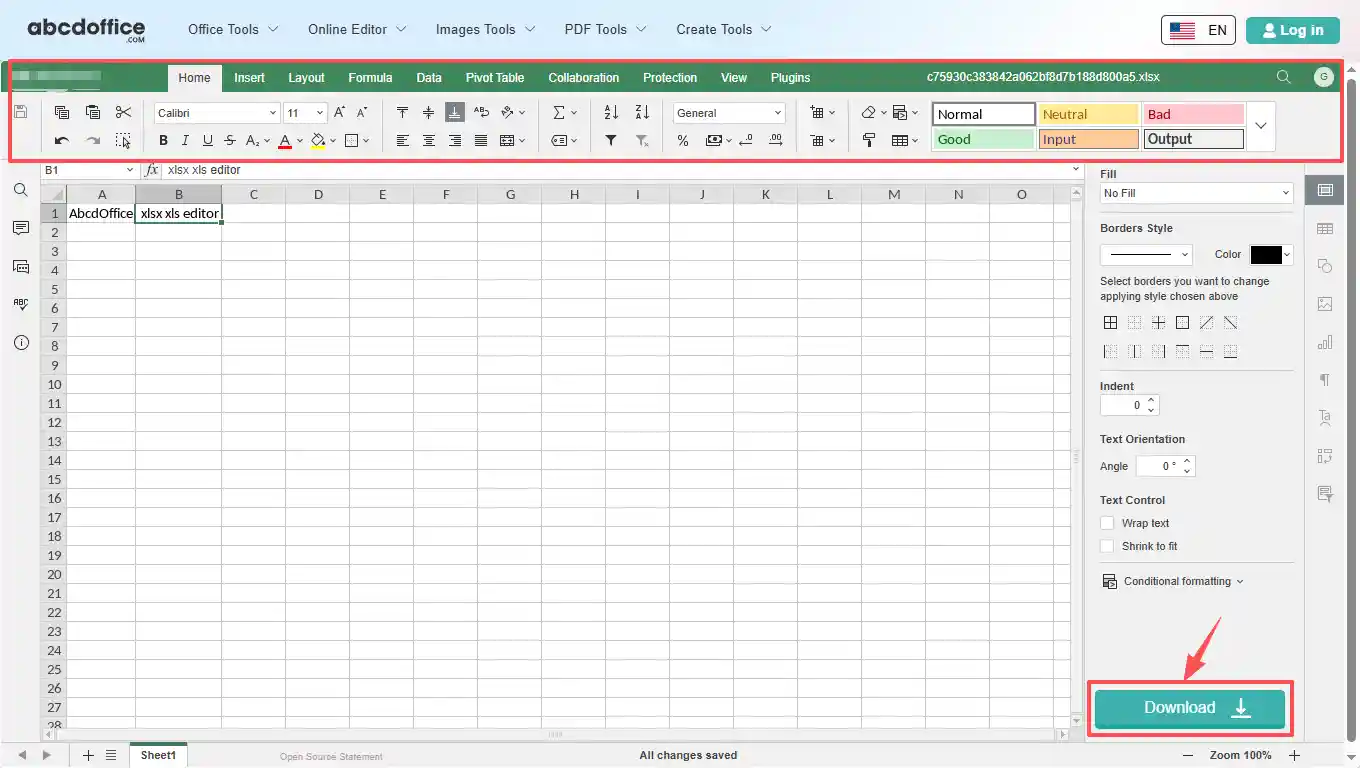
Après le téléchargement et le traitement, l'éditeur Excel en ligne s'ouvre dans votre navigateur sur abcdoffice.com. Utilisez la barre d'outils pour modifier le texte, les tableaux, les images et le formatage.

04
Étape 4 : Télécharger XLSX ou PDF

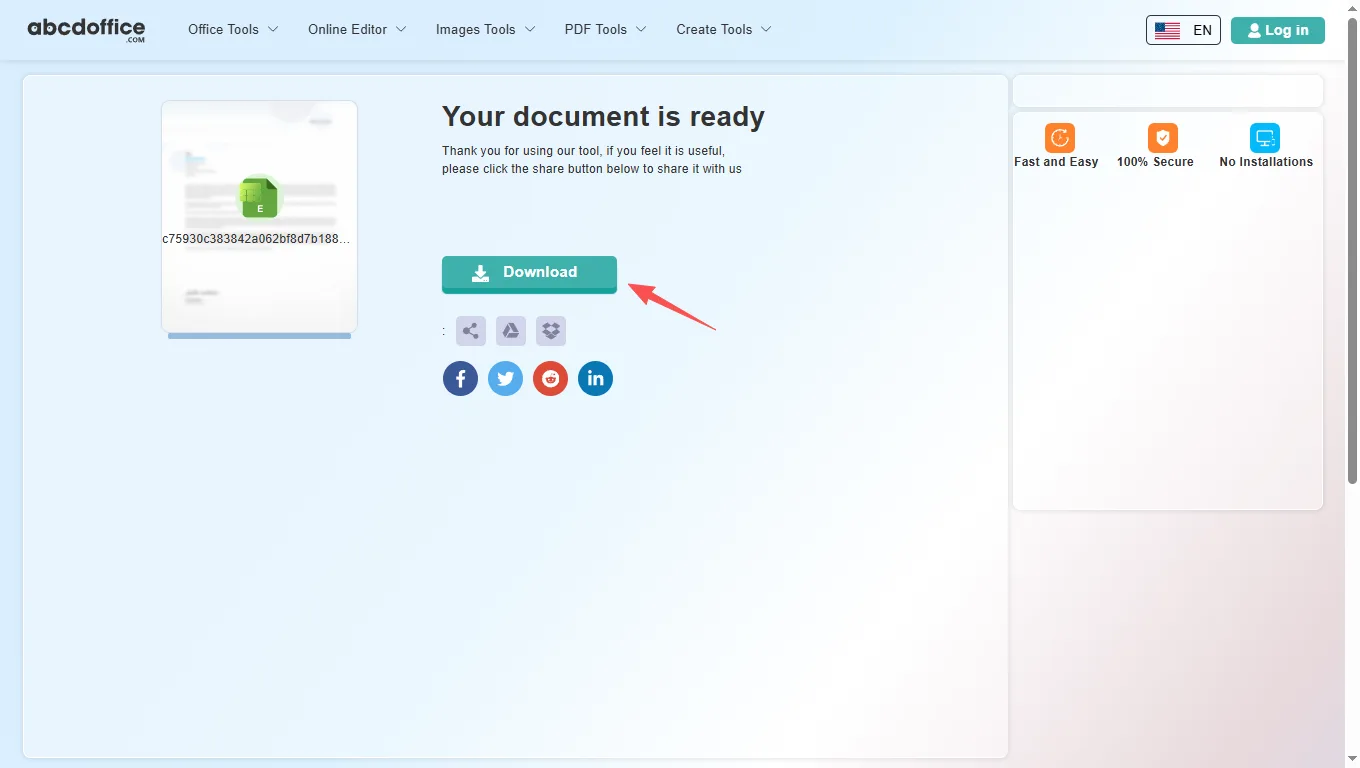
Lorsque le traitement est terminé, abcdoffice.com affiche un écran de téléchargement. Cliquez sur Télécharger pour enregistrer XLSX ou PDF sur votre ordinateur depuis cet éditeur Excel en ligne gratuit.

Barre d'outils de l'éditeur Excel — chaque onglet expliqué

L'éditeur Excel en ligne ABCD Office sur abcdoffice.com est construit sur ONLYOFFICE Docs. Après l'ouverture de votre fichier, utilisez les onglets de la barre d'outils ci-dessous — Accueil, Insertion, Mise en page, Formule, Données, Tableau croisé dynamique, Collaboration, Protection, Affichage et Plugins — correspondant aux outils affichés dans la barre d'outils de l'éditeur.

Accueil
Police, alignement, formats de nombre et styles de cellule

Police, alignement, formats de nombre et styles de cellule

L'onglet Accueil couvre l'édition quotidienne des cellules dans notre éditeur Excel en ligne — les mêmes outils de formatage de base que les gens utilisent en premier lorsqu'ils modifient des fichiers xlsx en ligne.

  • Famille de polices (Calibri et autres), taille, gras, italique, souligné, barré, couleur de police et couleur de remplissage
  • Alignement, retour à la ligne, fusion et centrage, bordures et orientation du texte
  • AutoSomme, Trier et Filtrer, formats de nombre (Général, Monétaire, Pourcentage) et contrôles décimaux
  • Galerie de styles de cellule — Normal, Bon, Mauvais, Entrée, Sortie, Calcul et plus de préréglages
Insertion
Tableaux, graphiques, images et objets riches

Tableaux, graphiques, images et objets riches

Les outils de l'onglet Insertion dans cet éditeur Excel en ligne vous permettent d'ajouter de la structure et des visuels au-delà des cellules simples — utiles pour les tableaux de bord, les rapports et les livrables clients sur abcdoffice.com.

  • Tableau croisé dynamique, Tableau, Image, Forme, Zone de texte et Art textuel
  • Graphique, Sparkline, SmartArt, Commentaire et Hyperlien
  • En-tête et pied de page, Équation, Symbole et Slicer
  • Créez des feuilles de calcul soignées lorsque vous modifiez un fichier xlsx en ligne sans Excel de bureau
Mise en page
Configuration de la page, zone d'impression et options de feuille

Configuration de la page, zone d'impression et options de feuille

Kontroluj rozkład strony w edytorze online Excel przed eksportem do XLSX lub PDF — marginesy, orientacja i ustawienia druku dla czystych wydruków.

  • Marginesy, Orientacja, Rozmiar, Obszar druku, Nagłówek i stopka, Dopasowanie do rozmiaru oraz Tytuły druku
  • Checkboxy dla linii siatki i nagłówków do wydruku dla wyników arkusza
  • Przenieś do przodu, Wyślij do tyłu, Wyrównaj i Grupuj obiekty na arkuszu
  • Ustawienia schematu kolorów dla spójnego wyglądu skoroszytu
Formuła
Funkcje, nazwane zakresy i obliczenia

Funkcje, nazwane zakresy i obliczenia

Twórz i audytuj formuły w edytorze online Excel — wstawiaj funkcje według kategorii, zarządzaj nazwanymi zakresami i kontroluj ponowne obliczenia.

  • Wstaw funkcję (fx), AutoSum, Ostatnio używane, Finansowe, Logiczne oraz Tekst i dane
  • Data i czas, Wyszukiwanie i odniesienie, Matematyka i trygonometria oraz Więcej funkcji
  • Nazwane zakresy i Okno obserwacji do śledzenia wartości komórek w różnych arkuszach
  • Opcje obliczeń — automatyczne lub ręczne ponowne obliczenie
Dane
Sortowanie, filtracja, walidacja i narzędzia do danych

Sortowanie, filtracja, walidacja i narzędzia do danych

Organizuj i porządkuj dane w edytorze online Excel — importuj linki, sortuj kolumny, filtruj wiersze i waliduj wpisy na abcdoffice.com.

  • Pobierz dane i linki zewnętrzne dla połączonych źródeł skoroszytów
  • Filtruj, Wyczyść filtr, Sortuj A–Z, Sortuj Z–A oraz Sortowanie niestandardowe
  • Tekst do kolumn, Usuń duplikaty oraz zasady walidacji danych
  • Grupuj i rozgrupuj wiersze lub kolumny dla widoków zarysów
Tabela przestawna
Wstaw, odśwież i stylizuj tabele przestawne

Wstaw, odśwież i stylizuj tabele przestawne

Podsumuj duże zbiory danych w edytorze Excel online — twórz tabele przestawne, dostosowuj układ i odświeżaj dane bez opuszczania przeglądarki.

  • Wstaw tabelę, aby utworzyć nową tabelę przestawną z zakresu danych
  • Układ raportu, Puste wiersze, Podsumowania i opcje całkowite
  • Narzędzia odświeżania i wyboru do aktualizacji i wyboru źródła danych tabeli przestawnej
  • Opcje stylu tabeli — Nagłówki wierszy, Nagłówki kolumn, Paskowane wiersze i Paskowane kolumny
Współpraca
Wspólna edycja, komentarze i czat

Wspólna edycja, komentarze i czat

Przeglądaj arkusze kalkulacyjne zespołu w edytorze Excel online — współedytuj, komentuj i czatuj w przeglądarce na abcdoffice.com.

  • Tryb współedytowania dla sesji edycyjnych w czasie rzeczywistym
  • Dodaj komentarz do wybranych komórek; Usuń lub Rozwiąż wątki komentarzy
  • Wbudowany czat do szybkiej dyskusji podczas edytowania xls online
  • Idealne do wspólnych budżetów, raportów i arkuszy danych zespołu
Ochrona
Szyfruj, chroń arkusz i skoroszyt

Szyfruj, chroń arkusz i skoroszyt

Zablokuj wrażliwe arkusze kalkulacyjne przed pobraniem z abcdoffice.com — szyfrowanie, ochrona arkusza i zasady edytowalnego zakresu dla wspólnych plików.

  • Szyfruj hasłem, aby tylko uprawnieni czytelnicy mogli otworzyć plik
  • Chroń strukturę skoroszytu i Chroń arkusz dla ograniczeń edycyjnych
  • Zezwól na edytowanie zakresów dla wyjątków w chronionym arkuszu
  • Opcje zablokowanej komórki i ukrytych formuł dla bezpieczeństwa formuł
Widok
Powiększenie, zamrożone okna i wyświetlanie

Powiększenie, zamrożone okna i wyświetlanie

Dostosuj przestrzeń roboczą arkusza kalkulacyjnego — poziom powiększenia, zamrożone nagłówki, linie siatki i motywy interfejsu w edytorze online Excel.

  • Widok arkusza — Nowy, Zamknij i dedykowane tryby widoku dla skoncentrowanej edycji
  • Zoom percentage, Interface Theme, and Freeze Panes
  • Show or hide Formula Bar, Gridlines, Headings, and Show Zeros
  • Always Show Toolbar, Left Panel, and Right Panel toggles
Plugins
OCR, AI, translate & more

OCR, AI, translate & more

Extend the online excel editor free with plugins — automation, AI help, translation, and media tools on abcdoffice.com.

  • Plugin Manager and Macros for custom automation
  • Highlight code, ChatGPT, Photo Editor, Speech, and Thesaurus
  • Translator, YouTube embed, and other productivity add-ins
  • Optional extras when the built-in excel editor online ribbon is not enough

Your guide to the free online excel editor on ABCD Office

How an excel editor online works on abcdoffice.com, what files it supports, and when to choose it over Microsoft Excel — written for searches like online excel editor, excel online editor, and online excel editor free.

What is an online excel editor?

An online excel editor runs in your web browser instead of on your desktop. On abcdoffice.com you upload a spreadsheet, the server prepares it for editing, and you work in a grid similar to Excel for the web. When you are done, Download saves XLSX or PDF to your computer.

Supported formats: XLSX, XLS, and export

This excel editor online accepts modern XLSX files and older XLS workbooks. After editing on abcdoffice.com, choose XLSX to keep working in Excel later, or PDF when you need a fixed layout for email, print, or client delivery.

Need to edit xlsx online after converting from PDF? Use PDF to Excel on abcdoffice.com first, then continue in the excel online editor to fix numbers and layout.

Typical use cases

Analysts update figures on a laptop without Office installed. Teachers fix grade spreadsheets from email attachments. Small teams edit shared inventory lists without waiting for IT. The online excel editor free model on abcdoffice.com fits any quick open–edit–download task — including edit xlsx file online and edit xls file online workflows.

Online excel editor vs Microsoft Excel

Microsoft Excel and Microsoft 365 remain the standard for complex modeling, Power Query, macros, and enterprise collaboration. ABCD Office targets the everyday majority: a free excel editor online that needs no install and finishes simple spreadsheet jobs in minutes at abcdoffice.com.

Privacy and quality

Upload only what you need for the edit task on abcdoffice.com. Review our privacy policy before sending highly confidential files. This editor excel online is built for high-quality XLSX output — so you spend less time fighting software and more time finishing the spreadsheet.

Online excel editor vs desktop Microsoft Excel

See how the ABCD Office online excel editor free workflow on abcdoffice.com compares to desktop Excel on steps, install time, and time to first edit.

Method Typical steps Install required Time to edit
abcdoffice.com excel editor online 3–4 steps None ~1 minute
Microsoft Excel (desktop) 5–7 steps Yes Several minutes
Excel for the web (365 login) 4–6 steps Se requiere cuenta 2–5 minutos
abcdoffice.com en línea
Flujo de trabajo rápido para cargar, editar y descargar
Microsoft Excel de escritorio
Más configuración, funciones avanzadas
Inicio de sesión web de Microsoft 365
Flujo de cuenta y OneDrive

Guías relacionadas con el editor de excel: tareas comunes de hojas de cálculo en ABCD Office

Guías para editar xlsx en línea, editar xls en línea y editor de excel en línea gratuito: todos los caminos comienzan en abcdoffice.com/excel-editor.html.

Guía

Agregar un gráfico a un libro de trabajo de ventas

Seleccione datos en el editor de excel en línea e inserte un gráfico para una presentación o captura de correo electrónico.

Téléchargez une feuille de calcul à modifier

Preguntas frecuentes

Antworten zu diesem Excel-Editor online auf abcdoffice.com — jede Frage entspricht echten Suchanfragen, mit Schritten, die abcdoffice.com/excel-editor.html umfassen.

Welcher kostenlose Online-Excel-Editor unterstützt XLSX- und XLS-Dateien?

abcdoffice.com/excel-editor.html ist ein kostenloser Online-Excel-Editor für XLSX und XLS — hochladen, im Browser mit einem vollständigen Excel-Editor online bearbeiten und ohne Microsoft Excel herunterladen.

  1. Öffnen Sie abcdoffice.com/excel-editor.html in Ihrem Browser.
  2. Klicken Sie auf Datei auswählen oder ziehen Sie Ihre Tabelle in den Upload-Bereich auf dieser Excel-Online-Editor-Seite.
  3. Bearbeiten Sie im Excel-Editor online, nachdem der Upload auf abcdoffice.com abgeschlossen ist.
  4. Klicken Sie auf Herunterladen, um XLSX oder PDF vom kostenlosen Online-Excel-Editor zu speichern.
Wie kann ich einen Excel-Online-Editor verwenden, ohne Microsoft Excel zu installieren?

Der ABCD Office Excel-Online-Editor läuft vollständig in Ihrem Browser auf abcdoffice.com — kein Desktop-Excel, keine Microsoft 365-Installation erforderlich für Standardbearbeitungsaufgaben.

  1. Besuchen Sie abcdoffice.com/excel-editor.html in jedem modernen Browser.
  2. Laden Sie Ihre XLSX- oder XLS-Datei auf die Seite des Excel-Editors online hoch.
  3. Warten Sie, bis der Tabelleneditor mit Ihrer Arbeitsmappe auf abcdoffice.com geöffnet wird.
  4. Bearbeiten und Herunterladen — keine Office-Installation auf Ihrem Gerät.
Gibt es einen kostenlosen Online-Excel-Editor ohne Anmeldung für grundlegende Bearbeitungen?

Ja — der Kern-Upload, die Bearbeitung und das Herunterladen auf abcdoffice.com/excel-editor.html funktioniert als kostenloser Online-Excel-Editor, ohne ein Konto für Standard-Tabellenkalkulationsaufgaben zu erstellen.

  1. Gehen Sie zu abcdoffice.com/excel-editor.html.
  2. Laden Sie Ihre Datei mit Datei auswählen auf diesem Excel-Editor online hoch — keine Anmeldung erforderlich, um mit der Bearbeitung zu beginnen.
  3. Nehmen Sie Ihre Änderungen im browserbasierten Excel-Online-Editor vor.
  4. Laden Sie XLSX oder PDF herunter, wenn Sie fertig sind, von abcdoffice.com.
Wie bearbeite ich eine XLSX-Datei online und lade die aktualisierte Tabelle herunter?

Der vollständige Bearbeitungsablauf für XLSX online auf abcdoffice.com/excel-editor.html ist hochladen → bearbeiten → herunterladen — die gleichen Schritte, die im Sidebar-Anleitungsfeld angezeigt werden.

  1. Klicken Sie auf abcdoffice.com/excel-editor.html auf Datei auswählen und laden Sie Ihre XLSX-Datei hoch.
  2. Wenn der Excel-Editor online geöffnet wird, ändern Sie Zellwerte, Formeln, Diagramme oder Formatierungen.
  3. Klicken Sie auf Herunterladen in der Editor-Symbolleiste auf abcdoffice.com.
  4. Wählen Sie XLSX, um später in Excel weiterzuarbeiten, oder PDF für einen festen Export.
Kann ich eine XLS-Datei online in diesem Excel-Editor online bearbeiten?

Ja — der Excel-Editor online auf abcdoffice.com akzeptiert sowohl XLSX- als auch ältere XLS-Uploads und öffnet sie im gleichen Browser-Editor.

  1. Laden Sie auf abcdoffice.com/excel-editor.html Ihre .XLS-Datei über Datei auswählen oder per Drag-and-Drop hoch.
  2. Warten Sie auf die Verarbeitung — der Online-Excel-Editor lädt die Arbeitsmappe.
  3. Bearbeiten und Herunterladen als XLSX oder PDF von abcdoffice.com.
Wie schneidet dieser Excel-Editor online im Vergleich zu Microsoft Excel ab?

Microsoft Excel ist hervorragend für fortgeschrittene Modellierung, Makros und Unternehmenszusammenarbeit. Der kostenlose ABCD Office Online-Excel-Editor auf abcdoffice.com zielt auf schnelle Bearbeitungen ab — hochladen, Zellen ändern, herunterladen — ohne Installation oder Abonnement.

  1. Verwenden Sie abcdoffice.com/excel-editor.html, wenn Sie einen schnellen browserbasierten Excel-Online-Editor benötigen.
  2. Laden Sie XLSX/XLS hoch, bearbeiten Sie Standardinhalte im Excel-Online-Editor und exportieren Sie.
  3. Wählen Sie Microsoft Excel für komplexe Modelle, VBA oder nachverfolgte Änderungen im großen Maßstab.
  4. Viele Benutzer kombinieren beides: PDF zu Excel auf abcdoffice.com, dann online bearbeiten, bevor sie PDF erneut exportieren.
Ist es sicher, Tabellenkalkulationen in diesen Online-Excel-Editor hochzuladen?

Dateien werden für Ihre Bearbeitungssitzung auf abcdoffice.com verarbeitet. Überprüfen Sie unsere Datenschutzrichtlinie und die Regeln Ihrer Organisation, bevor Sie vertrauliche Finanzdaten oder persönliche Aufzeichnungen an einen Online-Excel-Editor hochladen.

  1. Laden Sie auf abcdoffice.com/excel-editor.html nur die Tabelle hoch, die für die Bearbeitungsaufgabe benötigt wird.
  2. Vermeiden Sie das Senden von hochsensiblen Dateien, wenn Ihre Richtlinie die Cloud-Verarbeitung einschränkt.
  3. Laden Sie Ihr Ergebnis vom Excel-Online-Editor herunter, wenn Sie fertig sind.
  4. Lesen Sie die Datenschutzrichtlinie, die im Footer der abcdoffice.com-Website verlinkt ist, für Einzelheiten zur Aufbewahrung.
Kann ich meine bearbeitete Tabelle als PDF vom Excel-Online-Editor exportieren?

Ja — efter redigering på abcdoffice.com, klicka på Ladda ner och välj PDF för att skapa en delbar, utskriftsklar fil från den online excel-redigeraren gratis.

  1. Avsluta redigeringen av din arbetsbok i excel-redigeraren online på abcdoffice.com.
  2. Klicka på Ladda ner i redigerarens huvudmeny på abcdoffice.com/excel-editor.html.
  3. Välj PDF i formatvalet.
  4. Spara PDF-filen på din enhet för e-post eller utskrift.

Börja redigera ditt kalkylblad på abcdoffice.com

Ladda upp en XLSX- eller XLS-fil på abcdoffice.com/excel-editor.html — den gratis online excel-redigeraren öppnas efter uppladdning, klicka sedan på Ladda ner när du är klar.