Accedi al tuo account
or
L'utente con questa email esiste già
By clicking 'Download File,' you agree to our Terms and conditions and Privacy policy
pdf_to_ppt
Salva documento come
Seleziona un file da salvare
docx DOCX
pdf PDF
odt ODT
txt TXT
dotx DOTX
pdfa PDF/A
ott OTT
rtf RTF
docxf DOCXF
oform OFORM
html HTML
fb2 FB2
epub EPUB
xlsx XLSX
pdf PDF
ods ODS
csv CSV
xltx XLTX
pdfa PDF/A
ots OTS
pptx PPTX
pdf PDF
odp ODP
potx POTX
pdf PDF/A
otp OTP
png PNG
jpg JPG
close

Convertitore PDF in PowerPoint

Converti i tuoi file PDF in PowerPoint (PPTX) con eccezionale precisione.

Non chiudere il browser. Attendi fino a quando i tuoi file vengono caricati e elaborati! Potrebbe richiedere alcuni minuti. :)
officeedit Avanti Avanti
File
Open Source Statement
file icon
Size
Ddfdf.pptx
5.2MB
VIEW
edit_file
Come Convertitore PDF in PowerPoint
Passaggio 1: Carica
Carica i file nel nostro convertitore PDF in PPT online.
add file
Edit
Passaggio 2: Clicca su 'Converti'
Converti PDF in PPT in pochi secondi.
Passaggio 3: Scarica
Anteprima, modifica o scarica i tuoi file PPT.
add file

Lo que este convertidor gratuito de PDF a PPT admite

ABCD Office convierte PDF a PowerPoint en tu navegador — sube en abcdoffice.com/pdf-to-ppt.html, convierte páginas PDF en diapositivas PPTX editables y descarga sin instalar Adobe Acrobat o Microsoft PowerPoint.

Formato de entrada

Sube archivos PDF en abcdoffice.com/pdf-to-ppt.html — documentos PDF estándar para conversión a PPTX.

Convertir en el navegador

Haz clic en Convertir en abcdoffice.com — sin instalación de Acrobat de escritorio para tareas de conversión típicas.

Salida

Descarga PPTX listo para editar en Office o en las páginas del editor de abcdoffice.com.

Sin instalación

Convertidor gratuito en línea en escritorio o móvil en abcdoffice.com.

Cómo convertir PDF a PowerPoint en línea en ABCD Office

abcdoffice.com/pdf-to-ppt.html es la página del convertidor de PDF a PPT — sube PDF, haz clic en Convertir, descarga PPTX. Para convertir y luego editar, prueba pdf-to-ppt-editor.html.

Convertir

Convertidor de PDF a PPT — PDF a PPTX gratuito en línea

Tienes un conjunto de diapositivas o documento PDF que necesitas como diapositivas de PowerPoint editables — no páginas PDF estáticas en una reunión.

  • PDF a PowerPoint para presentaciones, PDFs de capacitación y presentaciones exportadas.
  • Convierte pdf a pptx en línea sin PowerPoint instalado.
  • Refine slides in ppt-editor.html on abcdoffice.com after download.
01
Paso 1: Abre PDF a PPT en abcdoffice.com

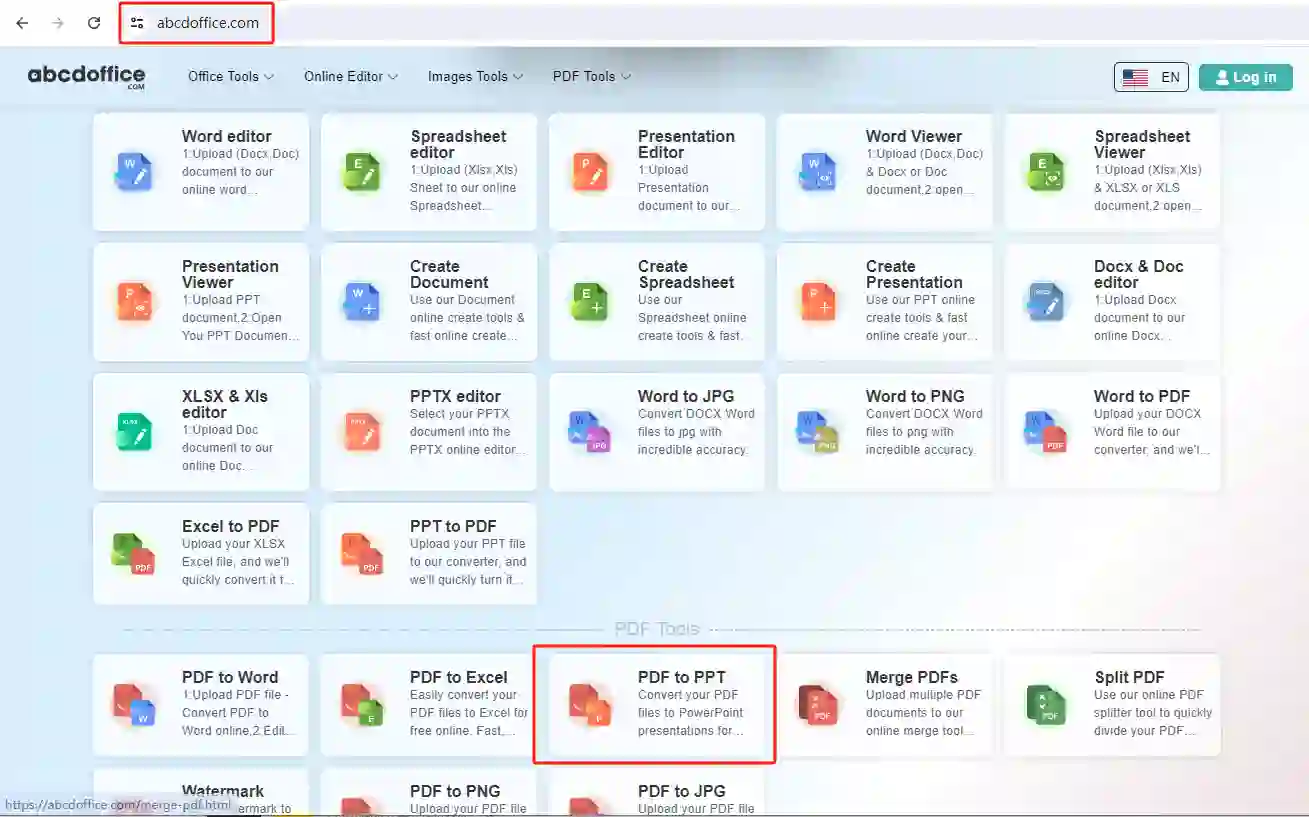
Open abcdoffice.com in your browser. On the homepage tools grid, click PDF to PPT under Online Editor or PDF Tools — or go directly to abcdoffice.com/pdf-to-ppt.html to open this pdf to ppt converter page.
02
Paso 2: Sube tu archivo

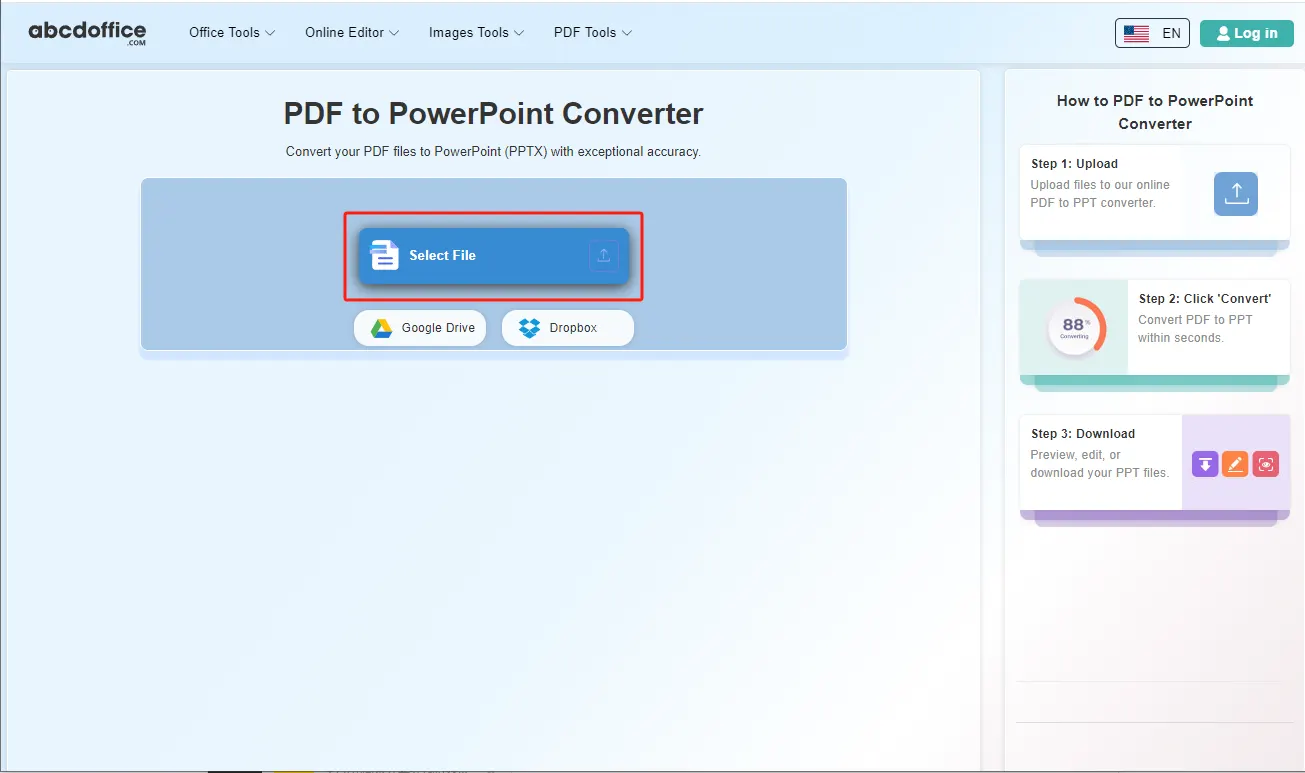
On the upload screen at abcdoffice.com/pdf-to-ppt.html, click Select File or drag PDF files into the upload area. Google Drive and Dropbox buttons appear below Select File on abcdoffice.com.

03
Step 3: Convert PDF to PowerPoint online

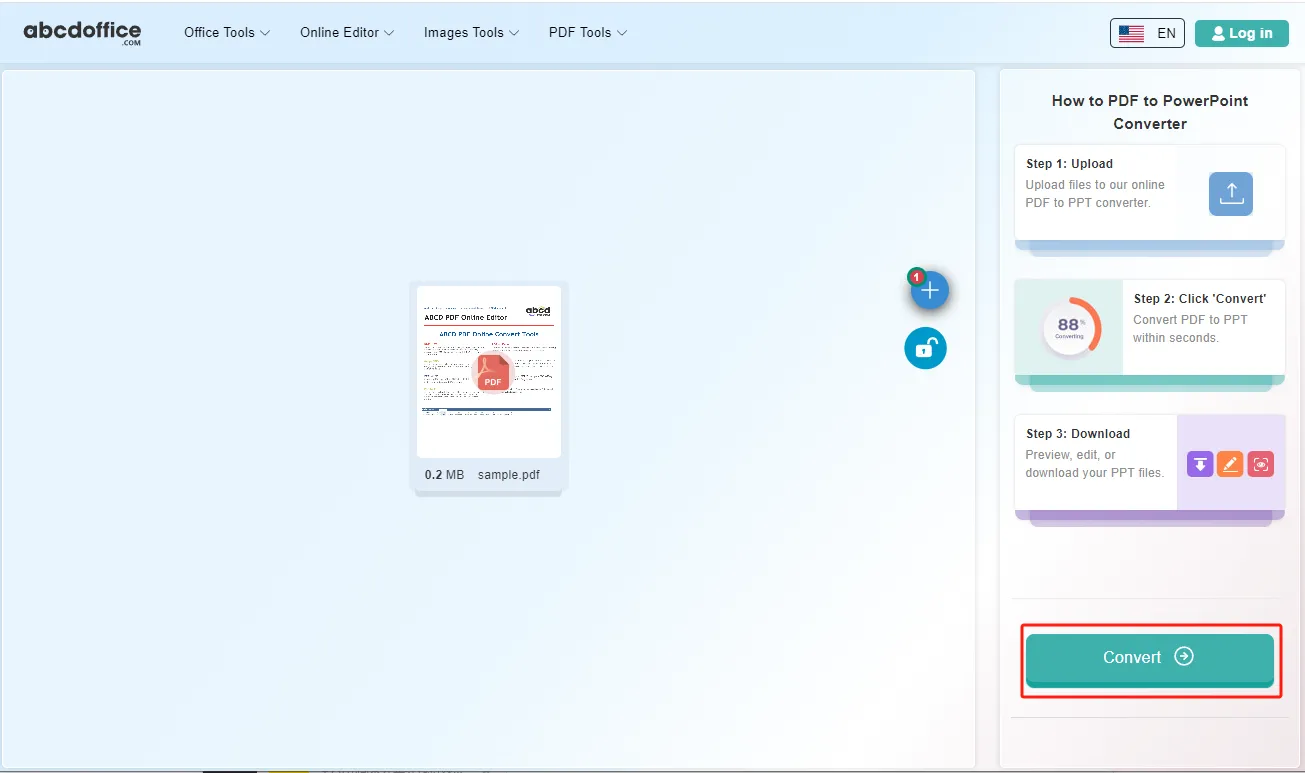
With your file uploaded, click Convert at the bottom of the page and wait a few seconds while abcdoffice.com converts PDF to PowerPoint — no extra steps during conversion.

04
Step 4: Download PPTX or PowerPoint files

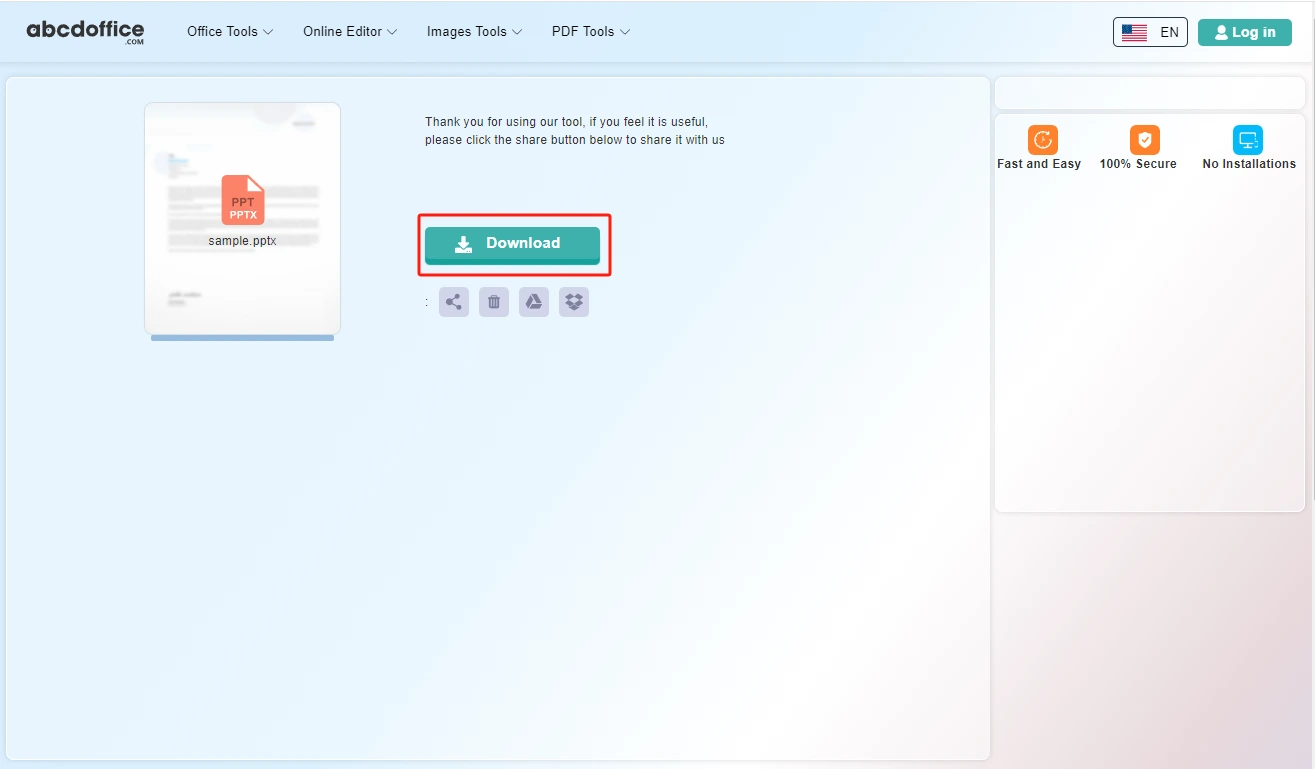
When processing finishes, abcdoffice.com shows a download screen. Click Download to save PPTX or PowerPoint files to your computer from this free pdf to ppt converter.

Your guide to PDF to PowerPoint conversion on ABCD Office

How pdf to ppt works and vs pdf-to-ppt-editor — for convert pdf to ppt, pdf to powerpoint, and pdf to pptx online.

What is an online PDF to PPT converter?

A PDF to PPT converter turns PDF pages into PowerPoint slides in your browser. Upload on abcdoffice.com, convert, and download PPTX to edit transitions and speaker notes in PowerPoint.

PDF to PPT vs PDF to PPT Editor

pdf-to-ppt.html downloads PPTX after conversion. pdf-to-ppt-editor.html converts and opens slides in the browser editor — use when you need immediate online edits.

Starting from PowerPoint? Use ppt-to-pdf.html to export PDF, or pptx-editor.html to edit PPTX directly.

Typical use cases

Trainers convert PDF training packs into editable slides. Sales revives old PDF decks for new pitches. Educators turn PDF readings into lecture slides. The convert pdf to ppt online path on abcdoffice.com fits PDF-to-slide recovery.

PDF to PowerPoint online vs rebuilding slides

Recreating every slide from a PDF is tedious. ABCD Office offers convert pdf to ppt online at abcdoffice.com in minutes.

Privacy and quality

Review the privacy policy before converting confidential presentation PDFs on abcdoffice.com.

PDF to PPT online vs manual slide rebuild

See how abcdoffice.com/pdf-to-ppt.html compares on steps, install time, and time to finished PPTX.

Method Typical steps Install required Time to convert
abcdoffice.com pdf-to-ppt.html 3–4 steps None ~1 minute
Manual slide recreation Many steps Often yes Much longer
Desktop Acrobat + Office 5–8 steps Yes Several minutes
abcdoffice.com online
Quick workflow for upload, convert & download PPTX
Manuelle Folienwiedergabe
Langsam und fehleranfällig
Desktop Acrobat-Export
Mehrere Apps und Installationen

PDF zu PowerPoint-Anleitungen – gängige Konvertierungsaufgaben auf ABCD Office

Anleitungen zum Konvertieren von PDF in PPT, PDF in PowerPoint und PDF in PPTX online – starten Sie unter abcdoffice.com/pdf-to-ppt.html.

Leitfaden

Verwandeln Sie ein PDF-Deck in bearbeitbare Folien

Verwenden Sie pdf-to-ppt.html, wenn Sie nur PDF-Folien von einem Anbieter erhalten haben.

Upload PDF to convert
Leitfaden

Marketing-PDF als PPTX neu erstellen

Konvertieren Sie, und passen Sie dann die Layouts auf ppt-editor.html vor Ihrer Kampagnenüberprüfung an.

Upload PDF to convert
Leitfaden

Training PDF zu PowerPoint

Importieren Sie PDF-Kapitel als Folien, die die Dozenten jedes Quartal aktualisieren können.

Upload PDF to convert
Leitfaden

Text nach PDF-Import auf Folien korrigieren

Laden Sie PPTX herunter und bearbeiten Sie die Aufzählungszeichen im ppt-Online-Editor.

Upload PDF to convert
Leitfaden

Keine PowerPoint-Installation auf dem PC vor Ort

Konvertieren Sie PDF im Voraus in PPTX, und präsentieren Sie dann bei Bedarf aus dem Browser-Editor.

Upload PDF to convert
Leitfaden

Später mit PDF-Export kombinieren

Bearbeiten Sie PPTX online und verwenden Sie dann ppt-to-pdf.html für das endgültige Handout für die Teilnehmer.

Upload PDF to convert

Häufig gestellte Fragen

PDF zu PowerPoint FAQ für abcdoffice.com/pdf-to-ppt.html – Folienpräsentationen aus PDF-Quellen neu erstellen.

Wie verwandle ich ein PDF-Folien-Deck in bearbeitbare PPTX?

Laden Sie auf abcdoffice.com/pdf-to-ppt.html hoch – die PDF-zu-PPT-Konvertierung erstellt PPTX, die Sie auf ppt-editor.html bearbeiten können.

  1. Öffnen Sie abcdoffice.com/pdf-to-ppt.html in Ihrem Browser.
  2. Cliquez sur Sélectionner un fichier ou faites glisser votre fichier dans la zone de téléchargement.
  3. Cliquez sur Convertir et attendez qu'abcdoffice.com termine le traitement.
  4. Cliquez sur Télécharger pour enregistrer le fichier converti.
Puis-je convertir un PDF en PowerPoint sans Acrobat ?

Le convertisseur pdf en ppt en ligne fonctionne dans le navigateur sur abcdoffice.com — téléchargez, Convertir, Télécharger PPTX.

  1. Ouvrez abcdoffice.com/pdf-to-ppt.html dans votre navigateur.
  2. Cliquez sur Sélectionner un fichier ou faites glisser votre fichier dans la zone de téléchargement.
  3. Cliquez sur Convertir et attendez qu'abcdoffice.com termine le traitement.
  4. Cliquez sur Télécharger pour enregistrer le fichier converti.
Les images d'un PDF apparaîtront-elles sur les diapositives ppt ?

Les PDF visuels se convertissent en diapositives que vous pouvez réorganiser — vérifiez la mise en page dans l'éditeur en ligne ppt après le téléchargement.

  1. Ouvrez abcdoffice.com/pdf-to-ppt.html dans votre navigateur.
  2. Cliquez sur Sélectionner un fichier ou faites glisser votre fichier dans la zone de téléchargement.
  3. Cliquez sur Convertir et attendez qu'abcdoffice.com termine le traitement.
  4. Cliquez sur Télécharger pour enregistrer le fichier converti.
La conversion pdf en ppt en ligne est-elle gratuite pour un deck ?

La conversion standard pdf en powerpoint sur pdf-to-ppt.html fonctionne sans inscription pour des fichiers typiques.

  1. Ouvrez abcdoffice.com/pdf-to-ppt.html dans votre navigateur.
  2. Cliquez sur Sélectionner un fichier ou faites glisser votre fichier dans la zone de téléchargement.
  3. Cliquez sur Convertir et attendez qu'abcdoffice.com termine le traitement.
  4. Cliquez sur Télécharger pour enregistrer le fichier converti.
Puis-je corriger les notes du présentateur après la conversion pdf en ppt ?

Ouvrez le PPTX dans pptx-editor.html et ajoutez des notes ou des puces avant de présenter.

  1. Ouvrez abcdoffice.com/pdf-to-ppt.html dans votre navigateur.
  2. Cliquez sur Sélectionner un fichier ou faites glisser votre fichier dans la zone de téléchargement.
  3. Cliquez sur Convertir et attendez qu'abcdoffice.com termine le traitement.
PDF en PPT en ligne vs reconstruction manuelle des diapositives ?

Les reconstructions manuelles prennent des heures. pdf en ppt en ligne fournit un PPTX de départ pour les PDF marketing exportés depuis des outils de conception.

  1. Ouvrez abcdoffice.com/pdf-to-ppt.html dans votre navigateur.
  2. Cliquez sur Sélectionner un fichier ou faites glisser votre fichier dans la zone de téléchargement.
  3. Cliquez sur Convertir et attendez qu'abcdoffice.com termine le traitement.
  4. Cliquez sur Télécharger pour enregistrer le fichier converti.
Est-il sûr de convertir des PDF stratégiques sur abcdoffice.com ?

Téléchargez uniquement les decks que vous êtes autorisé à traiter dans le cloud selon la politique de l'entreprise.

  1. Ouvrez abcdoffice.com/pdf-to-ppt.html dans votre navigateur.
  2. Cliquez sur Sélectionner un fichier ou faites glisser votre fichier dans la zone de téléchargement.
  3. Cliquez sur Convertir et attendez qu'abcdoffice.com termine le traitement.
  4. Cliquez sur Télécharger pour enregistrer le fichier converti.
Puis-je convertir un PDF en PPTX sur un ordinateur portable de conférence ?

Utilisez pdf-to-ppt.html dans le navigateur, téléchargez le PPTX, répétez dans l'éditeur ppt en ligne sans installer PowerPoint.

  1. Ouvrez abcdoffice.com/pdf-to-ppt.html dans votre navigateur.
  2. Cliquez sur Sélectionner un fichier ou faites glisser votre fichier dans la zone de téléchargement.
  3. Cliquez sur Convertir et attendez que abcdoffice.com termine le traitement.
  4. Cliquez sur Télécharger pour enregistrer le fichier converti.

Convertissez votre PDF en PowerPoint sur abcdoffice.com

Téléchargez le PDF sur abcdoffice.com/pdf-to-ppt.html — convertisseur PDF en PPT gratuit, puis téléchargez PPTX.