Login to your account
or
The mailbox user already exists
By clicking 'Download File,' you agree to our Terms and conditions and Privacy policy
docx_editor
Save document as
Please select a file to save
docx DOCX
pdf PDF
odt ODT
txt TXT
dotx DOTX
pdfa PDF/A
ott OTT
rtf RTF
docxf DOCXF
oform OFORM
html HTML
fb2 FB2
epub EPUB
xlsx XLSX
pdf PDF
ods ODS
csv CSV
xltx XLTX
pdfa PDF/A
ots OTS
pptx PPTX
pdf PDF
odp ODP
potx POTX
pdf PDF/A
otp OTP
png PNG
jpg JPG
close

Online Docx & Doc Editor

online Docx editing function

scicon Select File upload_btn add_upload
1
google-drive Google Drive
dropbox Dropbox
or drag PDF here
Do not close your browser Wait until your files are uploaded and processed! This might take a few minutes. :)
File
Open Source Statement
close
How to edit docx file online
Step 1:Upload
Upload Docx document to our online Docx Editor
add file
Edit
Step 2:Next
Edit you Docx document online
Step 3:Download
Download You Docx document
add file

DOCX document editing on docx-editor.html

abcdoffice.com/docx-editor.html is the edit docx file online page for Office Open XML — upload .docx or .doc, change text and layout in the browser, export without Microsoft Word.

DOCX & DOC support

Optimized for .docx attachments from email and cloud drives. Older .doc files follow the same docx editor online path on abcdoffice.com.

Text, tables & layout

A docx editor online with Home, Insert, and Layout tools — update headings, tables, images, and page setup in the ribbon after upload.

DOCX or PDF output

Keep editing in DOCX for collaborators, or export PDF when legal or clients need a locked copy from the docx online editor.

Word-free devices

Run the docx editor online free on school, library, or contractor laptops — no Word desktop app or Microsoft 365 sign-in for standard document edits.

How to edit a DOCX file on abcdoffice.com

Use docx-editor.html when your file is .docx or you searched for a docx editor. word-editor.html remains the broader Word editor hub on the same platform.

Edit

Edit DOCX attachments without Microsoft Word

Legal sent policy.docx and you must edit docx file online — update a clause, fix numbering, and return a DOCX the same afternoon.

  • Edit docx file online on contracts, statements of work, and proposal DOCX from clients.
  • Save a Gmail or Outlook .docx attachment, upload to docx-editor.html, and skip the Word install prompt.
  • Polish DOCX output from pdf-to-word.html — fix headings and tables on this page before download.
01
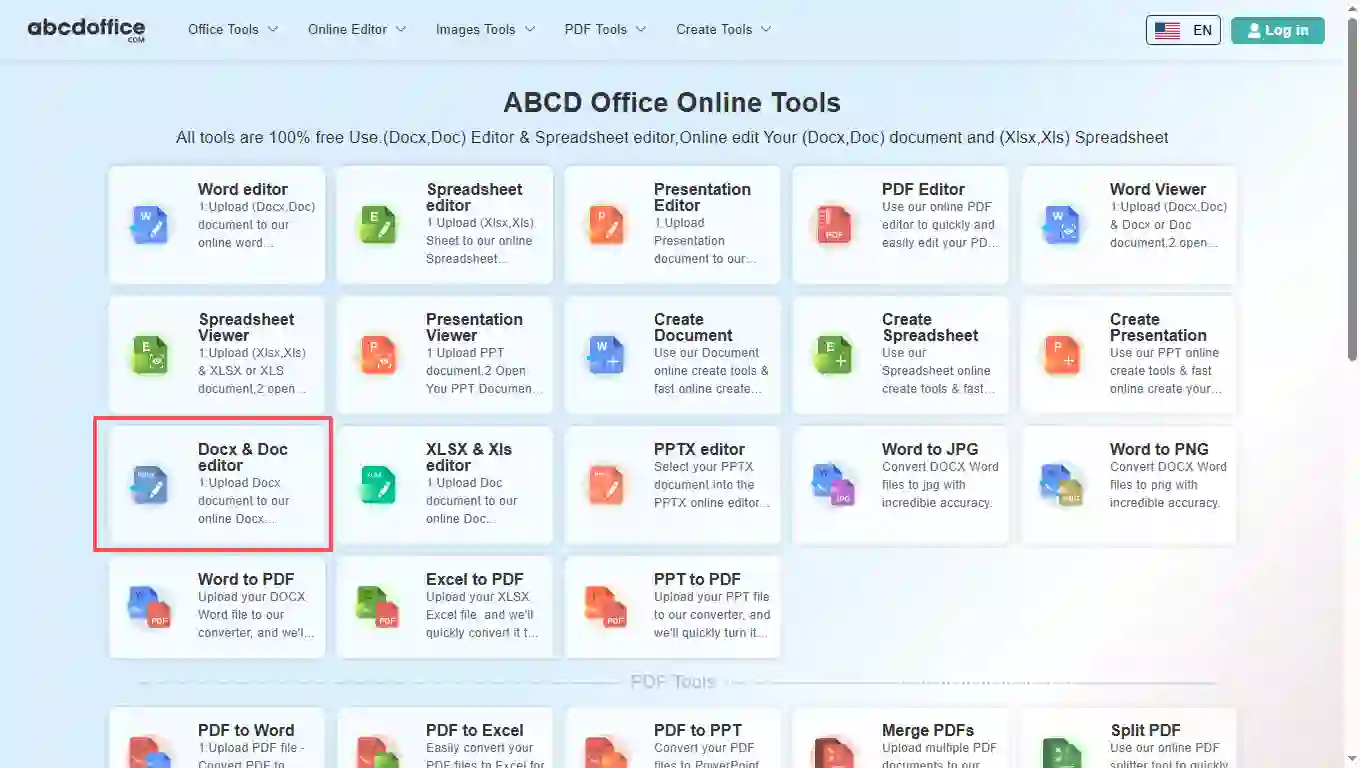
Step 1: Open Docx & Doc editor on abcdoffice.com

Open abcdoffice.com in your browser. On the homepage tools grid, click Docx & Doc editor under Online Editor or PDF Tools — or go directly to abcdoffice.com/docx-editor.html to open this online docx editor page.

02
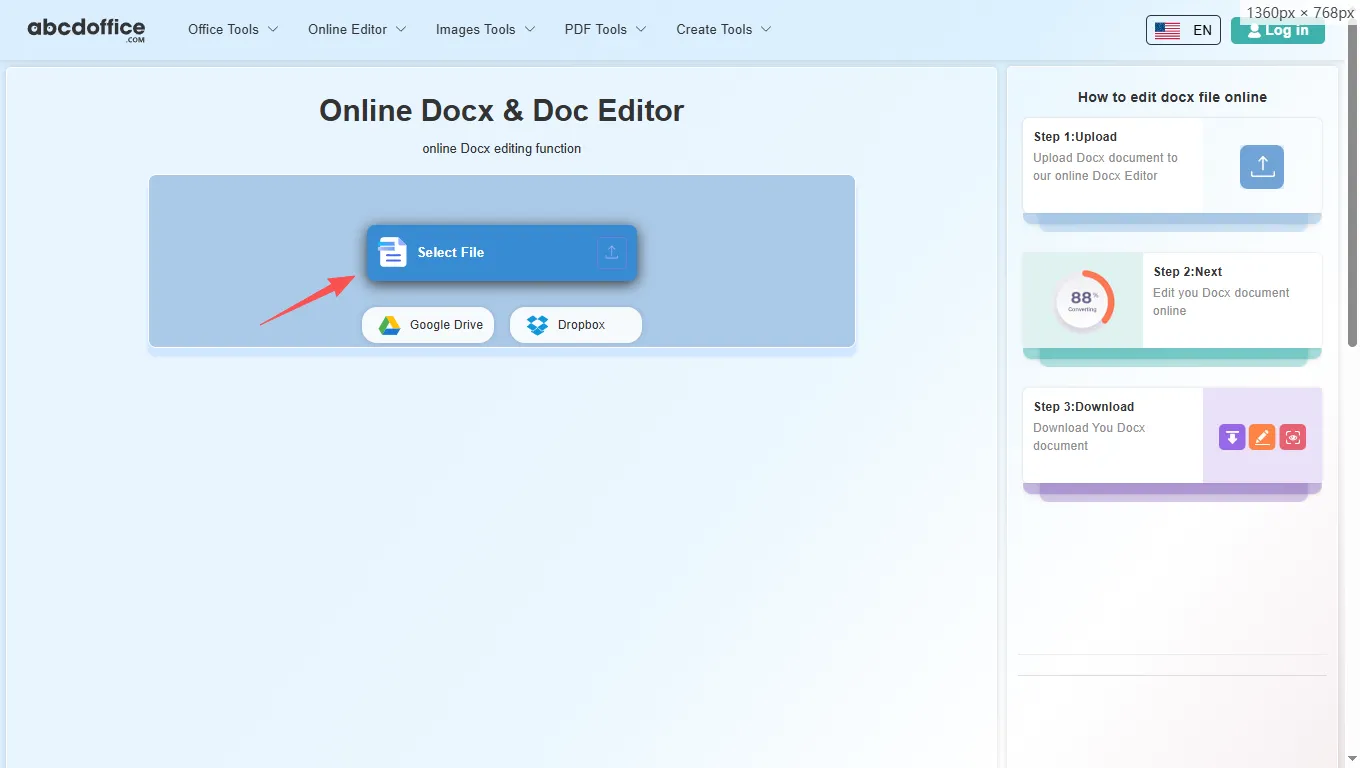
Step 2: Upload your file

On the upload screen at abcdoffice.com/docx-editor.html, click Select File or drag DOCX or DOC files into the upload area. Google Drive and Dropbox buttons appear below Select File on abcdoffice.com.

03
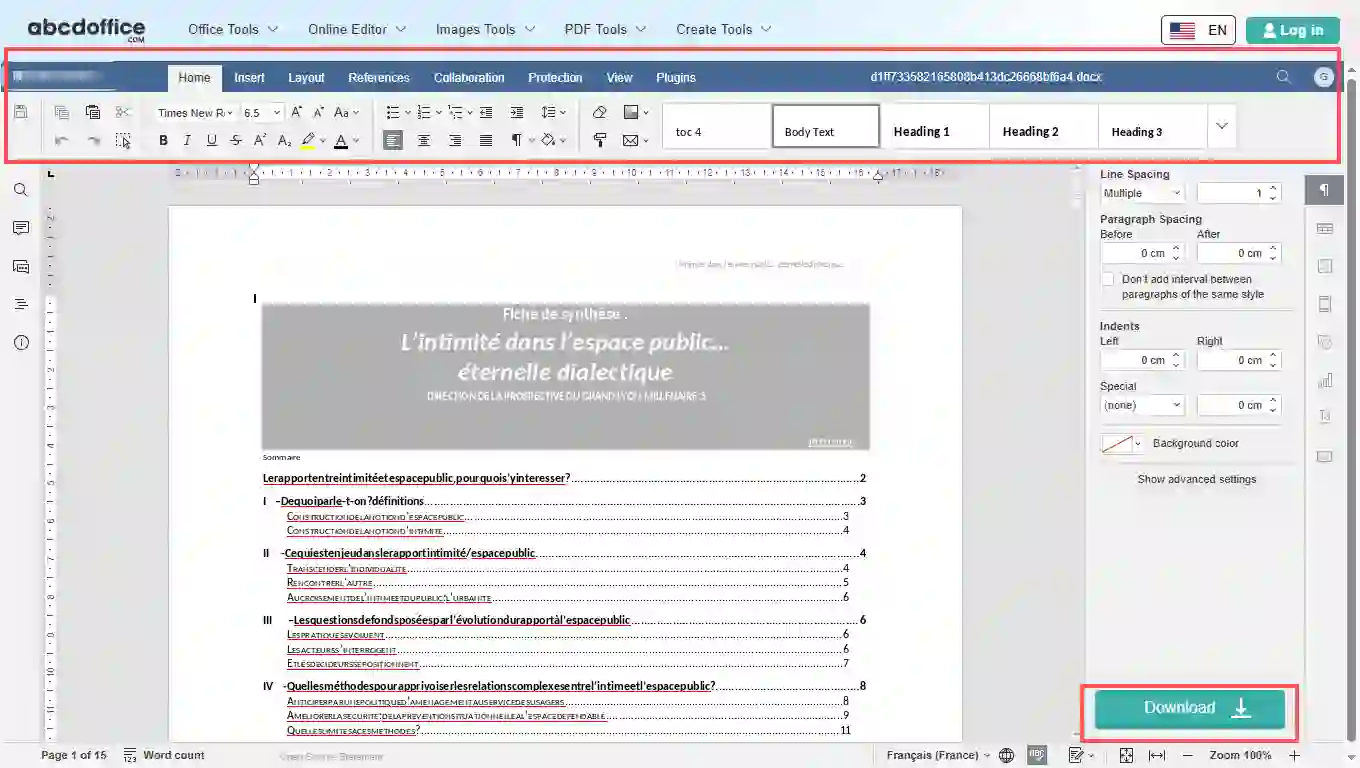
Step 3: Edit in docx editor online

After upload, the docx editor online opens on abcdoffice.com. Use Home and Insert to change text, tables, images, and styles in your DOCX.

04
Step 4: Download DOCX or PDF

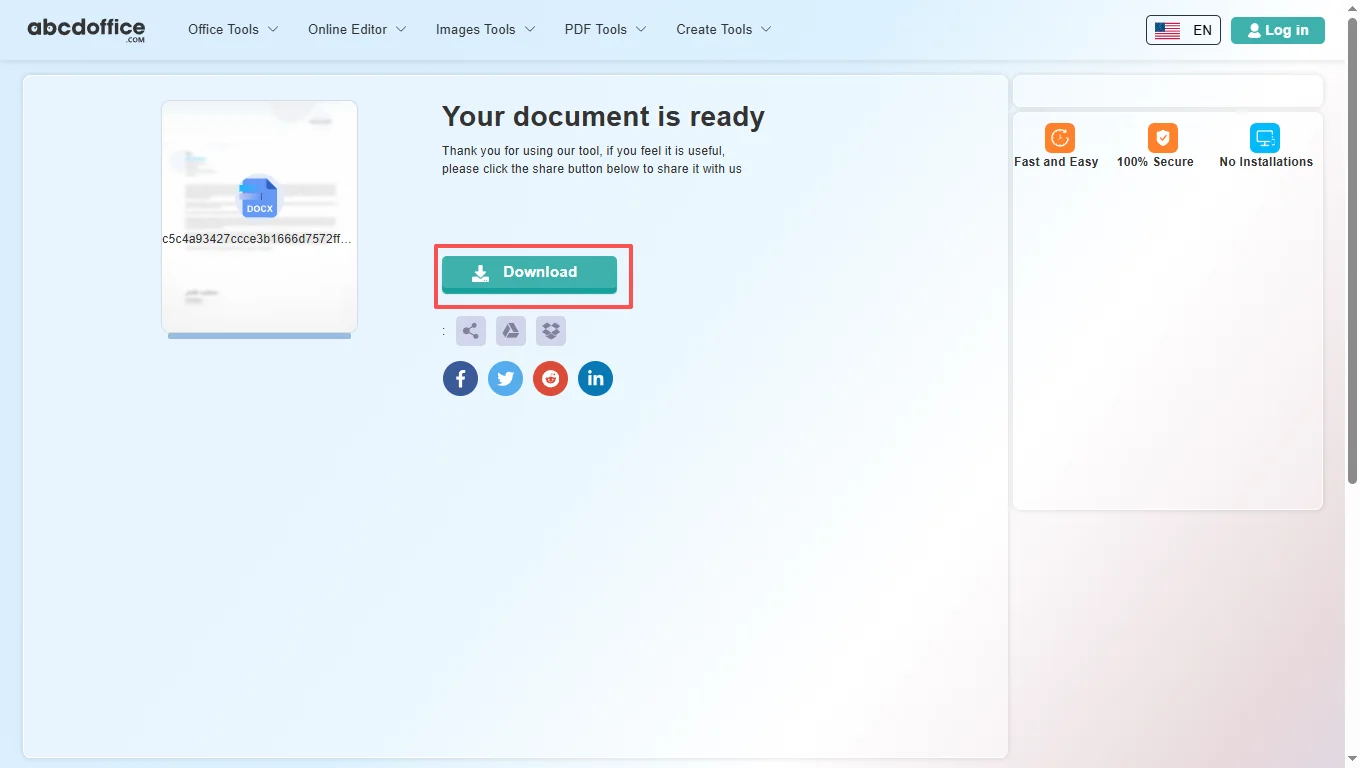
When processing finishes, abcdoffice.com shows a download screen. Click Download to save DOCX or PDF to your computer from this free online docx editor.

docx editor toolbar — every tab explained

The ABCD Office docx editor online on abcdoffice.com is built on ONLYOFFICE Docs. After your file opens, use the ribbon tabs below — Home, Insert, Layout, References, Collaboration, Protection, View, and Plugins — for the same small functions you expect from a desktop docx document editor.

Home
Font, paragraph & quick styles

Font, paragraph & quick styles

The Home tab covers everyday text editing in our docx online editor — the same core formatting tools people reach for first in any docx document editor.

  • Font family and size, increase/decrease size, bold, italic, underline, strikethrough, superscript and subscript
  • Text highlight color, font color, change case, bulleted/numbered/multilevel lists, indent and alignment
  • Line spacing, show/hide ¶ marks, paragraph shading and borders, Clear Formatting and Format Painter
  • Quick Styles gallery — Normal, Body Text, Heading 1 and other presets for consistent documents
Insert
Pages, tables, images & rich objects

Pages, tables, images & rich objects

Insert tab tools in this docx document editor let you add structure and visuals beyond plain text — useful for reports, resumes, and client deliverables on abcdoffice.com.

  • Blank page and breaks (page, section, column)
  • Tables, images, charts, shapes, SmartArt, comments and hyperlinks
  • Header & footer, date & time, text boxes, Text Art, equations and symbols
  • Drop cap and content controls for forms and structured templates
Layout
Margins, orientation, columns & watermarks

Margins, orientation, columns & watermarks

Control page layout in the docx editor online before you export to DOCX or PDF — margins, paper size, and multi-column layouts.

  • Margins, orientation (portrait/landscape), and paper size presets
  • Columns, breaks, and line numbers for long documents
  • Text wrapping, bring forward/send backward, align and group objects
  • Watermark for drafts, confidential copies, or branded backgrounds
References
TOC, footnotes, captions & cross-references

TOC, footnotes, captions & cross-references

Professional long-form documents need navigation and citations — the References tab handles tables of contents and linked notes.

  • Table of contents — insert, add text levels, update when headings change
  • Footnotes for citations and explanatory notes at the bottom of the page
  • Hyperlinks and bookmarks for in-document jumps
  • Captions, cross-references, table of figures, and update tables
Collaboration
Comments, track changes & compare

Comments, track changes & compare

Review contracts and team drafts in the docx editor online — add feedback, accept edits, and compare versions in the browser on abcdoffice.com.

  • Co-editing mode and threaded comments on selected text
  • Resolve or remove comments; navigate previous/next comment
  • Track Changes with display modes (Final, Original, markup)
  • Accept/reject changes and Compare two document versions side by side
Protection
Encrypt & restrict editing

Encrypt & restrict editing

Lock sensitive DOCX files before download from abcdoffice.com — password protection and editing restrictions for shared documents.

  • Encrypt with a password so only authorized readers can open the file
  • Protect Document to limit editing, comments-only mode, or read-only sharing
View
Zoom, rulers, panels & themes

Zoom, rulers, panels & themes

Tune the editing workspace — zoom level, visible rulers, side panels, and light/dark interface themes.

  • Headings navigation pane for long DOCX files
  • Zoom percentage, Fit to Page, Fit to Width
  • Interface theme and optional dark document canvas
  • Toggle toolbar, status bar, left/right panels, and horizontal ruler
Plugins
OCR, AI, translate & more

OCR, AI, translate & more

Extend the docx editor online with plugins — OCR scanned pages, AI writing help, translation, and reference tools.

  • Plugin Manager and Macros for automation
  • Highlight code, OCR, Photo Editor, Speech, Thesaurus
  • Translator, ChatGPT, YouTube embed, Mendeley and Zotero citations

DOCX document guide — abcdoffice.com/docx-editor.html

How the DOCX-focused editor differs from word-editor.html, what Office Open XML files need in the browser, and when edit docx file online is the right choice.

DOCX format and this URL

DOCX is the ZIP-based Office Open XML standard most organizations use for editable documents. A dedicated docx editor URL helps people who never think to search “Word” — they search “docx editor” or “open docx online”. The editing canvas matches word-editor.html after upload; the guidance here stays DOCX-specific.

DOCX, DOC, and export choices

Upload .docx for modern files or .doc when a vendor sends a legacy export. Save DOCX so legal or clients can keep redlining in Word. Export PDF when you need a locked copy for signature or portal upload.

Scanned PDFs converted to Word should be cleaned on docx-editor.html — fix broken lines, restore heading styles, then download DOCX before anyone reopens desktop Word.

Where teams use the docx editor

Recruiters patch a resume DOCX on a hiring manager’s laptop. Legal updates an NDA clause from a .docx attachment. Marketing fixes typos in a translated brochure. Students submit homework edited in the library browser. Each needs a docx document editor session measured in minutes, not a full Office rollout.

docx-editor.html vs word-editor.html

word-editor.html speaks to “online word editor” and mixed DOC/DOCX journeys. docx-editor.html speaks to filenames ending in .docx and searches like docx editor online free. Choose Microsoft Word when you need advanced publishing features; choose this page for quick DOCX open–edit–download on abcdoffice.com.

Privacy for document uploads

Treat contracts and HR files like any cloud edit: upload the minimum DOCX needed, download the result, and follow your company policy on confidential content. The docx editor online workflow on abcdoffice.com is meant to deliver faithful DOCX output after browser edits.

Online docx editor vs desktop Microsoft Word

See how the ABCD Office docx editor online free workflow on abcdoffice.com compares to desktop Word on steps, install time, and time to first edit.

Method Typical steps Install required Time to edit
abcdoffice.com docx editor online 3–4 steps None ~1 minute
Microsoft Word (desktop) 5–7 steps Yes Several minutes
Word for the web (365 login) 4–6 steps Account required 2–5 minutes
abcdoffice.com online
Quick workflow for upload, edit & download
Desktop Microsoft Word
More setup, advanced features
Microsoft 365 web login
Account and OneDrive flow

Related DOCX editor guides — common document tasks on ABCD Office

Guides for edit docx file online, docx online editor, and docx editor online free — all paths start at abcdoffice.com/docx-editor.html.

Guide

Open a DOCX attachment from email

Save the .docx from Gmail or Outlook, then upload to abcdoffice.com/docx-editor.html — built for DOCX-first searches.

Upload a DOCX file
Guide

Pick docx-editor vs word-editor URLs

Use docx-editor.html when the filename is .docx; use word-editor.html for general Word editing entry points.

Upload a DOCX file
Guide

Adjust styles in a proposal DOCX

Tweak Heading 1, body text, and list styles in OOXML proposals without installing Word.

Upload a DOCX file
Guide

Fix table borders in a DOCX report

Select table cells in the docx editor and update borders, shading, and column widths in the browser.

Upload a DOCX file
Guide

Send DOCX as PDF for sign-off

After edits on docx-editor.html, export PDF so approvers cannot accidentally change wording.

Upload a DOCX file
Guide

Quick fix typos in a Teams-shared DOCX

Download the shared file, upload to the docx online editor, correct text, and re-upload the updated DOCX.

Upload a DOCX file

Frequently asked questions

DOCX-focused answers for abcdoffice.com/docx-editor.html — how this page differs from abcdoffice.com/word-editor.html, with steps you can follow in the browser.

What is a DOCX file and can I edit it on abcdoffice.com/docx-editor.html?

A DOCX file is a modern Word document in Office Open XML format (.docx). abcdoffice.com/docx-editor.html is built for that format: upload a .docx (or legacy .doc), edit in the browser, and download DOCX or PDF without desktop Word.

  1. Open abcdoffice.com/docx-editor.html in Chrome, Edge, Firefox, or Safari.
  2. Click Select File or drag your .docx file into the upload area.
  3. Wait for the docx editor to load your document on abcdoffice.com.
  4. Edit text and layout, then Download as DOCX or PDF.
How is docx-editor.html different from word-editor.html on ABCD Office?

abcdoffice.com/word-editor.html is the broader Word editor entry for general Word editing searches. abcdoffice.com/docx-editor.html targets DOCX-specific queries — opening .docx attachments, fixing exported DOCX, and editing files when the filename already ends in .docx.

  1. Use abcdoffice.com/docx-editor.html when your file is .docx or you searched for "docx editor".
  2. Use abcdoffice.com/word-editor.html when you want the main Word editor landing page or mixed DOC/DOCX workflows.
  3. Both pages use the same browser editor after upload on abcdoffice.com.
  4. Pick the URL that matches your file type; the editing experience is the same.
How do I open a DOCX email attachment without installing Word?

Save the attachment from your mail app, then upload it to abcdoffice.com/docx-editor.html. The docx editor opens in your browser — useful on work laptops, school PCs, or Chromebooks without Microsoft Office.

  1. Download the .docx attachment from Gmail, Outlook, or another mail client.
  2. Go to abcdoffice.com/docx-editor.html and click Select File.
  3. Choose the saved DOCX from your Downloads folder.
  4. Edit and Download the updated DOCX or PDF from abcdoffice.com.
Will DOCX formatting stay intact when I edit online and download again?

Standard body text, headings, lists, tables, and images in typical business DOCX files are preserved for edit and re-export on abcdoffice.com. Heavy Word-only features (complex macros, some legacy fields) may not round-trip perfectly in any online editor.

  1. Upload your DOCX to abcdoffice.com/docx-editor.html.
  2. Review headings, tables, and images after the file opens in the docx editor.
  3. Make your text and layout changes in the ribbon toolbar.
  4. Download DOCX and reopen locally if you need to verify critical formatting.
Can I edit a DOCX after converting PDF to Word on ABCD Office?

Yes — many users run PDF to Word on abcdoffice.com, then open the resulting DOCX on docx-editor.html for quick fixes before sharing or exporting PDF again.

  1. Convert your PDF with abcdoffice.com/pdf-to-word.html.
  2. Download the DOCX output from the conversion result page.
  3. Upload that DOCX to abcdoffice.com/docx-editor.html and correct text, headings, or tables.
Does the docx editor support tables, images, and headers in DOCX files?

Yes — the docx editor on abcdoffice.com supports common DOCX building blocks: paragraphs, styles, tables, images, headers and footers, and page layout tools available in the ONLYOFFICE ribbon.

  1. Open your DOCX on abcdoffice.com/docx-editor.html.
  2. Use Insert for tables, pictures, and page breaks.
  3. Use Layout for margins, orientation, and header/footer areas.
  4. Download DOCX when your document structure looks correct.
Is it safe to upload DOCX contracts to abcdoffice.com/docx-editor.html?

Files are processed for your editing session on abcdoffice.com. Check your company policy before uploading NDAs, HR records, or client contracts to any cloud docx editor.

  1. On abcdoffice.com/docx-editor.html, upload only the DOCX needed for the task.
  2. Avoid highly classified documents if cloud editing is not approved.
  3. Download your result and close the tab when finished.
  4. Read the site privacy policy in the footer for data handling details.
How do I save an edited DOCX as PDF from the docx editor?

After editing, use Download in the editor and choose PDF in the Save document as dialog — handy for sending a fixed copy while keeping the DOCX for future edits.

  1. Finish edits in the docx editor on abcdoffice.com.
  2. Click Save, then pick PDF in the format list and click Next.
  3. Wait for processing on the download-ready screen.
  4. Click Download to save the PDF to your device.

Start editing your DOCX document on abcdoffice.com

Upload a DOCX or DOC file at abcdoffice.com/docx-editor.html — the free online docx editor opens after upload, then Download when you are done.