Login to your account
or
The mailbox user already exists
By clicking 'Download File,' you agree to our Terms and conditions and Privacy policy
word_to_png

Convert Word to PNG

Convert DOCX Word files to png with incredible accuracy.

scicon Select File upload_btn add_upload
1
google-drive Google Drive
dropbox Dropbox
or drag PDF here
Converting Word to PNG...
Do not close your browser Wait until your files are uploaded and processed! This might take a few minutes. :)
convert_img.zip
enlarge_img
How to Convert Word to PNG
Step 1:Upload
Upload Files to our Online (Docx,Doc) Converter
add file
Edit
Step 2:Click 'Convert'
You can convert Word to png within seconds
Step 3:Download
You can online Reader, Editor or Download your files
add file

What this free Word to PNG converter supports

ABCD Office converts DOCX and DOC to PNG images in your browser — upload on abcdoffice.com/word-to-png.html, convert online, and download PNG pages without installing Microsoft Word.

Input formats

ABCD Office converts DOCX and DOC to PNG images in your browser — upload on abcdoffice.com/word-to-png.html, convert online, and download PNG pages without installing Microsoft Word.

Convert in browser

Upload, click Convert, and download from abcdoffice.com — no desktop Office install for standard files.

Output

Download converted files ready to share, print, or archive.

No install

Free online converter on desktop or mobile at abcdoffice.com.

How to convert Word to PNG online on ABCD Office

abcdoffice.com/word-to-png.html is the Word to PNG converter — upload DOCX or DOC, click Convert, then download PNG images.

Convert

Word to PNG converter — DOCX and DOC to PNG free

You need crisp page images from Word for design tools or documentation — and want word to png online without screenshots.

  • Word to PNG for sharp text in slides, wikis, and design handoffs.
  • Convert docx to png online without Office installed.
  • Also use word-to-jpg.html or word-to-pdf.html on abcdoffice.com for other outputs.
01
Step 1: Open Word to PNG on abcdoffice.com

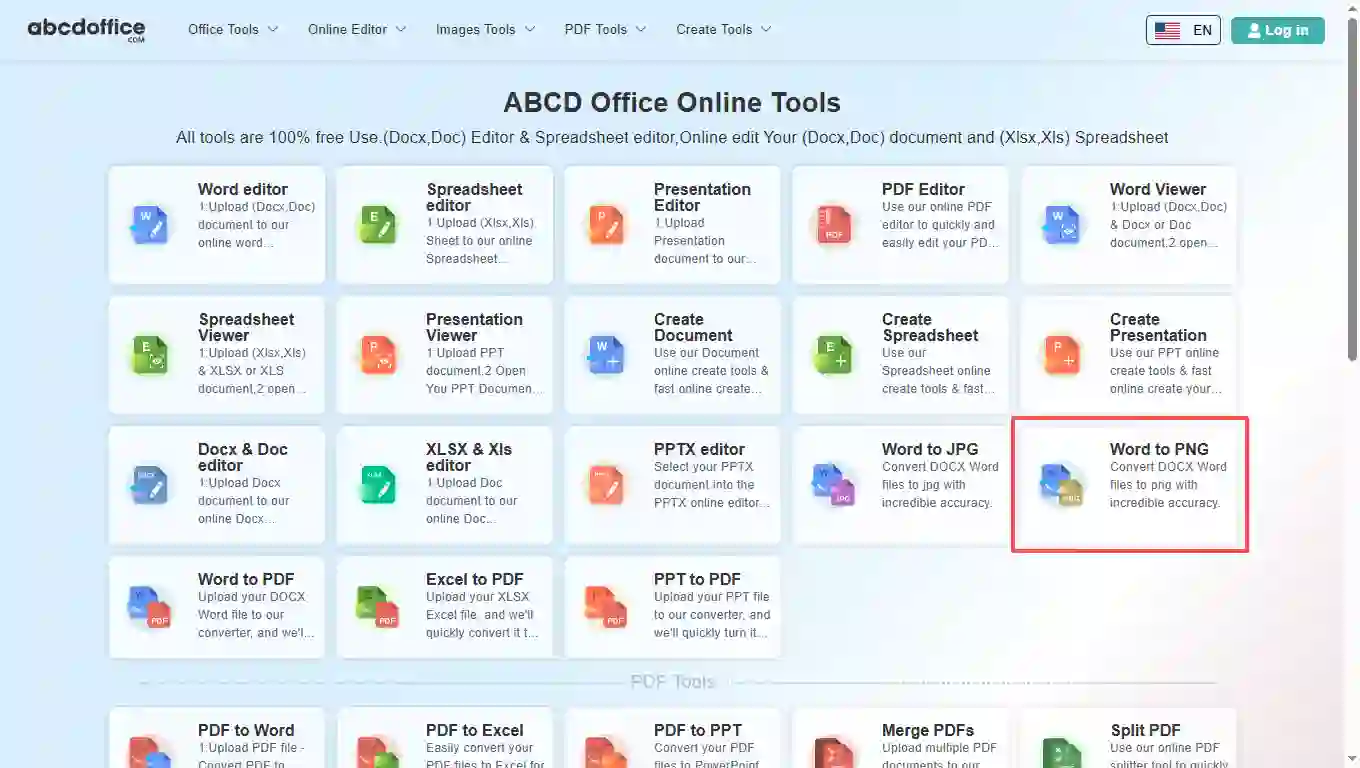
Open abcdoffice.com in your browser. On the homepage tools grid, click Word to PNG under Online Editor or PDF Tools — or go directly to abcdoffice.com/word-to-png.html to open this word to png converter page.
02
Step 2: Upload your file

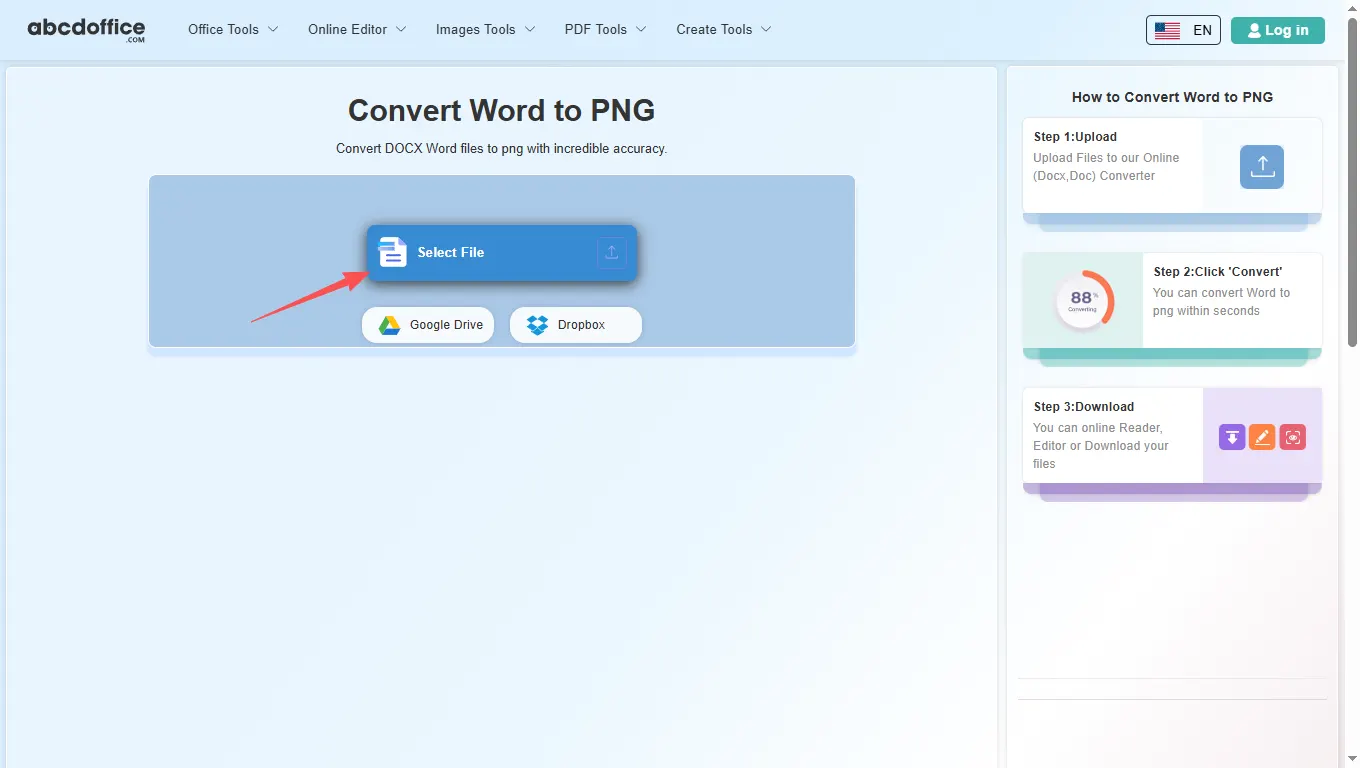
On the upload screen at abcdoffice.com/word-to-png.html, click Select File or drag DOCX or DOC files into the upload area. Google Drive and Dropbox buttons appear below Select File on abcdoffice.com.

03
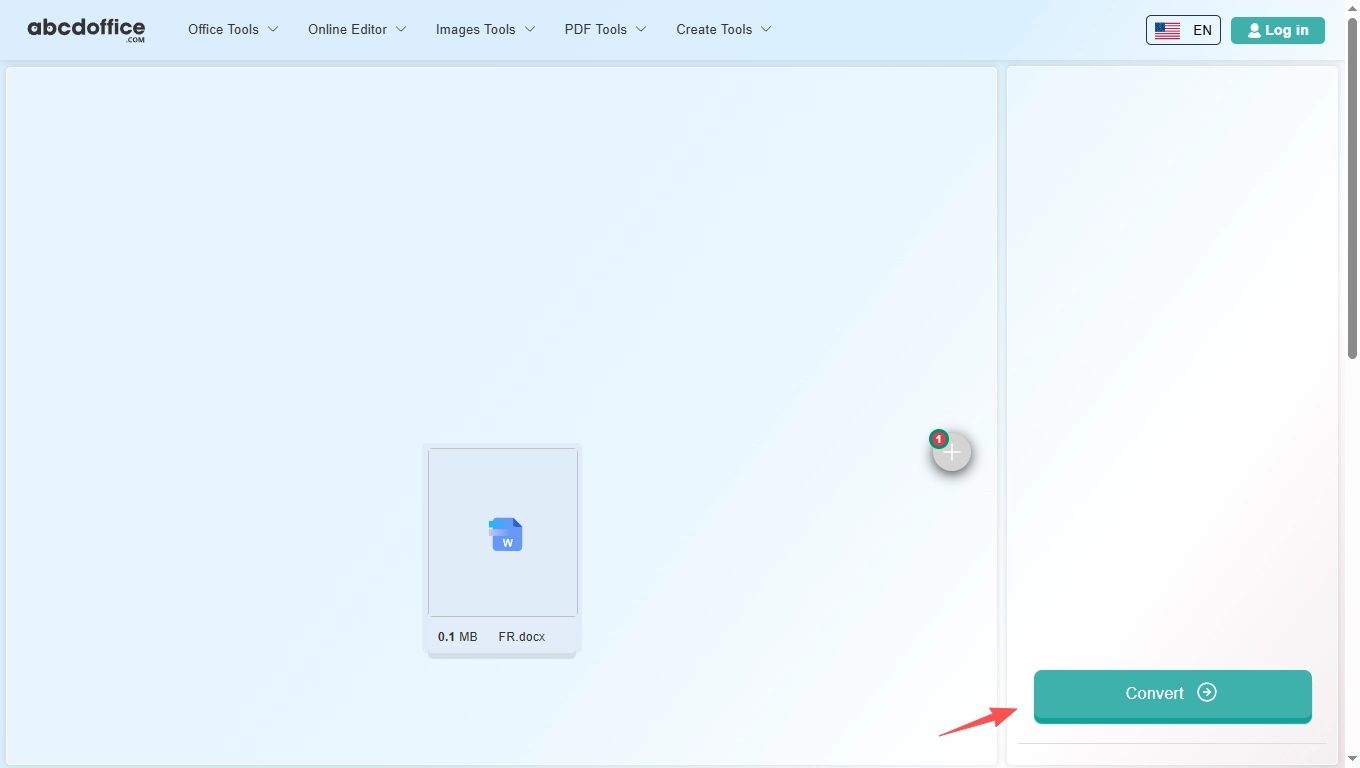
Step 3: Convert Word to PNG online

With your file uploaded, click Convert at the bottom of the page and wait a few seconds while abcdoffice.com exports pages as PNG — no extra steps during conversion.

04
Step 4: Download PNG images

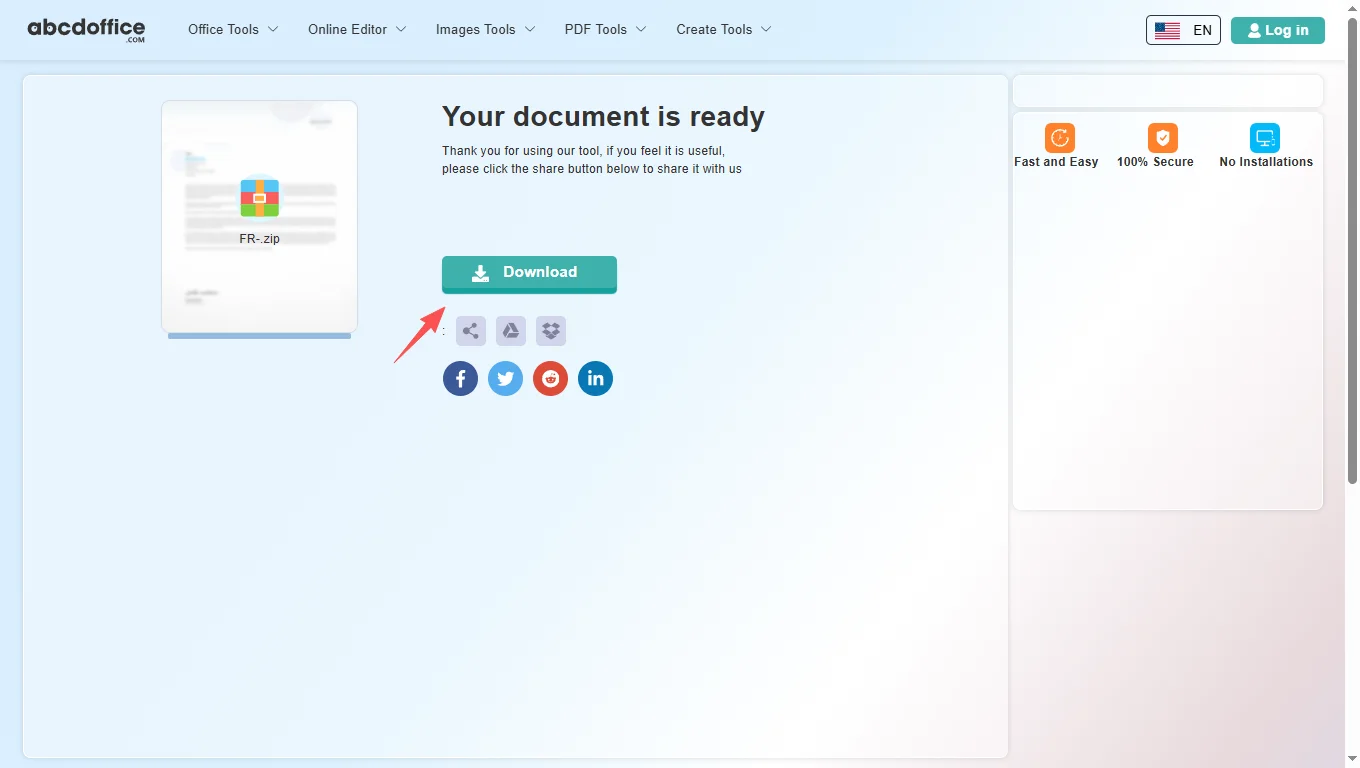
When processing finishes, abcdoffice.com shows a download screen. Click Download to save PNG images to your computer from this free word to png converter.

Your guide to Word to PNG conversion on ABCD Office

How word to png conversion works — for convert word to png, docx to png, and word to png online searches.

What is an online Word to PNG converter?

A Word to PNG converter exports document pages as PNG images in your browser — lossless-friendly for text and diagrams compared to JPG.

Supported formats: DOCX, DOC, and PNG output

Upload DOCX or DOC; download PNG images per page or bundled output depending on conversion result.

Need PDF? Use word-to-pdf.html. Need smaller files? Try word-to-jpg.html on abcdoffice.com.

Typical use cases

Designers import Word pages into Figma workflows. Teams archive policy pages as PNG. Students share sharp homework images. The convert word to png online path fits quick export.

Word to PNG online vs desktop workflows

Desktop export often needs extra tools. ABCD Office combines upload and convert at abcdoffice.com/word-to-png.html.

Privacy and quality

Review the privacy policy before converting confidential documents to images on abcdoffice.com.

Word to PNG online vs desktop workflows

See how abcdoffice.com/word-to-png.html compares to desktop Office export on steps, install time, and time to finished file.

Method Typical steps Install required Time to convert
abcdoffice.com word-to-png.html 3–4 steps None ~1 minute
Desktop Microsoft Office 5–7 steps Yes Several minutes
Office for the web (365 login) 4–6 steps Account required 2–5 minutes
abcdoffice.com online
Quick workflow for upload, convert & download
Desktop Office export
More setup, advanced options
Microsoft 365 web
Account and cloud flow

Word to PNG guides — common export tasks on ABCD Office

Guides for convert word to png and docx to png — start at abcdoffice.com/word-to-png.html.

Guide

Crisp PNG pages from DOCX

Use word-to-png.html when you need lossless page images for slides or docs.

Upload Word to convert
Guide

Insert Word page into a design tool

Convert to PNG, then import into Figma or Canva as a static reference layer.

Upload Word to convert
Guide

Transparent-friendly PNG workflow

Export pages as PNG for wikis or help centers that prefer image assets.

Upload Word to convert
Guide

DOC format to PNG pages

Upload .doc or .docx — both route through the same converter UI.

Upload Word to convert
Guide

Compare PNG output quality

Generate PNGs for a single chapter and verify text sharpness before bulk export.

Upload Word to convert
Guide

PNG after contract edits online

Finalize wording in word-editor.html, then export signature pages as PNG.

Upload Word to convert

Frequently asked questions

Word to PNG FAQ for abcdoffice.com/word-to-png.html — sharp page images for design and docs.

How do I get a lossless PNG of a Word cover page?

Use abcdoffice.com/word-to-png.html — word to png keeps edges sharp for wikis and design handoffs.

  1. Open abcdoffice.com/word-to-png.html in your browser.
  2. Click Select File or drag your file into the upload area.
  3. Click Convert and wait until abcdoffice.com finishes processing.
  4. Click Download to save the converted file.
Can I convert DOCX to PNG without Microsoft Word?

Upload to the word to png converter online, Convert, download PNG pages from abcdoffice.com.

  1. Open abcdoffice.com/word-to-png.html in your browser.
  2. Click Select File or drag your file into the upload area.
  3. Click Convert and wait until abcdoffice.com finishes processing.
  4. Click Download to save the converted file.
When should I pick PNG instead of JPG from Word?

Choose word to png for diagrams and text-heavy pages; use word-to-jpg.html for photo-like covers if file size matters.

  1. Open abcdoffice.com/word-to-png.html in your browser.
  2. Click Select File or drag your file into the upload area.
  3. Click Convert and wait until abcdoffice.com finishes processing.
  4. Click Download to save the converted file.
Is word to png online free for documentation?

Standard word to png free conversion works without signup for typical docs.

  1. Open abcdoffice.com/word-to-png.html in your browser.
  2. Click Select File or drag your file into the upload area.
  3. Click Convert and wait until abcdoffice.com finishes processing.
  4. Click Download to save the converted file.
Can I import PNG pages into Figma after word to png?

Download PNGs, place them as reference layers, rebuild UI on top — common for spec exports.

  1. Open abcdoffice.com/word-to-png.html in your browser.
  2. Click Select File or drag your file into the upload area.
  3. Click Convert and wait until abcdoffice.com finishes processing.
Word to PNG vs printing to PDF then rasterizing?

word to png online skips extra tools — one upload, multiple PNG pages out.

  1. Open abcdoffice.com/word-to-png.html in your browser.
  2. Click Select File or drag your file into the upload area.
  3. Click Convert and wait until abcdoffice.com finishes processing.
  4. Click Download to save the converted file.
Is it safe to convert internal guides on abcdoffice.com?

Follow your org rules before uploading policy DOCX files to any word to png tool.

  1. Open abcdoffice.com/word-to-png.html in your browser.
  2. Click Select File or drag your file into the upload area.
  3. Click Convert and wait until abcdoffice.com finishes processing.
  4. Click Download to save the converted file.
Can I convert a Word manual to PNG on a Chromebook?

Open word-to-png.html, upload from Drive, Convert, collect PNGs for your help center.

  1. Open abcdoffice.com/word-to-png.html in your browser.
  2. Click Select File or drag your file into the upload area.
  3. Click Convert and wait until abcdoffice.com finishes processing.
  4. Click Download to save the converted file.

Convert your Word file to PNG on abcdoffice.com

Upload DOCX or DOC at abcdoffice.com/word-to-png.html — free Word to PNG converter, then Download your images.