Login to your account
or
The mailbox user already exists
By clicking 'Download File,' you agree to our Terms and conditions and Privacy policy
jpg_to_pdf
Save document as
Please select a file to save
docx DOCX
pdf PDF
odt ODT
txt TXT
dotx DOTX
pdfa PDF/A
ott OTT
rtf RTF
docxf DOCXF
oform OFORM
html HTML
fb2 FB2
epub EPUB
xlsx XLSX
pdf PDF
ods ODS
csv CSV
xltx XLTX
pdfa PDF/A
ots OTS
pptx PPTX
pdf PDF
odp ODP
potx POTX
pdf PDF/A
otp OTP
png PNG
jpg JPG
close

JPG to PDF Converter

Convert JPG to PDF in seconds.

Do not close your browser Wait until your files are uploaded and processed! This might take a few minutes. :)
officeedit Next Next
file icon
Size
Ddfdf.pptx
5.2MB
VIEW
edit_file
How to JPG to PDF Converter
Step 1: Upload
Upload files to our online JPG to PDF converter.
add file
Edit
Step 2: Click 'Convert'
Convert JPG to PDF within seconds.
Step 3: Download
Preview, edit, or download your PDF files.
add file

What this free JPG to PDF converter supports

ABCD Office merges JPG and JPEG photos into one PDF in your browser — upload on abcdoffice.com/jpg-to-pdf.html, combine multiple images, and download a single PDF without installing Adobe Acrobat.

Input format

Upload JPG or JPEG images on abcdoffice.com/jpg-to-pdf.html — one or multiple image files supported.

Convert in browser

Click Convert on abcdoffice.com — merge jpg to pdf online with no desktop PDF software for typical tasks.

Output

Download one combined PDF ready to email, print, or open in online-pdf-editor.html on abcdoffice.com.

No install

Free online converter on desktop or mobile at abcdoffice.com.

How to convert JPG to PDF online on ABCD Office

abcdoffice.com/jpg-to-pdf.html is the JPG to PDF converter page — upload one or more JPG/JPEG files, click Convert, download one merged PDF.

Convert

JPG to PDF converter — merge JPEG images to PDF free

You have phone photos, scans saved as JPG, or multiple JPEG pages — and need one PDF for email or archiving without desktop tools.

  • Merge jpg to pdf for receipts, ID scans, homework photos, and multi-page photo sets.
  • Convert jpg to pdf online when Acrobat is not installed on a shared computer.
  • Round-trip with pdf-to-jpg.html or combine with png-to-pdf.html on abcdoffice.com.
01
Step 1: Open JPG to PDF on abcdoffice.com

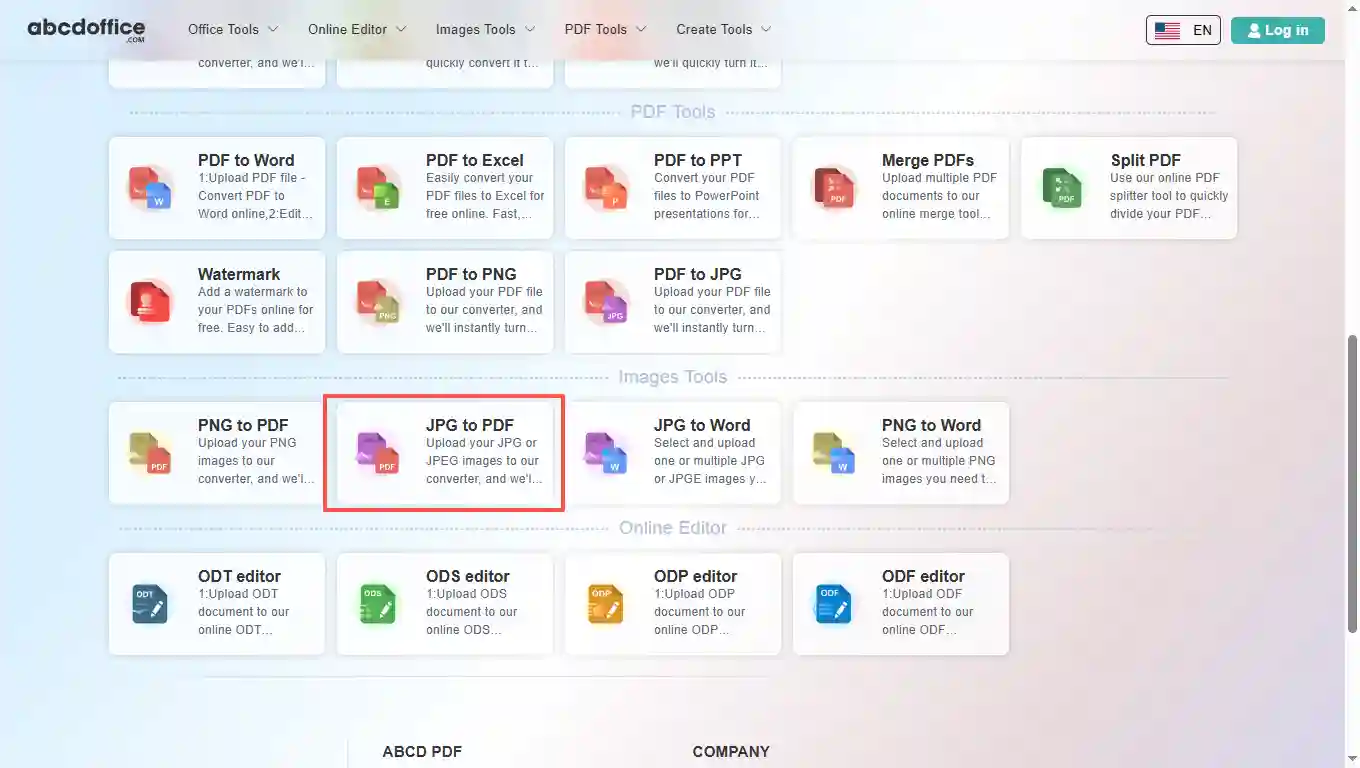
Open abcdoffice.com in your browser. On the homepage tools grid, click JPG to PDF under Online Editor or PDF Tools — or go directly to abcdoffice.com/jpg-to-pdf.html to open this jpg to pdf converter page.
02
Step 2: Upload your file

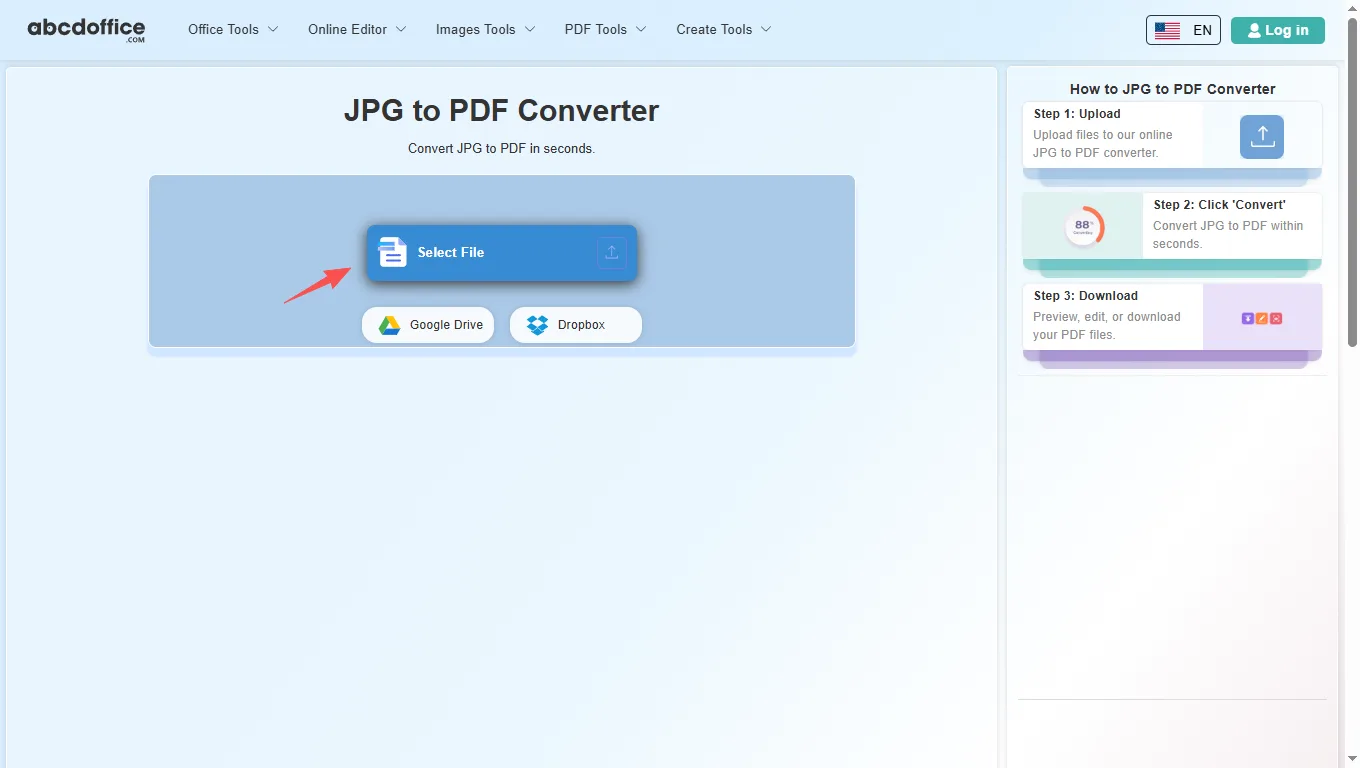
On the upload screen at abcdoffice.com/jpg-to-pdf.html, click Select File or drag JPG or JPEG images into the upload area. Google Drive and Dropbox buttons appear below Select File on abcdoffice.com.

03
Step 3: Merge JPG to PDF online

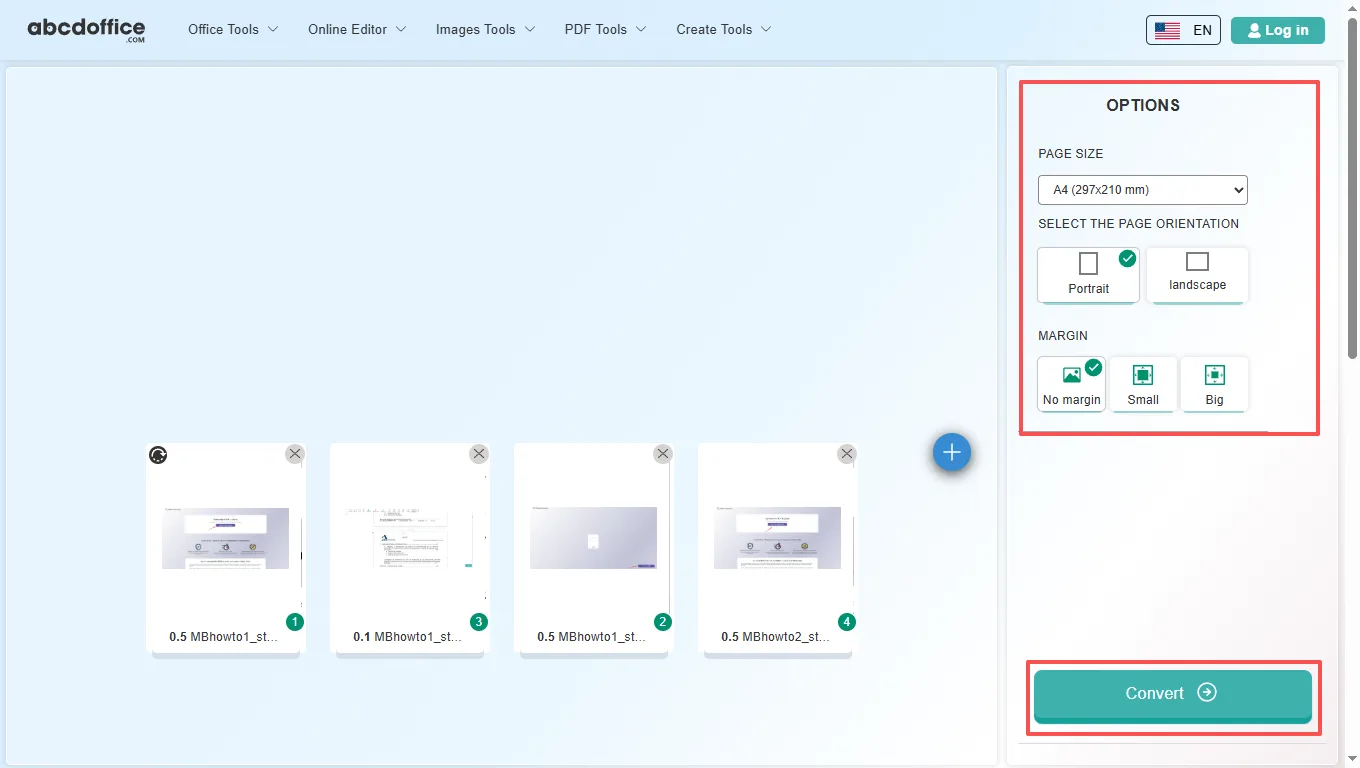
Reorder images if the tool shows a list, then click Convert — abcdoffice.com merges your images into one PDF document.

04
Step 4: Download the merged PDF

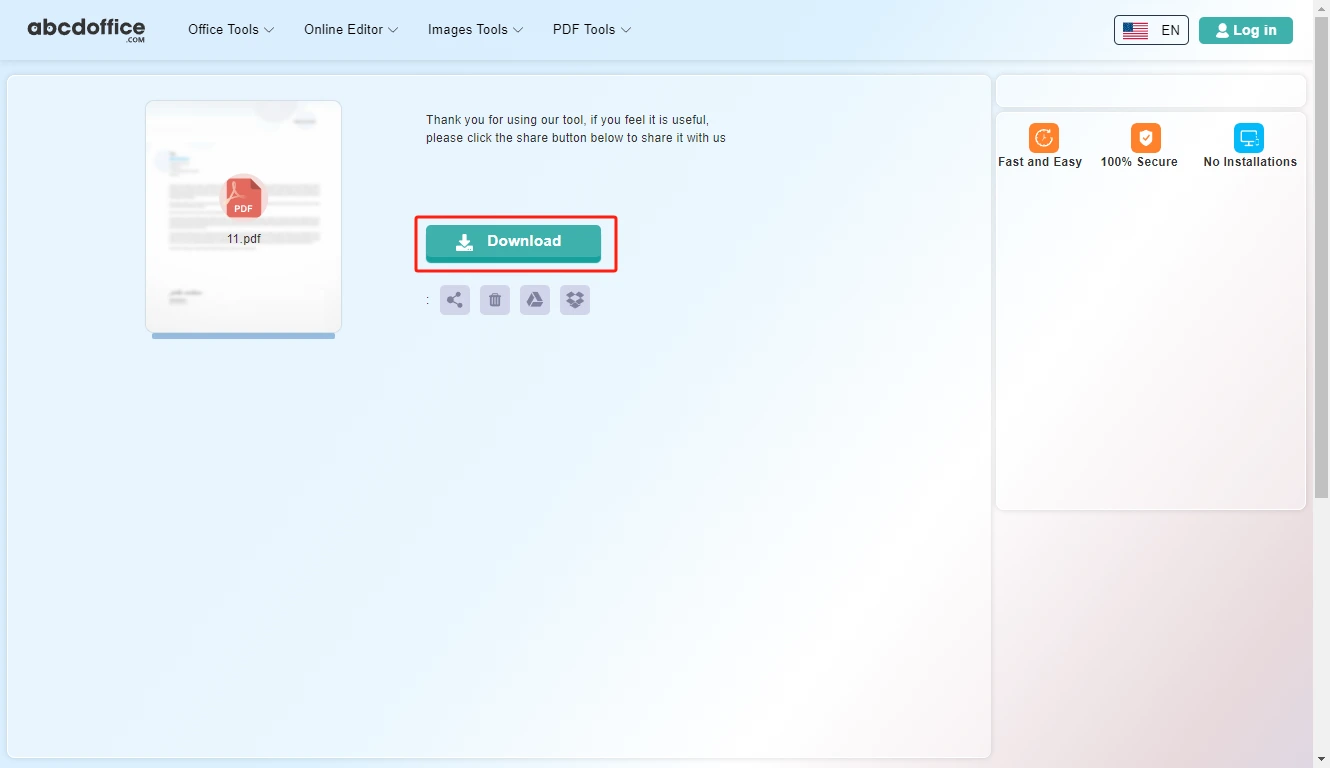
When processing finishes, abcdoffice.com shows a download screen. Click Download to save the merged PDF to your computer from this free jpg to pdf converter.

Your guide to JPG to PDF conversion on ABCD Office

How jpg to pdf works, multiple images, and vs desktop tools — for convert jpg to pdf, merge jpg to pdf, and jpeg to pdf searches.

What is an online JPG to PDF converter?

A JPG to PDF converter combines JPEG images into a single PDF file in your browser. Upload on abcdoffice.com, convert, and download one document for sharing or printing.

Merge multiple JPG files into one PDF

Upload several JPG or JPEG images on jpg-to-pdf.html — the tool merges them in order into one PDF. Ideal after exporting pages from pdf-to-jpg.html or collecting phone photos.

Have PNG instead? Use png-to-pdf.html. Need editable text from images? Try jpg-to-word.html on abcdoffice.com.

Typical use cases

Students merge homework photos into one PDF submission. Travelers combine ticket JPGs. Small businesses archive receipt photos. The convert jpg to pdf online workflow fits any images-to-PDF task.

JPG to PDF online vs desktop Acrobat

Acrobat can create PDF from images with advanced options. ABCD Office targets fast merge jpg to pdf online at abcdoffice.com in about a minute without install.

Privacy and quality

Upload only needed images. Review the privacy policy before converting confidential photos on abcdoffice.com.

JPG to PDF online vs print-and-scan

See how abcdoffice.com/jpg-to-pdf.html compares on steps, install time, and time to finished PDF.

Method Typical steps Install required Time to convert
abcdoffice.com jpg-to-pdf.html 3–4 steps None ~1 minute
Print photos then scan to PDF Many steps Often yes Much longer
Desktop Acrobat or Office 5–8 steps Yes Several minutes
abcdoffice.com online
Quick workflow for upload, merge & download PDF
Print photos then scan to PDF
Slow and error-prone
Desktop export tools
Multiple apps and installs

JPG to PDF guides — common conversion tasks on ABCD Office

Guides for convert jpg to pdf, merge jpg to pdf, and jpeg to pdf online — start at abcdoffice.com/jpg-to-pdf.html.

Guide

Merge photos into one PDF album

Upload multiple JPGs on jpg-to-pdf.html and convert to a single document.

Upload JPG to convert
Guide

Scan receipts JPG to PDF expense pack

Combine receipt images for accounting submission as one PDF.

Upload JPG to convert
Guide

ID photo pages as PDF portfolio

Turn JPG scans into a PDF packet for onboarding or KYC.

Upload JPG to convert
Guide

Reorder images before convert

Arrange JPG sequence on abcdoffice.com so pages read left-to-right.

Upload JPG to convert
Guide

Mobile camera roll to PDF

Select several phone photos and merge to PDF without a desktop app.

Upload JPG to convert
Guide

PDF after light image cleanup

Crop photos locally, then merge JPGs to PDF for a cleaner file size.

Upload JPG to convert

Frequently asked questions

JPG to PDF FAQ for abcdoffice.com/jpg-to-pdf.html — merge photos and scans into one PDF.

How do I combine receipt JPG photos into one PDF?

Upload images to abcdoffice.com/jpg-to-pdf.html — jpg to pdf merges them into a single document for accounting.

  1. Open abcdoffice.com/jpg-to-pdf.html in your browser.
  2. Click Select File or drag your file into the upload area.
  3. Click Convert and wait until abcdoffice.com finishes processing.
  4. Click Download to save the converted file.
Can I convert multiple JPEGs to one PDF without Adobe?

The jpg to pdf converter online orders files, converts, and downloads one PDF from abcdoffice.com.

  1. Open abcdoffice.com/jpg-to-pdf.html in your browser.
  2. Click Select File or drag your file into the upload area.
  3. Click Convert and wait until abcdoffice.com finishes processing.
  4. Click Download to save the converted file.
Can I reorder JPG pages before jpg to pdf merge?

Arrange thumbnails on the upload screen if shown, then Convert so pages read in the right sequence.

  1. Open abcdoffice.com/jpg-to-pdf.html in your browser.
  2. Click Select File or drag your file into the upload area.
  3. Click Convert and wait until abcdoffice.com finishes processing.
  4. Click Download to save the converted file.
Is jpg to pdf online free for expense reports?

Yes — typical jpg to pdf free merges need no signup.

  1. Open abcdoffice.com/jpg-to-pdf.html in your browser.
  2. Click Select File or drag your file into the upload area.
  3. Click Convert and wait until abcdoffice.com finishes processing.
  4. Click Download to save the converted file.
Does jpg to pdf reduce photo quality?

Images are embedded into PDF pages — use original resolution JPGs for clearest scans.

  1. Open abcdoffice.com/jpg-to-pdf.html in your browser.
  2. Click Select File or drag your file into the upload area.
  3. Click Convert and wait until abcdoffice.com finishes processing.
JPG to PDF vs printing photos and scanning?

jpg to pdf online is faster for digital camera roll receipts and ID photos.

  1. Open abcdoffice.com/jpg-to-pdf.html in your browser.
  2. Click Select File or drag your file into the upload area.
  3. Click Convert and wait until abcdoffice.com finishes processing.
  4. Click Download to save the converted file.
Is it safe to upload personal ID scans on abcdoffice.com?

Only upload ID images if your policy permits cloud processing; download and delete when done.

  1. Open abcdoffice.com/jpg-to-pdf.html in your browser.
  2. Click Select File or drag your file into the upload area.
  3. Click Convert and wait until abcdoffice.com finishes processing.
  4. Click Download to save the converted file.
Can I merge JPG to PDF on iPhone?

Select photos in mobile browser at jpg-to-pdf.html, Convert, save PDF to Files.

  1. Open abcdoffice.com/jpg-to-pdf.html in your browser.
  2. Click Select File or drag your file into the upload area.
  3. Click Convert and wait until abcdoffice.com finishes processing.
  4. Click Download to save the converted file.

Convert your JPG images to PDF on abcdoffice.com

Upload JPG at abcdoffice.com/jpg-to-pdf.html — free JPG to PDF converter, then Download your merged PDF.