Login to your account
or
The mailbox user already exists
By clicking 'Download File,' you agree to our Terms and conditions and Privacy policy
jpg_to_word

Convert JPG to Word

Convert JPG to Word in seconds

scicon Select File upload_btn add_upload
1
google-drive Google Drive
dropbox Dropbox
or drag PDF here
Converting JPG to Word...
Do not close your browser Wait until your files are uploaded and processed! This might take a few minutes. :)
file icon
Size
Ddfdf.pptx
5.2MB
VIEW
edit_file
How to Convert JPG to Word
Step 1:Upload
Upload Files to our Online JPG Converter
add file
Edit
Step 2:Click 'Convert'
You can convert JPG to Word within seconds
Step 3:Download
You can online Reader, Editor or Download your files
add file

What this free JPG to Word converter supports

ABCD Office converts JPG and JPEG images to an editable Word document in your browser — upload on abcdoffice.com/jpg-to-word.html, merge multiple photos into one DOCX, and download without installing Microsoft Word.

Input format

Upload JPG or JPEG images on abcdoffice.com/jpg-to-word.html — one or multiple image files supported.

Convert in browser

Click Convert on abcdoffice.com — jpg to word online with OCR-style layout for typical image-to-DOCX tasks.

Output

Download DOCX ready to edit in Microsoft Word or word-editor.html on abcdoffice.com.

No install

Free online converter on desktop or mobile at abcdoffice.com.

How to convert JPG to Word online on ABCD Office

abcdoffice.com/jpg-to-word.html is the JPG to Word converter page — upload one or more JPG/JPEG images, click Convert, download DOCX.

Convert

JPG to Word converter — image to DOCX free online

You photographed document pages or have scanned JPG homework — and need editable Word text instead of retyping every line.

  • Jpg to word for homework photos, scanned forms, and multi-page JPG sets merged into one document.
  • Convert jpg to docx online when Word desktop is not installed.
  • Export finished DOCX to PDF via word-to-pdf.html or edit in word-editor.html on abcdoffice.com.
01
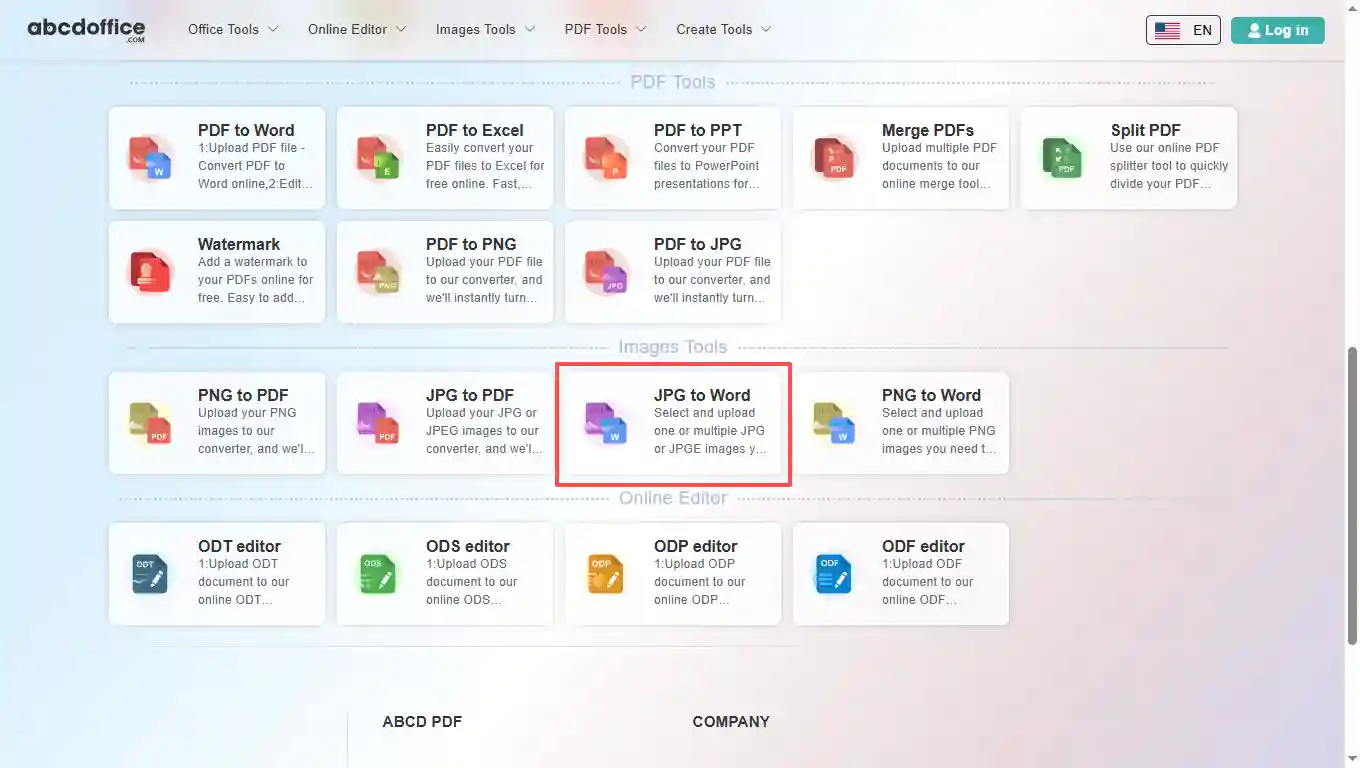
Step 1: Open JPG to Word on abcdoffice.com

Open abcdoffice.com in your browser. On the homepage tools grid, click JPG to Word under Online Editor or PDF Tools — or go directly to abcdoffice.com/jpg-to-word.html to open this jpg to word converter page.
02
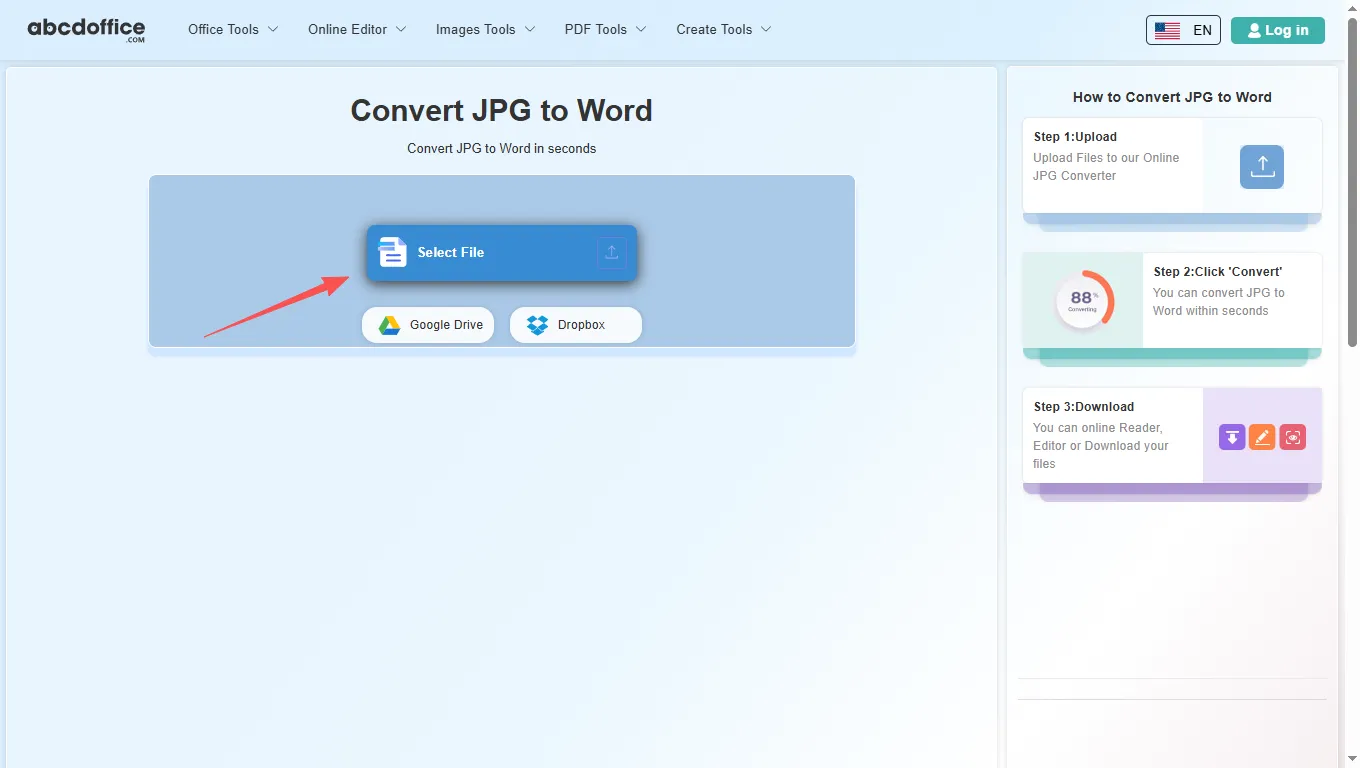
Step 2: Upload your file

On the upload screen at abcdoffice.com/jpg-to-word.html, click Select File or drag JPG or JPEG images into the upload area. Google Drive and Dropbox buttons appear below Select File on abcdoffice.com.

03
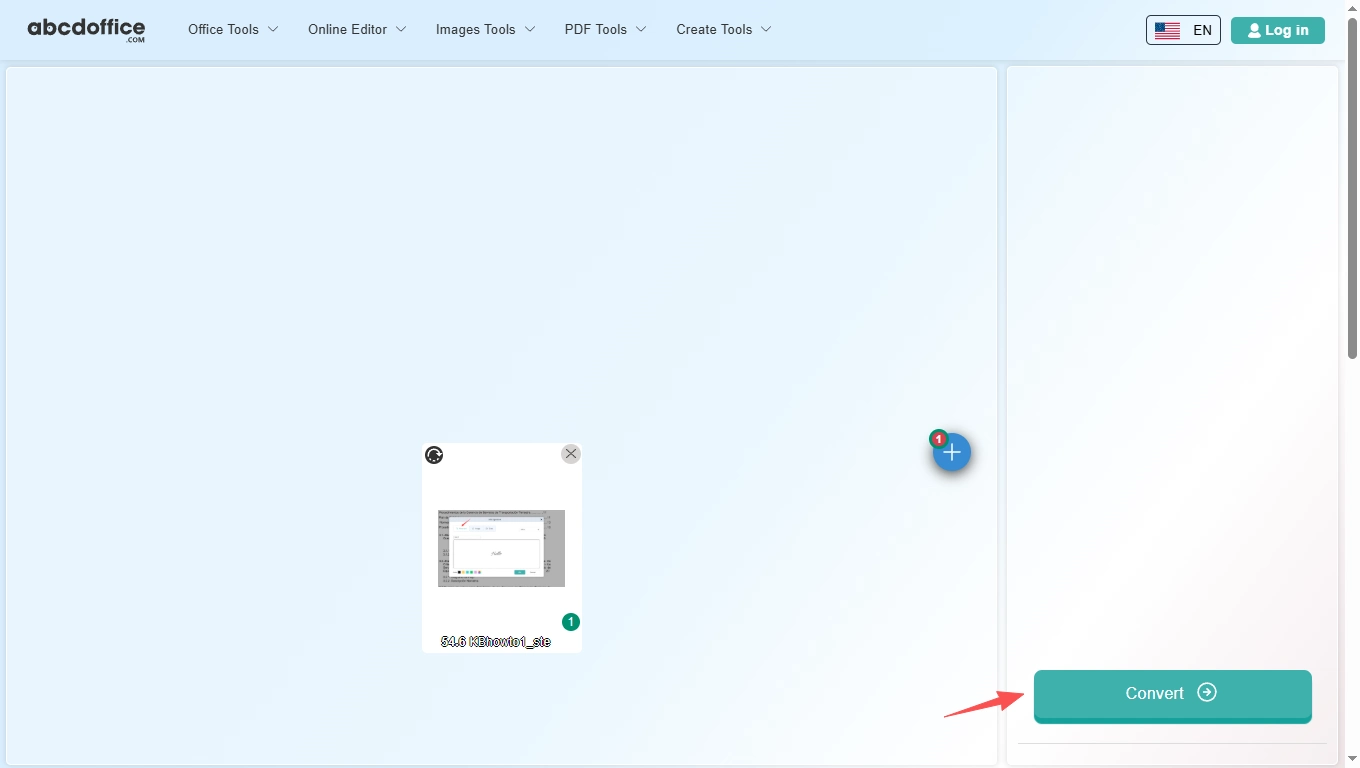
Step 3: Convert JPG to Word online

Click Convert and wait while abcdoffice.com runs OCR and builds an editable Word document from your image.

04
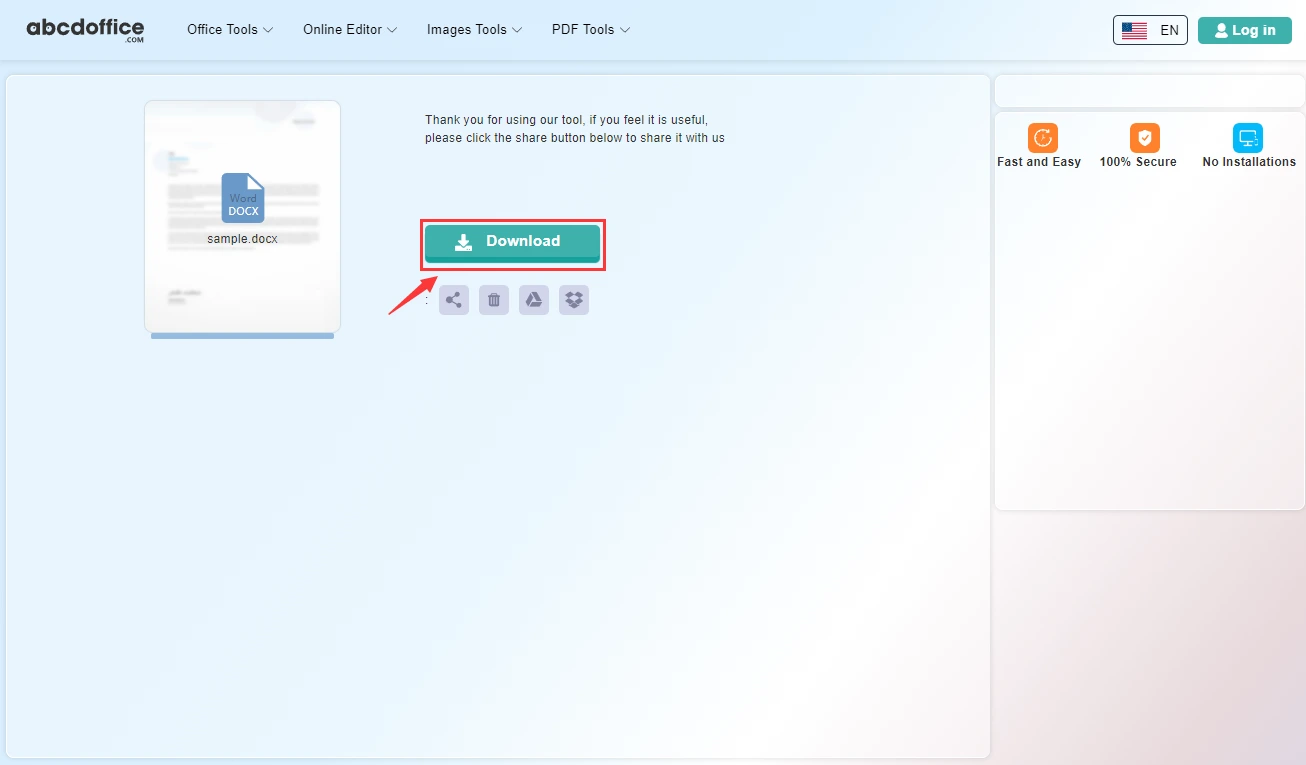
Step 4: Download DOCX or Word files

When processing finishes, abcdoffice.com shows a download screen. Click Download to save DOCX or Word files to your computer from this free jpg to word converter.

Your guide to JPG to Word conversion on ABCD Office

How jpg to word works, merge multiple JPGs, and vs desktop OCR — for convert jpg to word, jpg to docx, and image to word searches.

What is an online JPG to Word converter?

A JPG to Word converter turns image pages into an editable Word (DOCX) file in your browser — useful when your source is photos or scans rather than a text PDF.

Merge multiple JPG images into one Word file

Upload several JPG or JPEG files on jpg-to-word.html — the tool combines them into one Word document. Review and edit after download in Word or word-editor.html.

Need PDF instead of Word? Use jpg-to-pdf.html. Starting from PDF text? Use pdf-to-word.html on abcdoffice.com.

Typical use cases

Students convert photographed notes to editable homework files. Admins digitize paper forms from JPG photos. Teams recover text from scan images. The convert jpg to word online workflow fits image-in, DOCX-out tasks.

JPG to Word online vs manual retyping

Retyping every line from a photo is slow. ABCD Office offers convert jpg to word online at abcdoffice.com in minutes; complex layouts may still need manual cleanup in Word.

Privacy and quality

Review the privacy policy before converting confidential document photos on abcdoffice.com.

JPG to Word online vs manual typing

See how abcdoffice.com/jpg-to-word.html compares on steps, install time, and time to finished DOCX.

Method Typical steps Install required Time to convert
abcdoffice.com jpg-to-word.html 3–4 steps None ~1 minute
Manual retype from photos Many steps Often yes Much longer
Desktop Acrobat or Office 5–8 steps Yes Several minutes
abcdoffice.com online
Quick workflow for upload, convert & download DOCX
Manual retype from photos
Slow and error-prone
Desktop export tools
Multiple apps and installs

JPG to Word guides — common conversion tasks on ABCD Office

Guides for convert jpg to word, jpg to docx, and merge jpg to word — start at abcdoffice.com/jpg-to-word.html.

Guide

OCR a photographed contract to DOCX

jpg-to-word.html turns camera JPG text into an editable Word file.

Upload JPG to convert
Guide

Class notes photo to Word

Students convert whiteboard JPGs to DOCX for searchable study notes.

Upload JPG to convert
Guide

Menu or flyer JPG to editable text

Rebuild marketing copy in Word after OCR from a photo.

Upload JPG to convert
Guide

Fix OCR errors in word-editor

Convert JPG to Word, then correct names and numbers online.

Upload JPG to convert
Guide

Batch one JPG at a time

Process each page photo separately for cleaner OCR than stacking in one JPG.

Upload JPG to convert
Guide

DOCX export for translation vendors

Send OCR DOCX to translators instead of raw JPG attachments.

Upload JPG to convert

Frequently asked questions

JPG to Word FAQ for abcdoffice.com/jpg-to-word.html — OCR photos into editable DOCX.

How do I turn a photo of a contract into editable Word?

Upload the JPG to abcdoffice.com/jpg-to-word.html — jpg to word OCR builds DOCX for fixes in word-editor.html.

  1. Open abcdoffice.com/jpg-to-word.html in your browser.
  2. Click Select File or drag your file into the upload area.
  3. Click Convert and wait until abcdoffice.com finishes processing.
  4. Click Download to save the converted file.
Can I convert JPG to Word without desktop OCR software?

The jpg to word converter online processes images in the browser and returns a DOCX download.

  1. Open abcdoffice.com/jpg-to-word.html in your browser.
  2. Click Select File or drag your file into the upload area.
  3. Click Convert and wait until abcdoffice.com finishes processing.
  4. Click Download to save the converted file.
Will handwritten notes convert with jpg to word?

Printed text OCR works best — clean photos and good lighting improve jpg to word accuracy.

  1. Open abcdoffice.com/jpg-to-word.html in your browser.
  2. Click Select File or drag your file into the upload area.
  3. Click Convert and wait until abcdoffice.com finishes processing.
  4. Click Download to save the converted file.
Is jpg to word online free for one page?

Yes — typical jpg to word free conversion on abcdoffice.com needs no account.

  1. Open abcdoffice.com/jpg-to-word.html in your browser.
  2. Click Select File or drag your file into the upload area.
  3. Click Convert and wait until abcdoffice.com finishes processing.
  4. Click Download to save the converted file.
Can I fix OCR errors after jpg to word?

Download DOCX, upload to word-editor.html, correct names and numbers before sharing.

  1. Open abcdoffice.com/jpg-to-word.html in your browser.
  2. Click Select File or drag your file into the upload area.
  3. Click Convert and wait until abcdoffice.com finishes processing.
JPG to Word vs retyping a scanned page?

jpg to word online saves time on typed forms and printed letters photographed with a phone.

  1. Open abcdoffice.com/jpg-to-word.html in your browser.
  2. Click Select File or drag your file into the upload area.
  3. Click Convert and wait until abcdoffice.com finishes processing.
  4. Click Download to save the converted file.
Is it safe to OCR ID photos on abcdoffice.com?

Avoid uploading sensitive ID unless your policy allows cloud OCR.

  1. Open abcdoffice.com/jpg-to-word.html in your browser.
  2. Click Select File or drag your file into the upload area.
  3. Click Convert and wait until abcdoffice.com finishes processing.
  4. Click Download to save the converted file.
Can I convert a whiteboard photo to Word on mobile?

Take the photo, open jpg-to-word.html, upload, Convert, edit DOCX in the mobile browser editor.

  1. Open abcdoffice.com/jpg-to-word.html in your browser.
  2. Click Select File or drag your file into the upload area.
  3. Click Convert and wait until abcdoffice.com finishes processing.
  4. Click Download to save the converted file.

Convert your JPG images to Word on abcdoffice.com

Upload JPG at abcdoffice.com/jpg-to-word.html — free JPG to Word converter, then Download DOCX.