Login to your account
or
The mailbox user already exists
By clicking 'Download File,' you agree to our Terms and conditions and Privacy policy
pdf_to_word
Save document as
Please select a file to save
docx DOCX
pdf PDF
odt ODT
txt TXT
dotx DOTX
pdfa PDF/A
ott OTT
rtf RTF
docxf DOCXF
oform OFORM
html HTML
fb2 FB2
epub EPUB
xlsx XLSX
pdf PDF
ods ODS
csv CSV
xltx XLTX
pdfa PDF/A
ots OTS
pptx PPTX
pdf PDF
odp ODP
potx POTX
pdf PDF/A
otp OTP
png PNG
jpg JPG
close

PDF to Word

Convert your PDF to Word documents(DOCX) with incredible accuracy.

Do not close your browser Wait until your files are uploaded and processed! This might take a few minutes. :)
officeedit Next Next
File
Open Source Statement
file icon
Size
Ddfdf.pptx
5.2MB
VIEW
edit_file
How to PDF to Word
Step 1:Upload
Upload Files to our Online PDF Converter
add file
Edit
Step 2:Click 'Convert'
You can convert PDF to Word within seconds
Step 3:Download
You can online Reader, Editor or Download your files
add file

What this free PDF to Word converter supports

ABCD Office converts PDF to Word in your browser — upload on abcdoffice.com/pdf-to-word.html, get an editable DOCX file, and download without installing Adobe Acrobat or Microsoft Word.

Input format

Upload PDF files on abcdoffice.com/pdf-to-word.html — standard PDF documents for conversion to DOCX.

Convert in browser

Click Convert on abcdoffice.com — no desktop Acrobat install for typical conversion tasks.

Output

Download DOCX ready to edit in Office or on abcdoffice.com editor pages.

No install

Free online converter on desktop or mobile at abcdoffice.com.

How to convert PDF to Word online on ABCD Office

abcdoffice.com/pdf-to-word.html is the PDF to Word converter page — upload PDF, click Convert, download DOCX. For convert-then-edit, try pdf-to-word-editor.html.

Convert

PDF to Word converter — PDF to DOCX free online

You received a PDF contract or report and need editable text in Word — but retyping is slow and you want convert pdf to word online in one step.

  • PDF to Word for contracts, resumes, forms, and client documents you must edit.
  • Convert pdf to docx online when Word or Acrobat is not installed on a shared PC.
  • After download, open the DOCX in word-editor.html on abcdoffice.com for further edits.
01
Step 1: Open PDF to Word on abcdoffice.com

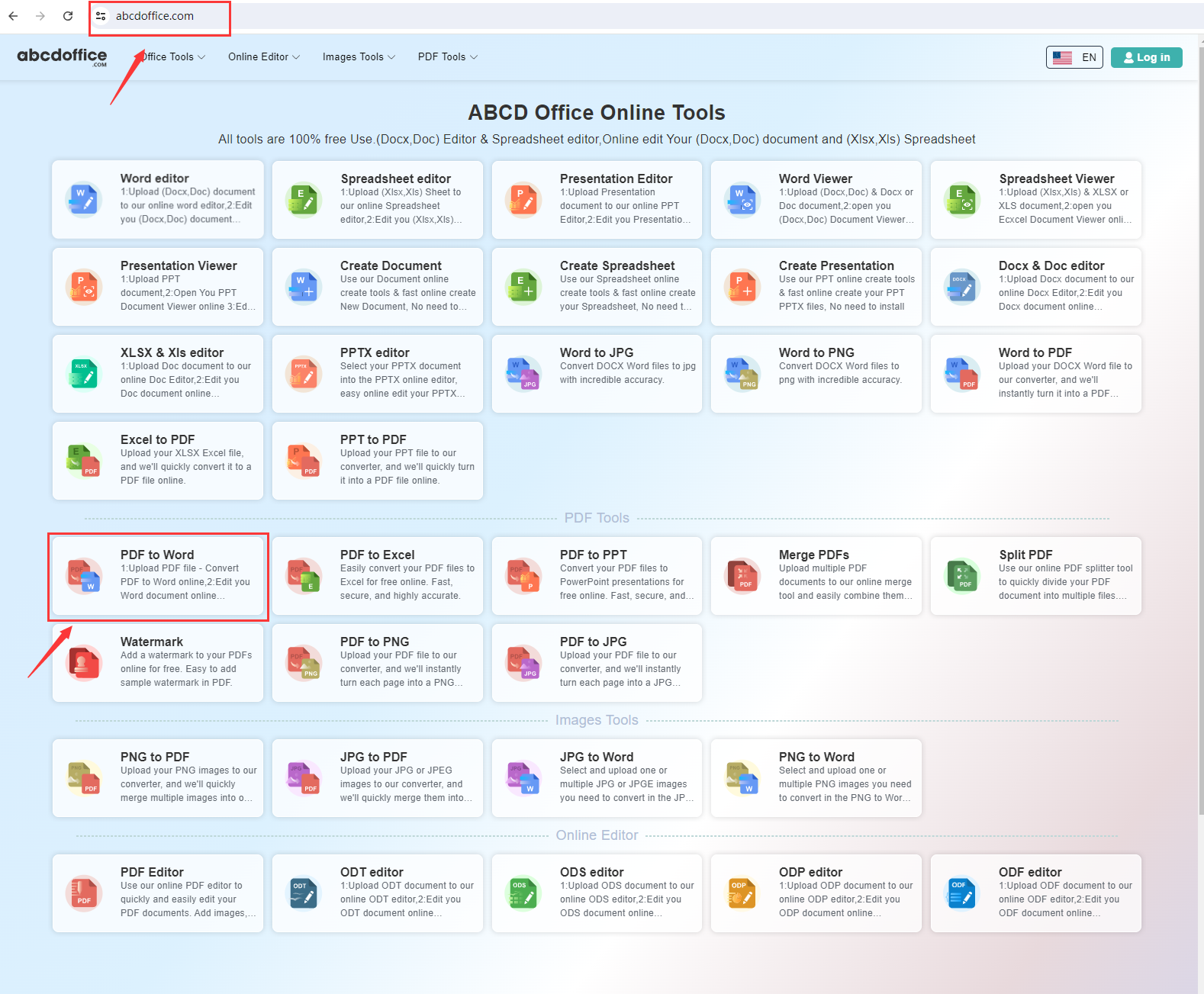
Open abcdoffice.com in your browser. On the homepage tools grid, click PDF to Word under Online Editor or PDF Tools — or go directly to abcdoffice.com/pdf-to-word.html to open this pdf to word converter page.
02
Step 2: Upload your file

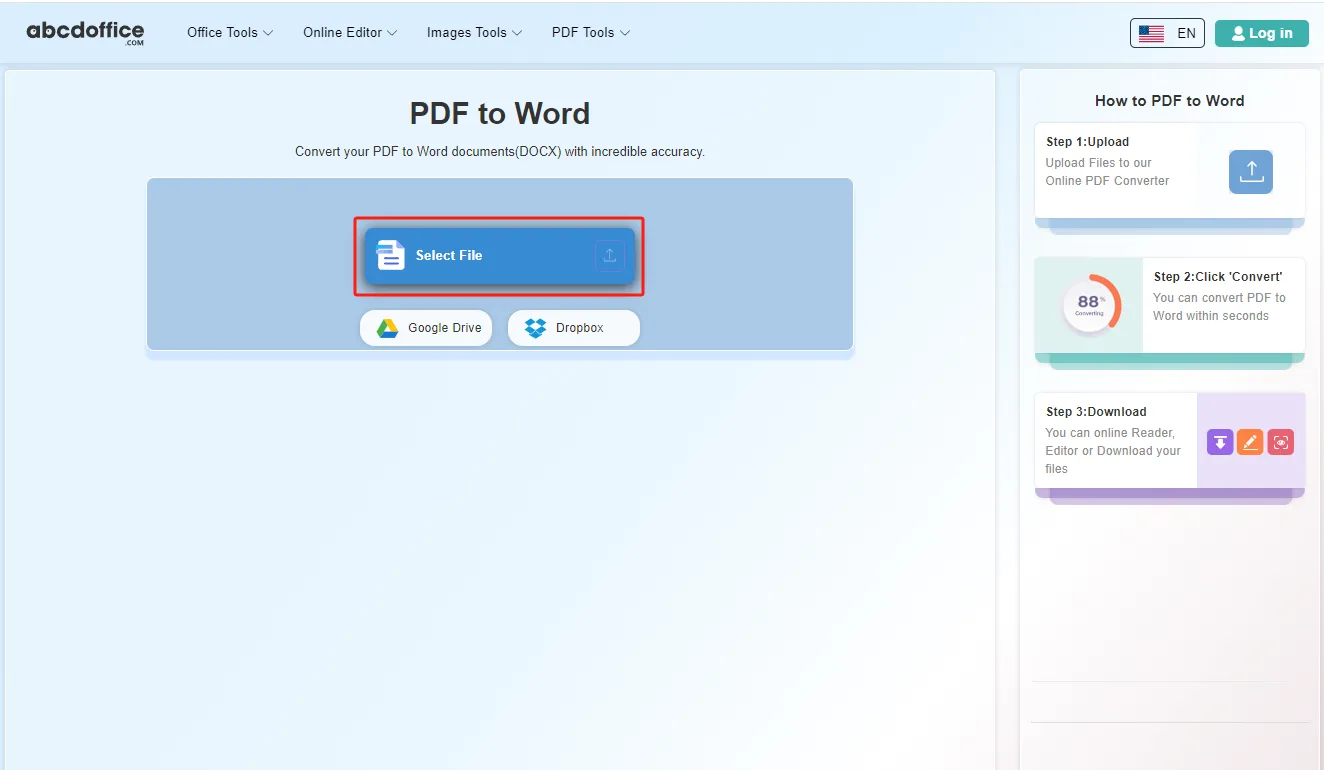
On the upload screen at abcdoffice.com/pdf-to-word.html, click Select File or drag PDF files into the upload area. Google Drive and Dropbox buttons appear below Select File on abcdoffice.com.

03
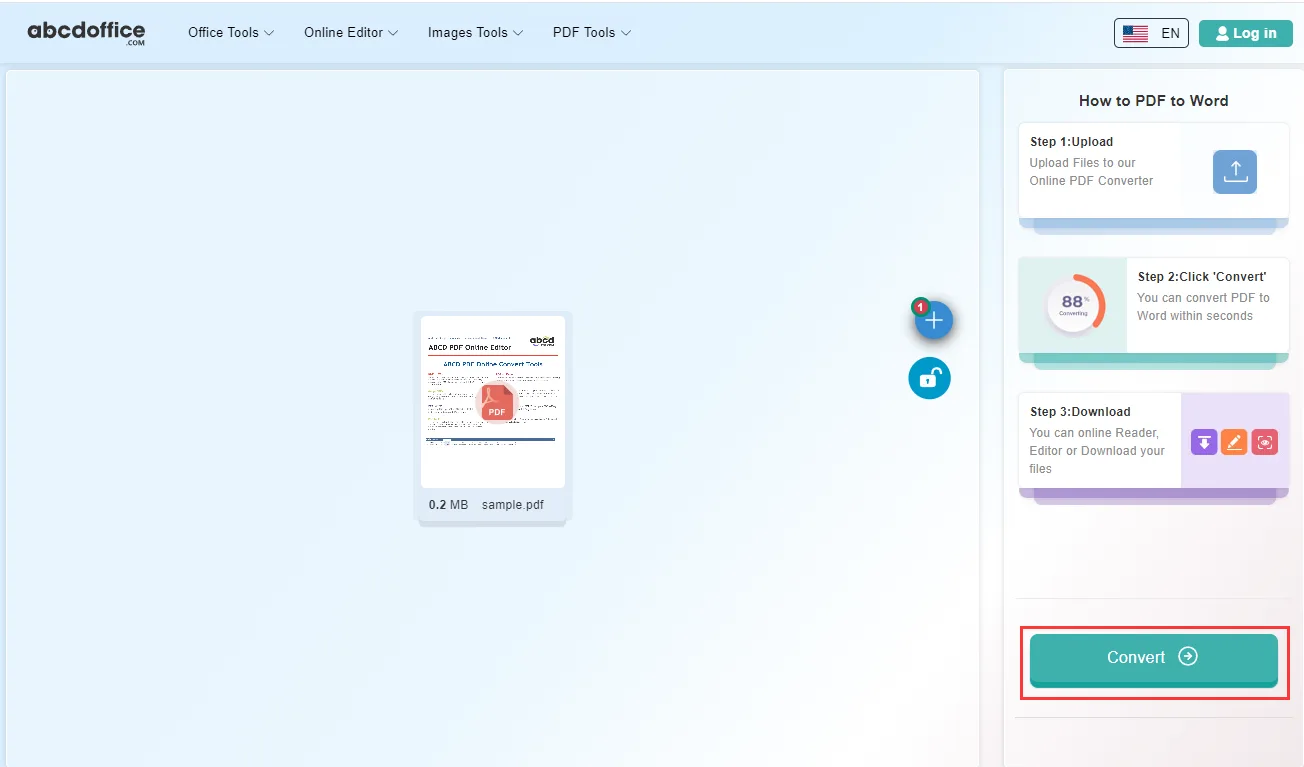
Step 3: Convert PDF to Word online

With your file uploaded, click Convert at the bottom of the page and wait a few seconds while abcdoffice.com converts PDF to editable Word — no extra steps during conversion.

04
Step 4: Download DOCX or Word files

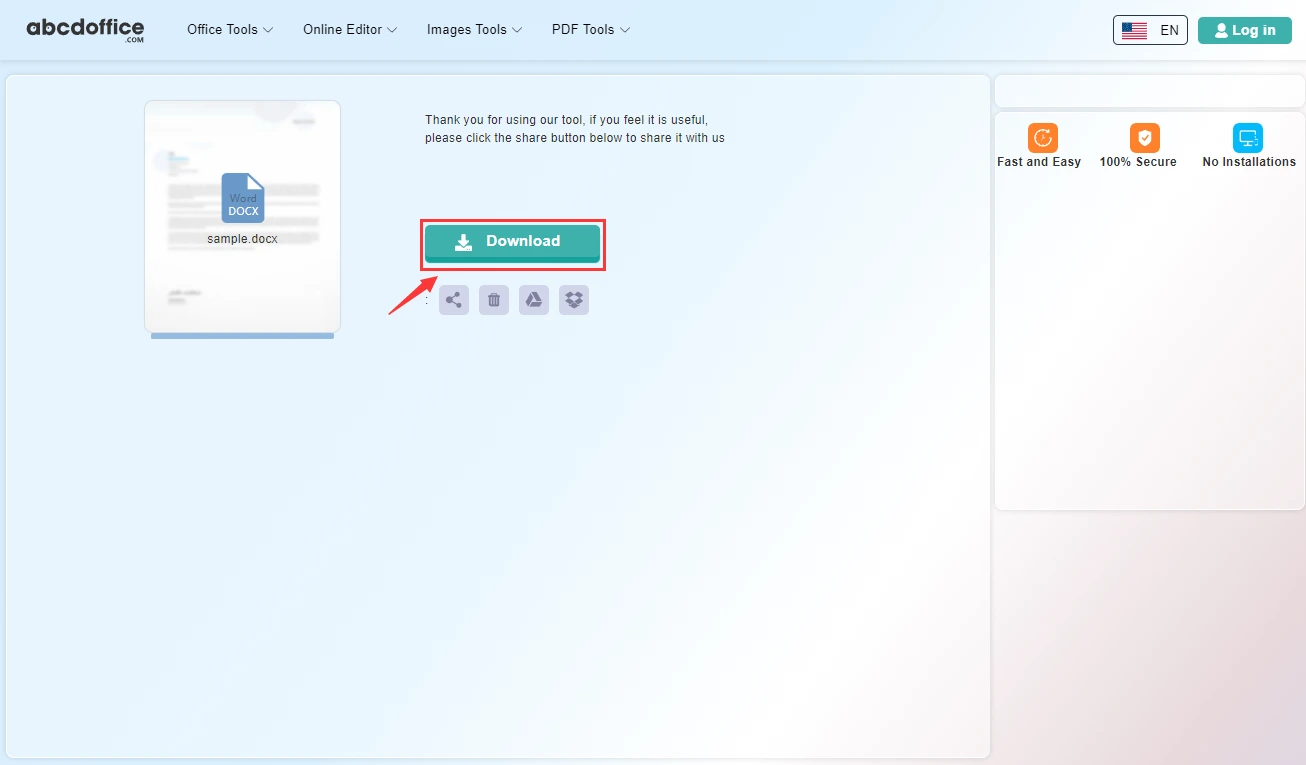
When processing finishes, abcdoffice.com shows a download screen. Click Download to save DOCX or Word files to your computer from this free pdf to word converter.

Your guide to PDF to Word conversion on ABCD Office

How pdf to word conversion works, accuracy tips, and pdf-to-word vs pdf-to-word-editor — for convert pdf to word, pdf to docx, and pdf to word online searches.

What is an online PDF to Word converter?

A PDF to Word converter turns a fixed PDF into an editable DOCX file in your browser. Upload on abcdoffice.com, the service maps text and layout into Word format, and you download to continue editing.

PDF to Word vs PDF to Word Editor

pdf-to-word.html focuses on convert and download DOCX. pdf-to-word-editor.html converts PDF and opens the result in the browser editor immediately — choose based on whether you only need the file or instant online editing.

Starting from Word already? Use word-to-pdf.html to export PDF, or docx-editor.html to edit DOCX directly.

Typical use cases

Legal teams recover contract text from PDF. Students turn paper handouts into editable homework files. Admins convert policy PDFs for internal edits. The convert pdf to word online workflow on abcdoffice.com fits any PDF-in, DOCX-out task.

PDF to Word online vs manual copy-paste

Copy-paste from PDF often breaks tables and headers. ABCD Office targets structured convert pdf to word online at abcdoffice.com in about a minute.

Privacy and quality

Upload only needed PDFs. Review the privacy policy before converting confidential contracts on abcdoffice.com.

PDF to Word online vs manual workflows

See how abcdoffice.com/pdf-to-word.html compares on steps, install time, and time to finished DOCX.

Method Typical steps Install required Time to convert
abcdoffice.com pdf-to-word.html 3–4 steps None ~1 minute
Manual copy-paste from PDF Many steps Often yes Much longer
Desktop Acrobat + Office 5–8 steps Yes Several minutes
abcdoffice.com online
Quick workflow for upload, convert & download DOCX
Manual copy-paste from PDF
Slow and error-prone
Desktop Acrobat export
Multiple apps and installs

PDF to Word guides — common conversion tasks on ABCD Office

Guides for convert pdf to word, pdf to docx, and pdf to word online free — start at abcdoffice.com/pdf-to-word.html.

Guide

Make a scanned contract editable

Upload the PDF to pdf-to-word.html and download DOCX to change clauses.

Upload PDF to convert
Guide

Reuse text from a PDF brochure

Convert to Word, then copy sections into a new marketing DOCX.

Upload PDF to convert
Guide

Fix OCR tables from invoices

After conversion, open the DOCX in word-editor.html to adjust columns.

Upload PDF to convert
Guide

PDF homework sheet to Word

Students convert PDF assignments to DOCX to type answers online.

Upload PDF to convert
Guide

No Acrobat — PDF to DOCX only

Skip desktop tools: upload, Convert, Download DOCX on abcdoffice.com.

Upload PDF to convert
Guide

Mobile PDF to Word on the go

Convert a PDF attachment from phone mail, then edit DOCX in the mobile browser editor.

Upload PDF to convert

Frequently asked questions

PDF to Word FAQ for abcdoffice.com/pdf-to-word.html — editable DOCX from contracts, scans, and forms.

How do I make a scanned contract PDF editable in Word?

Upload the PDF to abcdoffice.com/pdf-to-word.html — pdf to word conversion builds a DOCX you can fix in word-editor.html.

  1. Open abcdoffice.com/pdf-to-word.html in your browser.
  2. Click Select File or drag your file into the upload area.
  3. Click Convert and wait until abcdoffice.com finishes processing.
  4. Click Download to save the converted file.
Can I convert PDF to Word without Adobe Acrobat?

The pdf to word converter online on abcdoffice.com runs in the browser — upload, Convert, Download DOCX.

  1. Open abcdoffice.com/pdf-to-word.html in your browser.
  2. Click Select File or drag your file into the upload area.
  3. Click Convert and wait until abcdoffice.com finishes processing.
  4. Click Download to save the converted file.
Will tables from a PDF survive pdf to word conversion?

Simple tables often convert to editable Word tables — review the DOCX after download and adjust columns online if needed.

  1. Open abcdoffice.com/pdf-to-word.html in your browser.
  2. Click Select File or drag your file into the upload area.
  3. Click Convert and wait until abcdoffice.com finishes processing.
  4. Click Download to save the converted file.
Is pdf to word online free for one document?

Standard pdf to word free conversion on abcdoffice.com works without signup for typical files.

  1. Open abcdoffice.com/pdf-to-word.html in your browser.
  2. Click Select File or drag your file into the upload area.
  3. Click Convert and wait until abcdoffice.com finishes processing.
  4. Click Download to save the converted file.
How long does pdf to word edit conversion take?

Most text PDFs finish in seconds; scanned pages may take longer while OCR runs on abcdoffice.com.

  1. Open abcdoffice.com/pdf-to-word.html in your browser.
  2. Click Select File or drag your file into the upload area.
  3. Click Convert and wait until abcdoffice.com finishes processing.
PDF to Word online vs Acrobat export?

Acrobat excels at batch OCR and redaction. ABCD Office pdf to word online targets quick DOCX export without install.

  1. Open abcdoffice.com/pdf-to-word.html in your browser.
  2. Click Select File or drag your file into the upload area.
  3. Click Convert and wait until abcdoffice.com finishes processing.
  4. Click Download to save the converted file.
Is it safe to convert HR PDFs on abcdoffice.com?

Upload only necessary files and follow your privacy rules before using any pdf to word converter for employee records.

  1. Open abcdoffice.com/pdf-to-word.html in your browser.
  2. Click Select File or drag your file into the upload area.
  3. Click Convert and wait until abcdoffice.com finishes processing.
  4. Click Download to save the converted file.
Can I convert PDF to DOCX on a Chromebook?

Open pdf-to-word.html, upload from Drive or local storage, Convert, edit the DOCX in the browser editor if needed.

  1. Open abcdoffice.com/pdf-to-word.html in your browser.
  2. Click Select File or drag your file into the upload area.
  3. Click Convert and wait until abcdoffice.com finishes processing.
  4. Click Download to save the converted file.

Convert your PDF to Word on abcdoffice.com

Upload PDF at abcdoffice.com/pdf-to-word.html — free PDF to Word converter, then Download DOCX.