Login to your account
or
The mailbox user already exists
By clicking 'Download File,' you agree to our Terms and conditions and Privacy policy
png_to_pdf
Save document as
Please select a file to save
docx DOCX
pdf PDF
odt ODT
txt TXT
dotx DOTX
pdfa PDF/A
ott OTT
rtf RTF
docxf DOCXF
oform OFORM
html HTML
fb2 FB2
epub EPUB
xlsx XLSX
pdf PDF
ods ODS
csv CSV
xltx XLTX
pdfa PDF/A
ots OTS
pptx PPTX
pdf PDF
odp ODP
potx POTX
pdf PDF/A
otp OTP
png PNG
jpg JPG
close

PNG to PDF Converter

Convert PNG to PDF in seconds.

Do not close your browser Wait until your files are uploaded and processed! This might take a few minutes. :)
officeedit Next Next
file icon
Size
Ddfdf.pptx
5.2MB
VIEW
edit_file
How to PNG to PDF Converter
Step 1: Upload
Upload files to our online PNG to PDF converter.
add file
Edit
Step 2: Click 'Convert'
Convert PNG to PDF within seconds.
Step 3: Download
Preview, edit, or download your PDF files.
add file

What this free PNG to PDF converter supports

ABCD Office merges PNG images into one PDF in your browser — upload on abcdoffice.com/png-to-pdf.html, combine multiple PNGs, and download a single PDF without Adobe Acrobat.

Input format

Upload PNG images on abcdoffice.com/png-to-pdf.html — one or multiple image files supported.

Convert in browser

Click Convert on abcdoffice.com — combine png to pdf online with no desktop install for typical tasks.

Output

Download one merged PDF ready to share, print, or edit on abcdoffice.com PDF tools.

No install

Free online converter on desktop or mobile at abcdoffice.com.

How to convert PNG to PDF online on ABCD Office

abcdoffice.com/png-to-pdf.html is the PNG to PDF converter page — upload one or more PNG files, click Convert, download one merged PDF.

Convert

PNG to PDF converter — merge PNG images to PDF free

You have screenshots, UI captures, or design PNGs — and need one PDF document without manual paste into Word.

  • Merge png to pdf for screenshots, diagrams, slides exported as PNG, and multi-image sets.
  • Convert png to pdf online free when Acrobat is not on a shared PC.
  • Pair with pdf-to-png.html or jpg-to-pdf.html for round-trip workflows on abcdoffice.com.
01
Step 1: Open PNG to PDF on abcdoffice.com

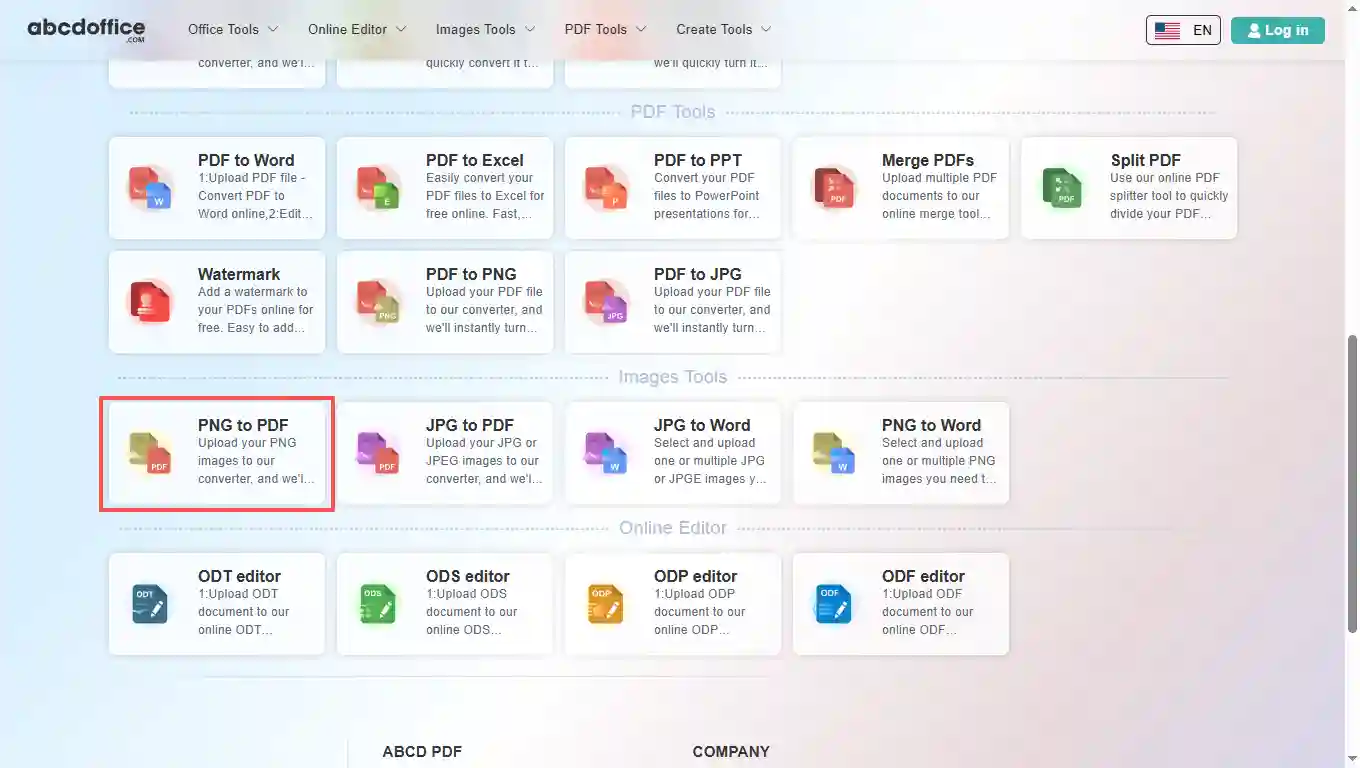
Open abcdoffice.com in your browser. On the homepage tools grid, click PNG to PDF under Online Editor or PDF Tools — or go directly to abcdoffice.com/png-to-pdf.html to open this png to pdf converter page.
02
Step 2: Upload your file

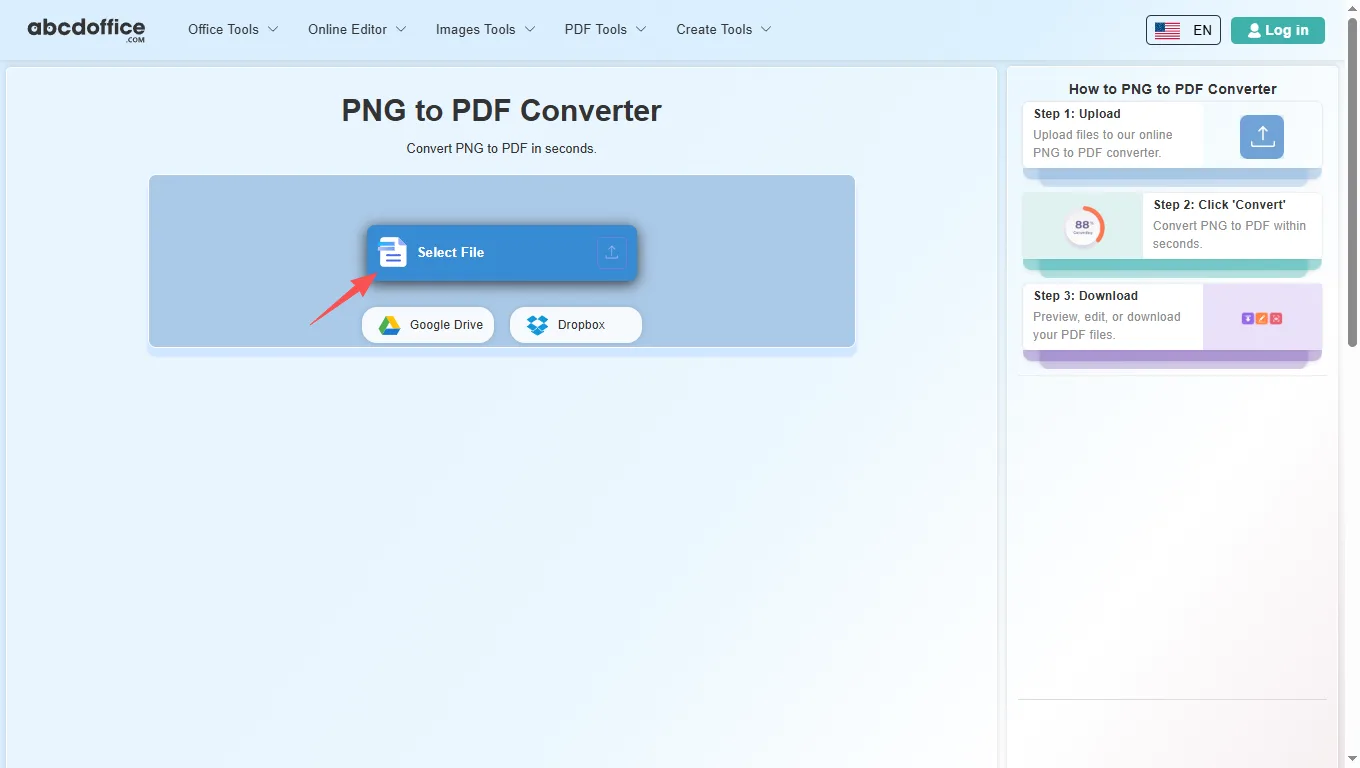
On the upload screen at abcdoffice.com/png-to-pdf.html, click Select File or drag PNG images into the upload area. Google Drive and Dropbox buttons appear below Select File on abcdoffice.com.

03
Step 3: Merge PNG to PDF online

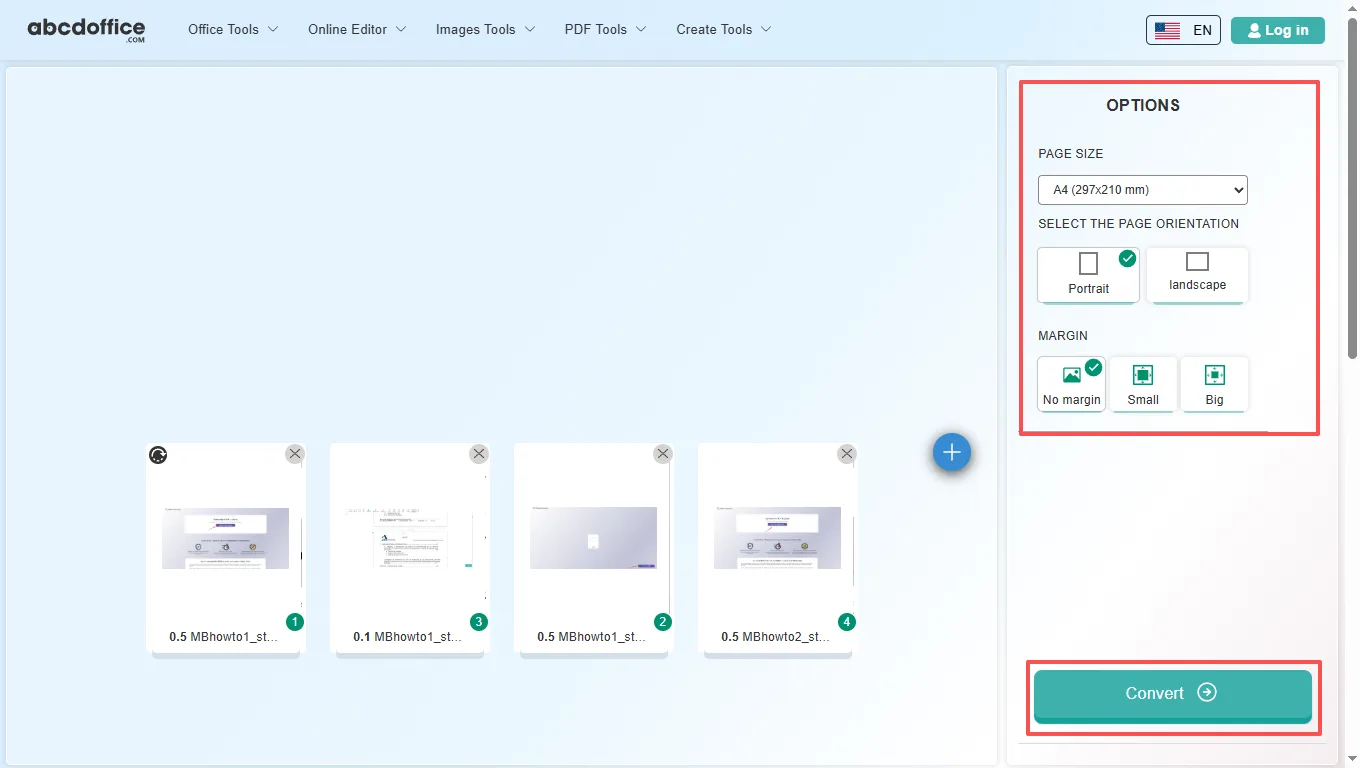
Reorder images if the tool shows a list, then click Convert — abcdoffice.com merges your images into one PDF document.

04
Step 4: Download the merged PDF

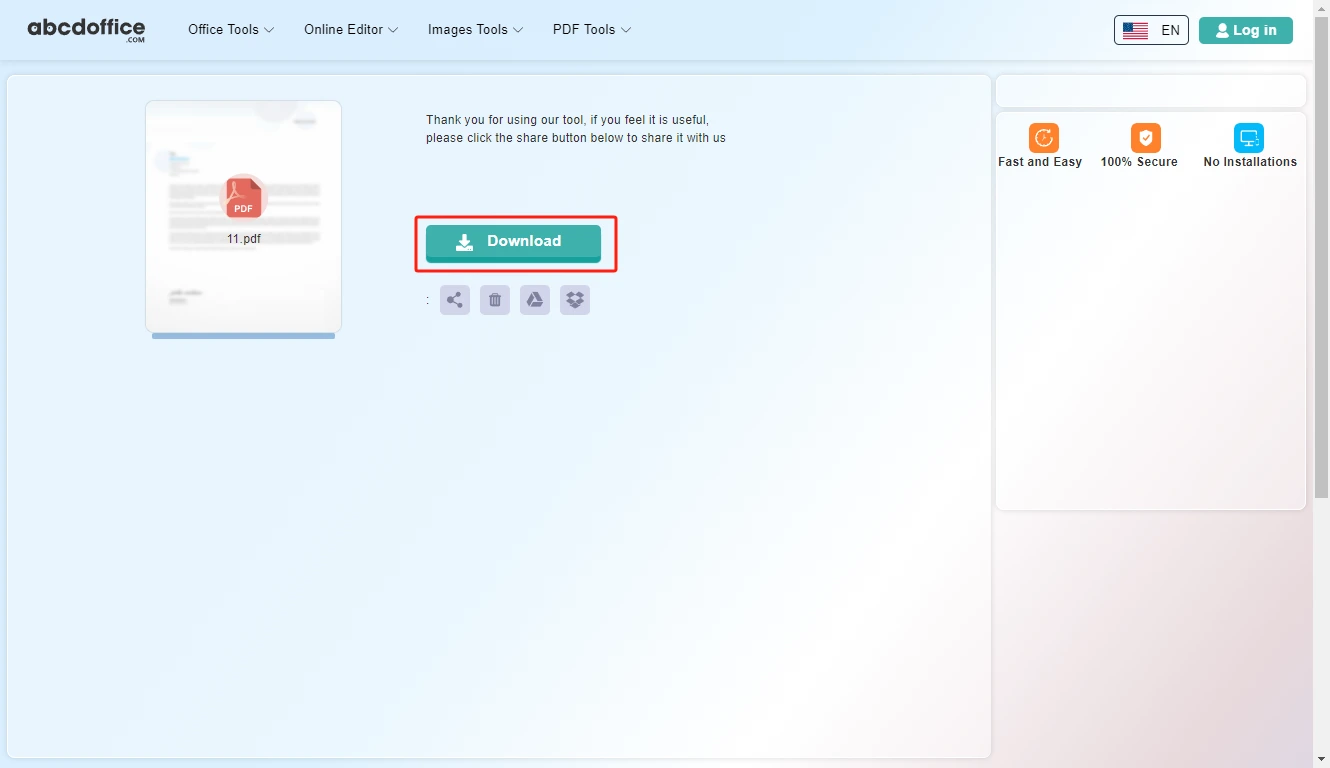
When processing finishes, abcdoffice.com shows a download screen. Click Download to save the merged PDF to your computer from this free png to pdf converter.

Your guide to PNG to PDF conversion on ABCD Office

How png to pdf works, multiple PNGs, PNG vs JPG — for convert png to pdf, merge png to pdf, and images to pdf searches.

What is an online PNG to PDF converter?

A PNG to PDF converter combines PNG images into one PDF in your browser — sharp for screenshots and graphics with text.

Merge multiple PNG files into one PDF

Upload several PNG files on png-to-pdf.html; the tool merges them in order into one PDF. Common after pdf-to-png.html export or design tool PNG exports.

Have JPEG photos instead? Use jpg-to-pdf.html. Need Word output from images? Try jpg-to-word.html on abcdoffice.com.

Typical use cases

Developers archive UI screenshot sets as PDF. Teachers bundle diagram PNGs. Teams email one PDF instead of many attachments. The convert png to pdf online path fits quick image-to-PDF merging.

PNG to PDF online vs desktop workflows

Desktop Acrobat Create PDF from images works well at scale. ABCD Office offers fast png to pdf online at abcdoffice.com without install.

Privacy and quality

Review the privacy policy before converting confidential screenshots on abcdoffice.com.

PNG to PDF online vs manual Word export

See how abcdoffice.com/png-to-pdf.html compares on steps, install time, and time to finished PDF.

Method Typical steps Install required Time to convert
abcdoffice.com png-to-pdf.html 3–4 steps None ~1 minute
Paste PNGs in Word then Save as PDF Many steps Often yes Much longer
Desktop Acrobat or Office 5–8 steps Yes Several minutes
abcdoffice.com online
Quick workflow for upload, merge & download PDF
Paste PNGs in Word then Save as PDF
Slow and error-prone
Desktop export tools
Multiple apps and installs

PNG to PDF guides — common conversion tasks on ABCD Office

Guides for convert png to pdf, merge png to pdf, and png to pdf online free — start at abcdoffice.com/png-to-pdf.html.

Guide

Combine UI PNG screens into one PDF

Product teams merge mockup PNGs into a PDF spec for stakeholders.

Upload PNG to convert
Guide

Lossless PNG scans to PDF archive

Keep diagram clarity when archiving PNG exports as a PDF bundle.

Upload PNG to convert
Guide

Transparent PNG in PDF portfolio

Upload PNG assets and convert for print shops that want one file.

Upload PNG to convert
Guide

Screenshot PNG set for bug report PDF

Attach one PDF of PNG steps instead of ten separate images in Jira.

Upload PNG to convert
Guide

Reorder PNG storyboard frames

Sort frames before Convert so the PDF reads in narrative order.

Upload PNG to convert
Guide

PNG figures from design handoff

Designers deliver PNG; developers receive one PDF reference doc.

Upload PNG to convert

Frequently asked questions

PNG to PDF FAQ for abcdoffice.com/png-to-pdf.html — UI screens and lossless scans in one file.

How do I bundle UI PNG screens into one PDF spec?

Upload PNGs to abcdoffice.com/png-to-pdf.html — png to pdf creates a single PDF for stakeholders.

  1. Open abcdoffice.com/png-to-pdf.html in your browser.
  2. Click Select File or drag your file into the upload area.
  3. Click Convert and wait until abcdoffice.com finishes processing.
  4. Click Download to save the converted file.
Can I convert PNG to PDF without Preview or Acrobat?

The png to pdf converter online runs fully in the browser on abcdoffice.com.

  1. Open abcdoffice.com/png-to-pdf.html in your browser.
  2. Click Select File or drag your file into the upload area.
  3. Click Convert and wait until abcdoffice.com finishes processing.
  4. Click Download to save the converted file.
Will transparency in PNG affect png to pdf output?

Flat UI PNGs convert cleanly — test one screen if your PNG uses unusual alpha channels.

  1. Open abcdoffice.com/png-to-pdf.html in your browser.
  2. Click Select File or drag your file into the upload area.
  3. Click Convert and wait until abcdoffice.com finishes processing.
  4. Click Download to save the converted file.
Is png to pdf online free for a bug-report pack?

Standard png to pdf free merges work without an account for typical screenshot sets.

  1. Open abcdoffice.com/png-to-pdf.html in your browser.
  2. Click Select File or drag your file into the upload area.
  3. Click Convert and wait until abcdoffice.com finishes processing.
  4. Click Download to save the converted file.
Can I mix portrait and landscape PNGs in one PDF?

Upload all PNGs, Convert, then review page orientation in the downloaded PDF.

  1. Open abcdoffice.com/png-to-pdf.html in your browser.
  2. Click Select File or drag your file into the upload area.
  3. Click Convert and wait until abcdoffice.com finishes processing.
PNG to PDF vs zipping PNG files for email?

A single PDF from png to pdf online is easier for reviewers who prefer one attachment.

  1. Open abcdoffice.com/png-to-pdf.html in your browser.
  2. Click Select File or drag your file into the upload area.
  3. Click Convert and wait until abcdoffice.com finishes processing.
  4. Click Download to save the converted file.
Is it safe to upload design PNGs on abcdoffice.com?

Follow client NDAs before putting unreleased UI PNGs through any png to pdf tool.

  1. Open abcdoffice.com/png-to-pdf.html in your browser.
  2. Click Select File or drag your file into the upload area.
  3. Click Convert and wait until abcdoffice.com finishes processing.
  4. Click Download to save the converted file.
Can I convert PNG screenshots to PDF on mobile?

Open png-to-pdf.html, upload from gallery, Convert, share the PDF link.

  1. Open abcdoffice.com/png-to-pdf.html in your browser.
  2. Click Select File or drag your file into the upload area.
  3. Click Convert and wait until abcdoffice.com finishes processing.
  4. Click Download to save the converted file.

Convert your PNG images to PDF on abcdoffice.com

Upload PNG at abcdoffice.com/png-to-pdf.html — free PNG to PDF converter, then Download your merged PDF.