Login to your account
or
The mailbox user already exists
By clicking 'Download File,' you agree to our Terms and conditions and Privacy policy
ods_editor
Save document as
Please select a file to save
docx DOCX
pdf PDF
odt ODT
txt TXT
dotx DOTX
pdfa PDF/A
ott OTT
rtf RTF
docxf DOCXF
oform OFORM
html HTML
fb2 FB2
epub EPUB
xlsx XLSX
pdf PDF
ods ODS
csv CSV
xltx XLTX
pdfa PDF/A
ots OTS
pptx PPTX
pdf PDF
odp ODP
potx POTX
pdf PDF/A
otp OTP
png PNG
jpg JPG
close

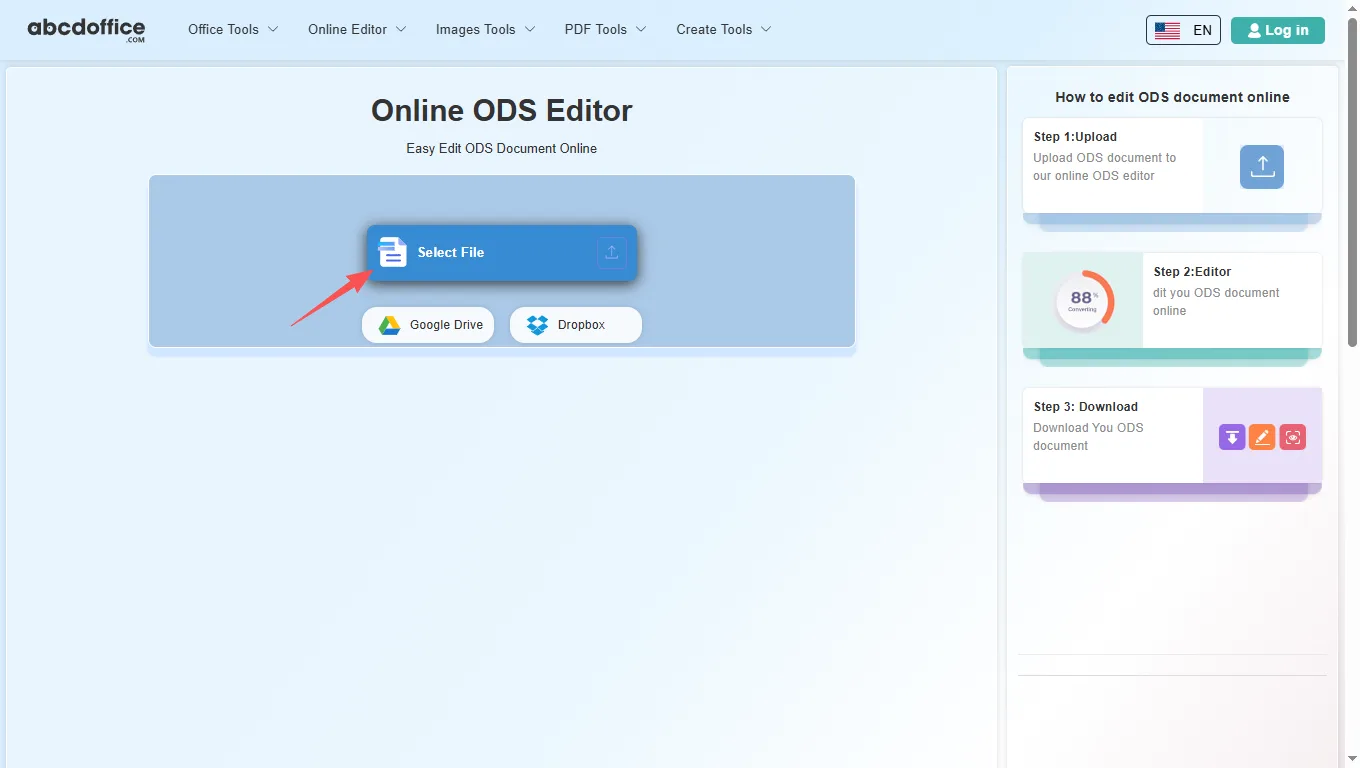
Online ODS Editor

Easy Edit ODS Document Online

scicon Select File upload_btn add_upload
1
google-drive Google Drive
dropbox Dropbox
or drag PDF here
Do not close your browser Wait until your files are uploaded and processed! This might take a few minutes. :)
File
Open Source Statement
close
How to edit ODS document online
Step 1:Upload
Upload ODS document to our online ODS editor
add file
Edit
Step 2:Editor
dit you ODS document online
Step 3: Download
Download You ODS document
add file

What this free online ODS editor supports

ABCD Office is an ods editor online on abcdoffice.com — upload OpenDocument Spreadsheet (.ODS) files, edit cells in your browser, then export without installing LibreOffice Calc or Microsoft Excel.

File formats

Upload and edit .ODS files. Legacy XLS spreadsheets use the same ods editor online workflow as modern XLSX on abcdoffice.com.

Edit in browser

A true online ods editor — change values, formulas, charts, and formatting in the ribbon toolbar. The ods online editor opens automatically after upload completes.

Export options

Click Download to save from the ods editor online as XLSX, or export to PDF for sharing and printing.

No install

Use this ods editor online free on desktop or mobile at abcdoffice.com. No Microsoft Office or Microsoft 365 subscription required for standard spreadsheet edits.

How to edit ODS files online on ABCD Office

abcdoffice.com/ods-editor.html is the ods editor online page — upload ODS, edit in the browser, then download.

Edit

Online ODS editor — edit OpenDocument Spreadsheet files free

You received a budget, invoice list, or report as an ODS file and need an ods online editor to update numbers, fix formulas, or adjust columns before sending it back.

  • ods editor online for everyday edits — budgets, timesheets, inventory lists, and client data sheets.
  • ods online editor that works when Office is not installed on a school, work, or shared computer.
  • Upload from your device, Google Drive, or Dropbox on abcdoffice.com — then export as XLSX or PDF.
01
Step 1: Open ODS editor on abcdoffice.com

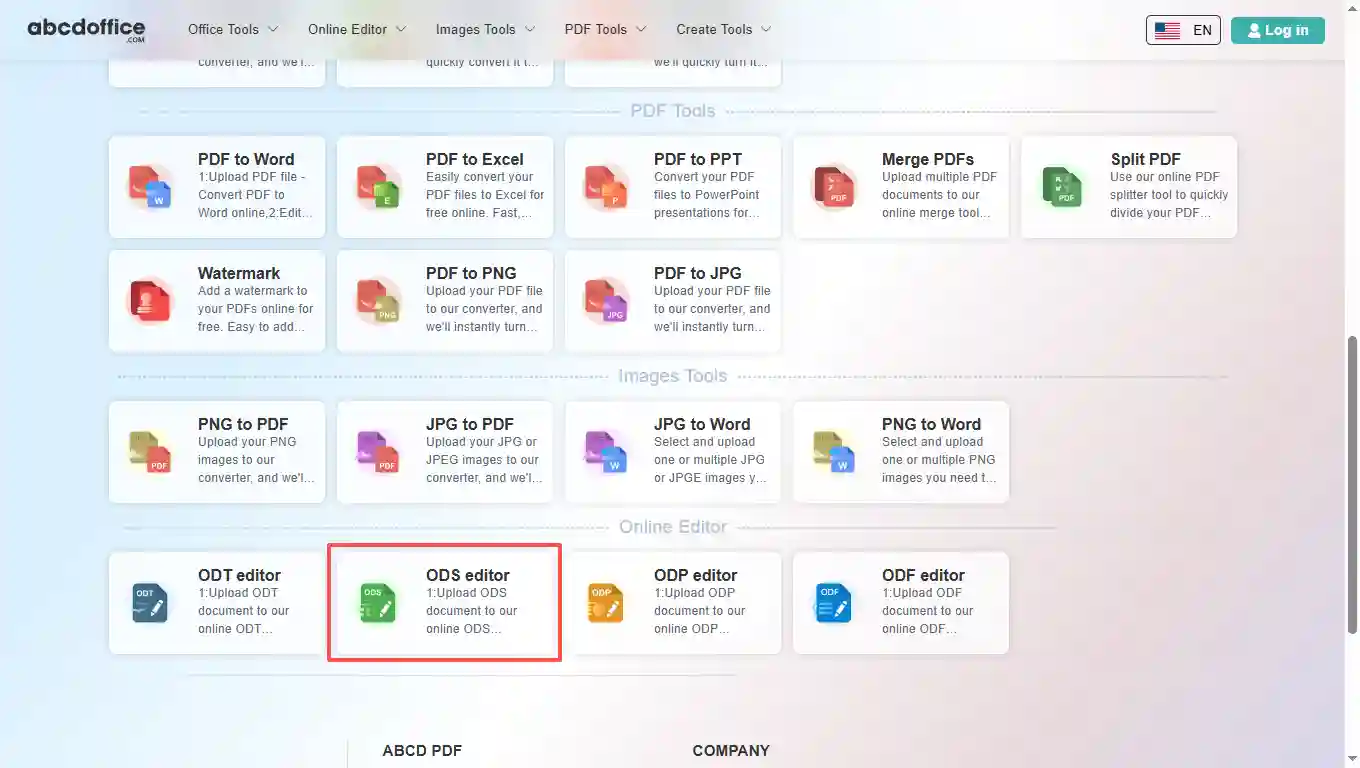
Open abcdoffice.com in your browser. On the homepage tools grid, click ODS editor under Online Editor or PDF Tools — or go directly to abcdoffice.com/ods-editor.html to open this online ods editor page.

02
Step 2: Upload your file

On the upload screen at abcdoffice.com/ods-editor.html, click Select File or drag ODS spreadsheets into the upload area. Google Drive and Dropbox buttons appear below Select File on abcdoffice.com.

03
Step 3: Edit in ods editor online

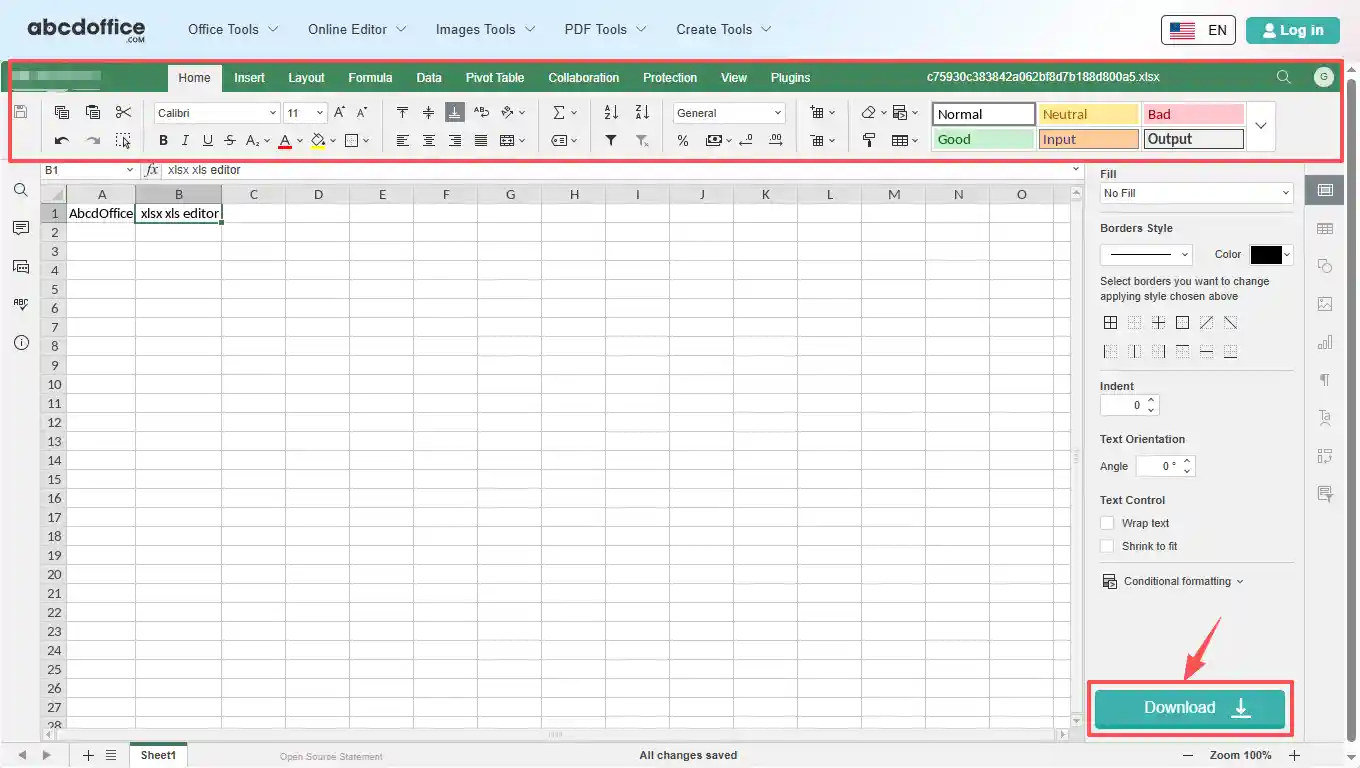
After upload and processing, the ods editor online opens in your browser on abcdoffice.com. Use the ribbon toolbar to change text, tables, images, and formatting.

04
Step 4: Download ODS or PDF

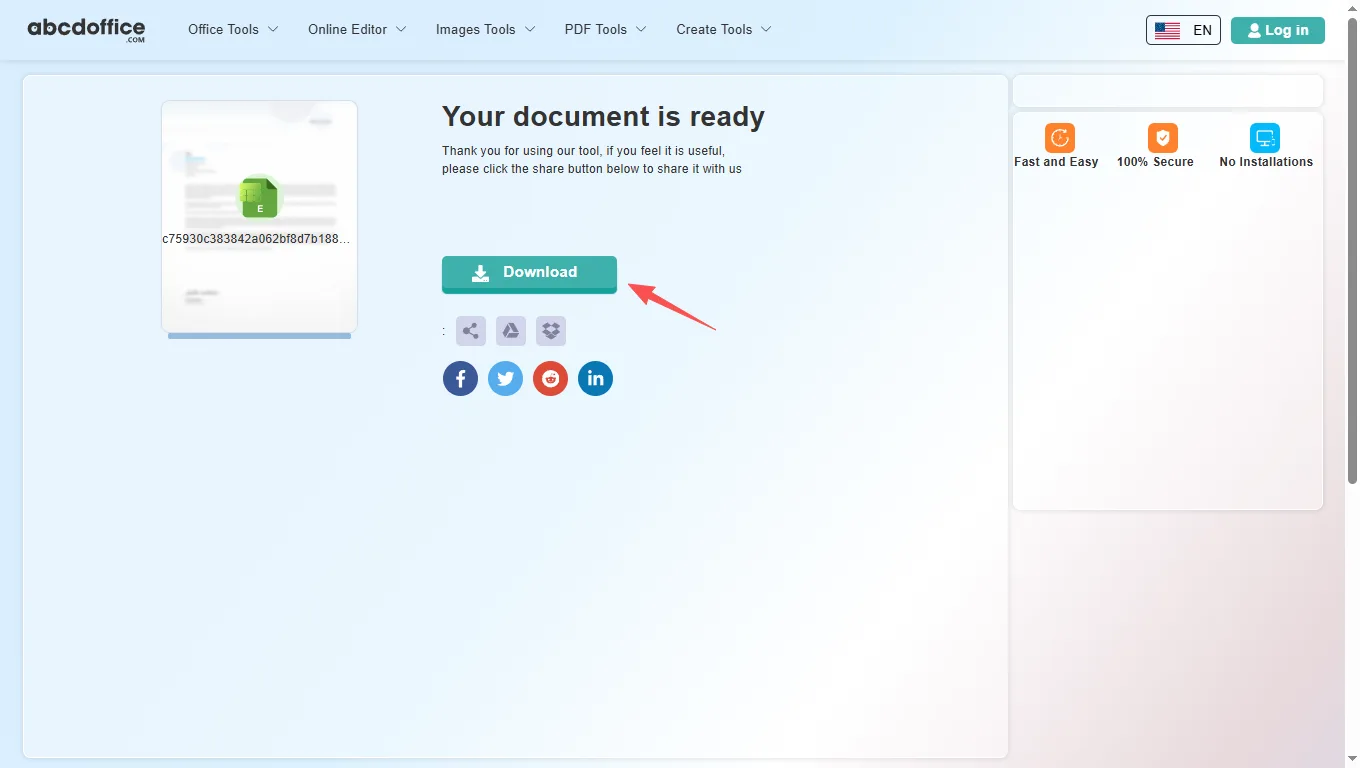
When processing finishes, abcdoffice.com shows a download screen. Click Download to save ODS or PDF to your computer from this free online ods editor.

ods editor toolbar — spreadsheet tabs explained

The ABCD Office ods editor online on abcdoffice.com uses ONLYOFFICE spreadsheet editing. After your ODS file opens, use File, Home, Insert, Layout, Formulas, Data, Collaboration, Protection, View, and Plugins for Calc-style work in the browser.

Home
Font, alignment, number formats & cell styles

Font, alignment, number formats & cell styles

The Home tab covers everyday cell editing in our ods online editor — the same core formatting tools people reach for first when they edit ods online.

  • Font family (Calibri and others), size, bold, italic, underline, strikethrough, font color, and fill color
  • Alignment, text wrap, merge and center, borders, and text orientation
  • AutoSum, Sort & Filter, number formats (General, Currency, Percentage), and decimal controls
  • Cell Styles gallery — Normal, Good, Bad, Input, Output, Calculation, and more presets
Insert
Tables, charts, images & rich objects

Tables, charts, images & rich objects

Insert tab tools in this ods editor online let you add structure and visuals beyond plain cells — useful for dashboards, reports, and client deliverables on abcdoffice.com.

  • Pivot Table, Table, Image, Shape, Text Box, and Text Art
  • Chart, Sparkline, SmartArt, Comment, and Hyperlink
  • Header & Footer, Equation, Symbol, and Slicer
  • Build polished spreadsheets when you edit ods file online without desktop Excel
Layout
Page setup, print area & sheet options

Page setup, print area & sheet options

Control page layout in the ods online editor before you export to XLSX or PDF — margins, orientation, and print settings for clean printouts.

  • Margins, Orientation, Size, Print Area, Header & Footer, Scale To Fit, and Print Titles
  • Print Gridlines and Print Headings checkboxes for worksheet output
  • Bring Forward, Send Backward, Align, and Group for objects on the sheet
  • Color Scheme presets for consistent workbook appearance
Formula
Functions, named ranges & calculation

Functions, named ranges & calculation

Build and audit formulas in the ods editor online — insert functions by category, manage named ranges, and control recalculation.

  • Insert Function (fx), AutoSum, Recently Used, Financial, Logical, and Text and data
  • Date and time, Lookup and reference, Math and trigonometry, and More functions
  • Named ranges and Watch Window for tracking cell values across sheets
  • Calculation options — automatic or manual recalculate
Data
Sort, filter, validation & data tools

Sort, filter, validation & data tools

Organize and clean data in the online ods editor — import links, sort columns, filter rows, and validate entries on abcdoffice.com.

  • Get Data and External Links for connected workbook sources
  • Filter, Clear Filter, Sort A–Z, Sort Z–A, and Custom Sort
  • Text to Columns, Remove Duplicates, and Data Validation rules
  • Group and Ungroup rows or columns for outline views
Pivot Table
Insert, refresh & style pivot tables

Insert, refresh & style pivot tables

Summarize large datasets in the ods editor online — create pivot tables, adjust layout, and refresh data without leaving the browser.

  • Insert Table to create a new pivot table from your data range
  • Report Layout, Blank Rows, Subtotals, and Grand Totals options
  • Refresh and Select tools to update and pick pivot source data
  • Table Style Options — Row Headers, Column Headers, Banded Rows, and Banded Columns
Collaboration
Co-editing, comments & chat

Co-editing, comments & chat

Review team spreadsheets in the ods editor online — co-edit, comment, and chat in the browser on abcdoffice.com.

  • Co-editing Mode for real-time shared editing sessions
  • Add Comment on selected cells; Remove or Resolve comment threads
  • Built-in Chat for quick discussion while you edit xls online
  • Ideal for shared budgets, reports, and team data sheets
Protection
Encrypt, protect sheet & workbook

Encrypt, protect sheet & workbook

Lock sensitive spreadsheets before download from abcdoffice.com — encryption, sheet protection, and editable-range rules for shared files.

  • Encrypt with a password so only authorized readers can open the file
  • Protect Workbook structure and Protect Sheet for editing limits
  • Allow Edit Ranges for exceptions within a protected sheet
  • Locked Cell and Hidden Formulas options for formula security
View
Zoom, freeze panes & display

Zoom, freeze panes & display

Tune the spreadsheet workspace — zoom level, frozen headers, gridlines, and interface themes in the ods online editor.

  • Sheet View — New, Close, and dedicated view modes for focused editing
  • Zoom percentage, Interface Theme, and Freeze Panes
  • Show or hide Formula Bar, Gridlines, Headings, and Show Zeros
  • Always Show Toolbar, Left Panel, and Right Panel toggles
Plugins
OCR, AI, translate & more

OCR, AI, translate & more

Extend the ods editor online free with plugins — automation, AI help, translation, and media tools on abcdoffice.com.

  • Plugin Manager and Macros for custom automation
  • Highlight code, ChatGPT, Photo Editor, Speech, and Thesaurus
  • Translator, YouTube embed, and other productivity add-ins
  • Optional extras when the built-in ods editor online ribbon is not enough

Your guide to ODS editing on ABCD Office

How an online ods editor works, ODS vs XLSX, and vs LibreOffice Calc desktop — for edit ods online and open document spreadsheet editor searches.

What is an online ods editor?

An online ods editor runs in your web browser instead of on your desktop. On abcdoffice.com you upload a spreadsheet, the server prepares it for editing, and you work in a grid similar to Excel for the web. When you are done, Download saves XLSX or PDF to your computer.

Supported formats: XLSX, XLS, and export

This ods editor online accepts modern ODS files and older XLS workbooks. After editing on abcdoffice.com, choose XLSX to keep working in Excel later, or PDF when you need a fixed layout for email, print, or client delivery.

Need to edit ods online after converting from PDF? Use PDF to Excel on abcdoffice.com first, then continue in the ods online editor to fix numbers and layout.

Typical use cases

Analysts update figures on a laptop without Office installed. Teachers fix grade spreadsheets from email attachments. Small teams edit shared inventory lists without waiting for IT. The ods editor online free model on abcdoffice.com fits any quick open–edit–download task — including edit ods file online and edit ods file online workflows.

online ods editor vs LibreOffice Calc

LibreOffice Calc and Microsoft 365 remain the standard for complex modeling, Power Query, macros, and enterprise collaboration. ABCD Office targets the everyday majority: a free ods editor online that needs no install and finishes simple spreadsheet jobs in minutes at abcdoffice.com.

Privacy and quality

Upload only what you need for the edit task on abcdoffice.com. Review our privacy policy before sending highly confidential files. This ods editor online is built for high-quality XLSX output — so you spend less time fighting software and more time finishing the spreadsheet.

online ods editor vs desktop LibreOffice Calc

See how the ABCD Office ods editor online free workflow on abcdoffice.com compares to desktop Excel on steps, install time, and time to first edit.

Method Typical steps Install required Time to edit
abcdoffice.com ods editor online 3–4 steps None ~1 minute
LibreOffice Calc (desktop) 5–7 steps Yes Several minutes
Excel for the web (365 login) 4–6 steps Account required 2–5 minutes
abcdoffice.com online
Quick workflow for upload, edit & download
Desktop LibreOffice Calc
More setup, advanced features
Microsoft 365 web login
Account and OneDrive flow

Related ODS editor guides — common spreadsheet tasks on ABCD Office

Guides for edit ods online, edit xls online, and ods editor online free — all paths start at abcdoffice.com/ods-editor.html.

Guide

Edit LibreOffice ODS spreadsheets online

Open abcdoffice.com/ods-editor.html for OpenDocument calc files without local install.

Upload an ODS file
Guide

ODS budget from open-source teams

Update community project budgets stored in ODS format in the browser.

Upload an ODS file
Guide

Fix ODS formula errors remotely

Upload ODS, correct broken references, download the repaired sheet.

Upload an ODS file
Guide

ODS export to PDF for grants

Send funders a PDF snapshot after you finalize ODS figures online.

Upload an ODS file
Guide

Open ODS from government data portals

Many EU datasets ship as ODS — edit locally in your browser copy.

Upload an ODS file
Guide

Move ODS data to XLSX workflow

Edit ODS here, then continue in excel-editor.html if partners require XLSX.

Upload an ODS file

Frequently asked questions

Answers about this ods editor online on abcdoffice.com — each question matches real searches, with steps that include abcdoffice.com/ods-editor.html.

Which free online ods editor supports ODS spreadsheets?

abcdoffice.com/ods-editor.html is a free online ods editor for XLSX and XLS — upload, edit in the browser with a full ods editor online, and download without LibreOffice Calc installed.

  1. Open abcdoffice.com/ods-editor.html in your browser.
  2. Click Select File or drag your spreadsheet into the upload area on this ods online editor page.
  3. Edit in the ods editor online after upload completes on abcdoffice.com.
  4. Click Download to save XLSX or PDF from the ods editor online free.
How can I use an ods online editor without installing LibreOffice Calc?

The ABCD Office ods online editor runs entirely in your browser at abcdoffice.com — no desktop Excel, no Microsoft 365 install required for standard editing tasks.

  1. Visit abcdoffice.com/ods-editor.html on any modern browser.
  2. Upload your ODS file to the ods editor online page.
  3. Wait for the spreadsheet editor to open with your workbook loaded on abcdoffice.com.
  4. Edit and Download — no Office install on your device.
Is there an ods editor online free with no signup for basic edits?

Yes — core upload, edit, and download on abcdoffice.com/ods-editor.html works as an ods editor online free without creating an account for standard spreadsheet tasks.

  1. Go to abcdoffice.com/ods-editor.html.
  2. Upload your file with Select File on this ods editor online — no signup needed to start editing.
  3. Make your changes in the browser-based ods online editor.
  4. Download XLSX or PDF when finished from abcdoffice.com.
How do I edit ods file online and download the updated spreadsheet?

The full edit ods online workflow on abcdoffice.com/ods-editor.html is upload → edit → Download — the same steps shown in the sidebar how-to panel.

  1. On abcdoffice.com/ods-editor.html, click Select File and upload your ODS file.
  2. When the ods editor online opens, change cell values, formulas, charts, or formatting.
  3. Click Download in the editor toolbar on abcdoffice.com.
  4. Choose XLSX to keep editing in Excel later, or PDF for a fixed export.
Can I edit ods file online in this ods editor online?

Yes — the ods editor online on abcdoffice.com accepts both XLSX and legacy XLS uploads and opens them in the same browser editor.

  1. On abcdoffice.com/ods-editor.html, upload your .XLS file via Select File or drag-and-drop.
  2. Wait for processing — the online ods editor loads the workbook.
  3. Edit and Download as XLSX or PDF from abcdoffice.com.
How does this ods editor online compare to LibreOffice Calc?

LibreOffice Calc excels at advanced modeling, macros, and enterprise collaboration. The ABCD Office ods editor online free on abcdoffice.com targets quick edits — upload, change cells, download — without install or subscription.

  1. Use abcdoffice.com/ods-editor.html when you need a fast browser-based ods editor online.
  2. Upload ODS, edit standard content in the ods online editor, and export.
  3. Choose LibreOffice Calc for complex models, VBA, or tracked changes at scale.
  4. Many users combine both: PDF to Excel on abcdoffice.com, then edit online before exporting PDF again.
Is it safe to upload spreadsheets to this online ods editor?

Files are processed for your edit session on abcdoffice.com. Review our privacy policy and your organization's rules before uploading confidential financial data or personal records to any ods editor online.

  1. On abcdoffice.com/ods-editor.html, upload only the spreadsheet needed for the editing task.
  2. Avoid sending highly sensitive files if your policy restricts cloud processing.
  3. Download your result from the ods online editor when done.
  4. Read the privacy policy linked in the abcdoffice.com site footer for retention details.
Can I export my edited spreadsheet as PDF from the ods online editor?

Yes — after editing on abcdoffice.com, click Download and select PDF to create a shareable, print-ready file from the ods editor online free.

  1. Finish editing your workbook in the ods editor online on abcdoffice.com.
  2. Click Download in the editor header on abcdoffice.com/ods-editor.html.
  3. Select PDF in the format chooser.
  4. Save the PDF to your device for email or print.

Start editing your spreadsheet on abcdoffice.com

Upload an ODS file at abcdoffice.com/ods-editor.html — the free online ods editor opens after upload, then Download when you are done.