Login to your account
or
The mailbox user already exists
By clicking 'Download File,' you agree to our Terms and conditions and Privacy policy
excel_online_edit
Save document as
Please select a file to save
docx DOCX
pdf PDF
odt ODT
txt TXT
dotx DOTX
pdfa PDF/A
ott OTT
rtf RTF
docxf DOCXF
oform OFORM
html HTML
fb2 FB2
epub EPUB
xlsx XLSX
pdf PDF
ods ODS
csv CSV
xltx XLTX
pdfa PDF/A
ots OTS
pptx PPTX
pdf PDF
odp ODP
potx POTX
pdf PDF/A
otp OTP
png PNG
jpg JPG
close

Online Spreadsheet editor

edit excel (Xls Xlsx) Sheet online

scicon Select File upload_btn add_upload
1
google-drive Google Drive
dropbox Dropbox
or drag PDF here
Do not close your browser Wait until your files are uploaded and processed! This might take a few minutes. :)
File
Open Source Statement
close
How to edit excel sheet online
Step 1:Upload
Upload (Xlsx,Xls) Sheet to our online Spreadsheet editor
add file
Edit
Step 2:Editor
Edit you (Xlsx,Xls) Sheet online
Step 3:Download
Download You (Xlsx,Xls) Sheet
add file

What this free online excel editor supports

ABCD Office is an excel editor online in your browser — open XLSX or XLS on abcdoffice.com, edit cells and formulas with a full excel online editor, then export without installing Microsoft Excel.

File formats

Upload and edit .XLSX and .XLS files. Legacy XLS spreadsheets use the same excel editor online workflow as modern XLSX on abcdoffice.com.

Edit in browser

A true online excel editor — change values, formulas, charts, and formatting in the ribbon toolbar. The excel online editor opens automatically after upload completes.

Export options

Click Download to save from the editor excel online as XLSX, or export to PDF for sharing and printing.

No install

Use this online excel editor free on desktop or mobile at abcdoffice.com. No Microsoft Office or Microsoft 365 subscription required for standard spreadsheet edits.

How to edit Excel spreadsheets online on ABCD Office

abcdoffice.com/excel-editor.html is the excel editor online page — upload an existing XLSX or XLS file, edit in the browser, then download. No preview-only mode and no blank-workbook create flow here.

Edit

Online excel editor — edit XLSX and XLS files free

You received a budget, invoice list, or report as an Excel file and need an excel online editor to update numbers, fix formulas, or adjust columns before sending it back.

  • Excel editor online for everyday edits — budgets, timesheets, inventory lists, and client data sheets.
  • Excel online editor that works when Office is not installed on a school, work, or shared computer.
  • Upload from your device, Google Drive, or Dropbox on abcdoffice.com — then export as XLSX or PDF.
01
Step 1: Open Spreadsheet editor on abcdoffice.com

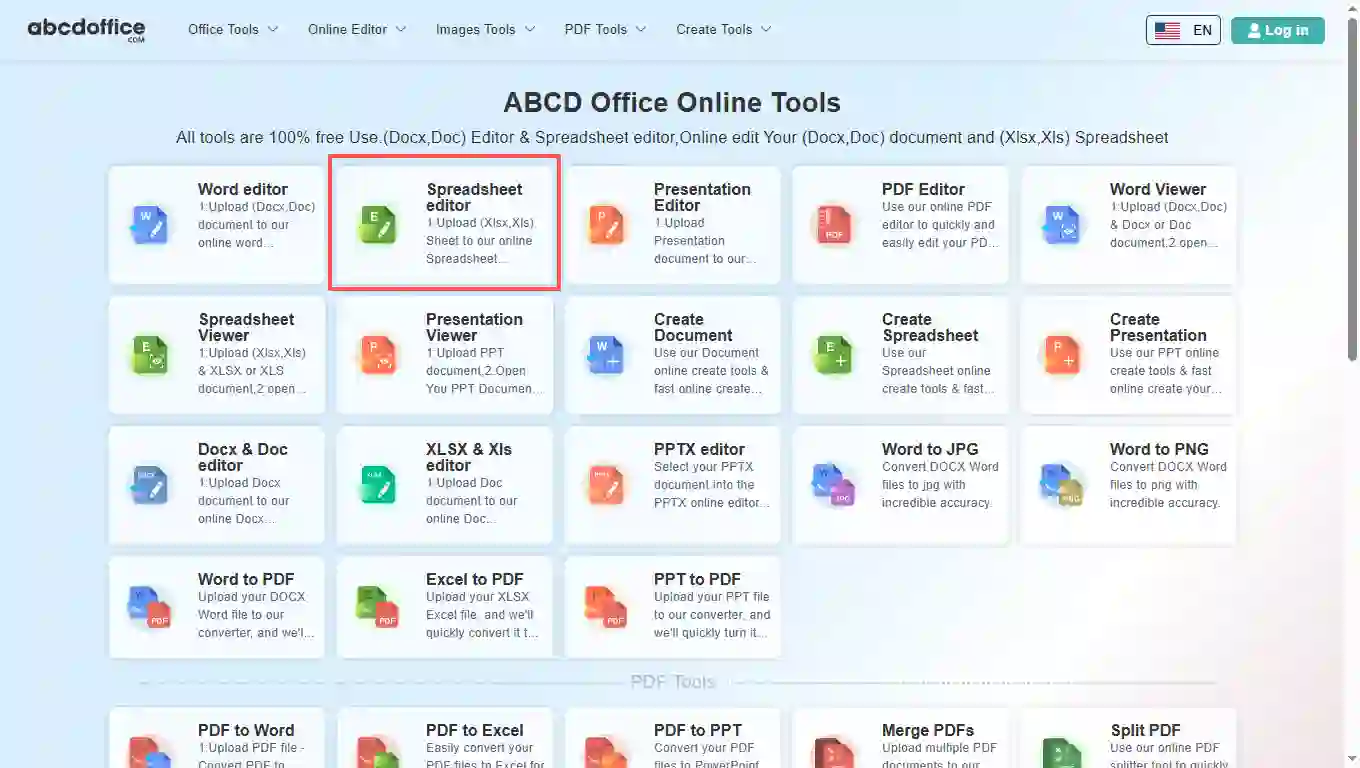
Open abcdoffice.com in your browser. On the homepage tools grid, click Spreadsheet editor under Online Editor or PDF Tools — or go directly to abcdoffice.com/excel-editor.html to open this online excel editor page.

02
Step 2: Upload your file

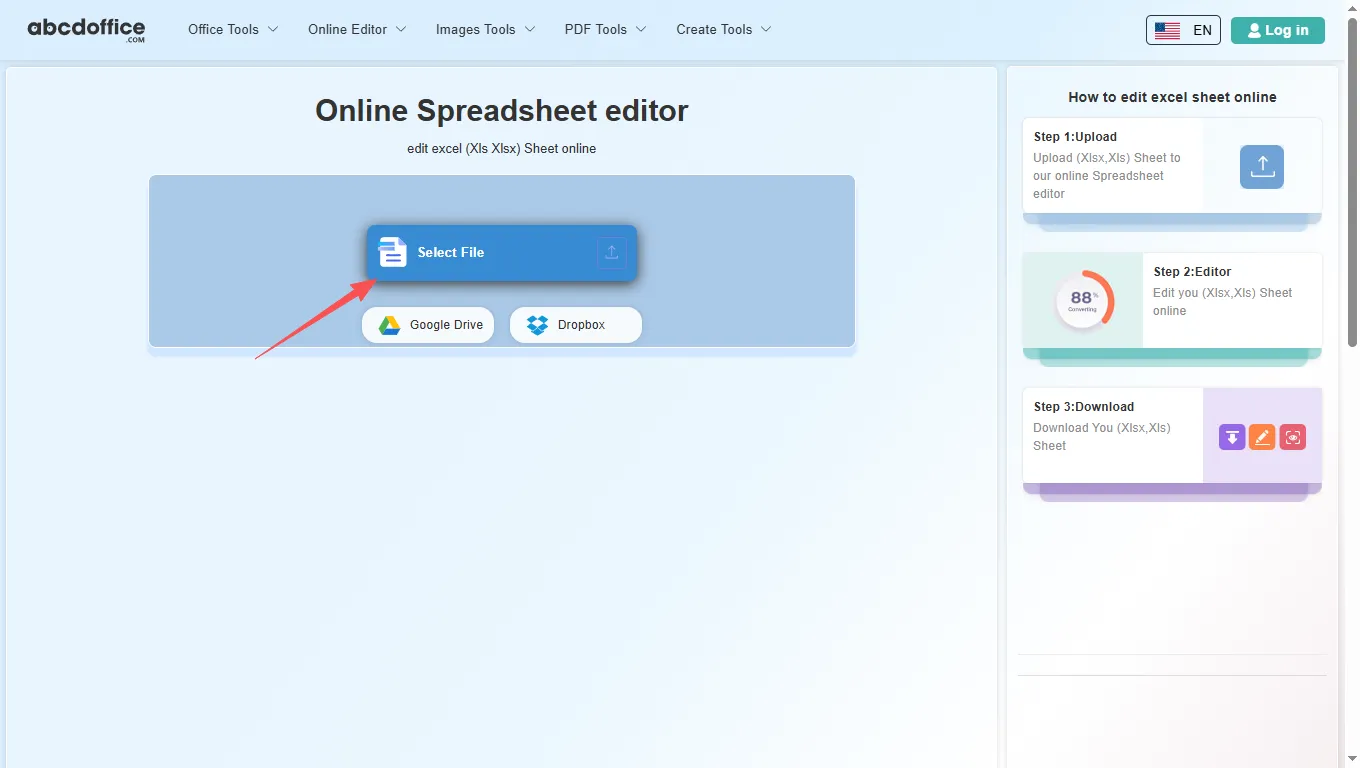
On the upload screen at abcdoffice.com/excel-editor.html, click Select File or drag XLSX or XLS spreadsheets into the upload area. Google Drive and Dropbox buttons appear below Select File on abcdoffice.com.

03
Step 3: Edit in excel online editor

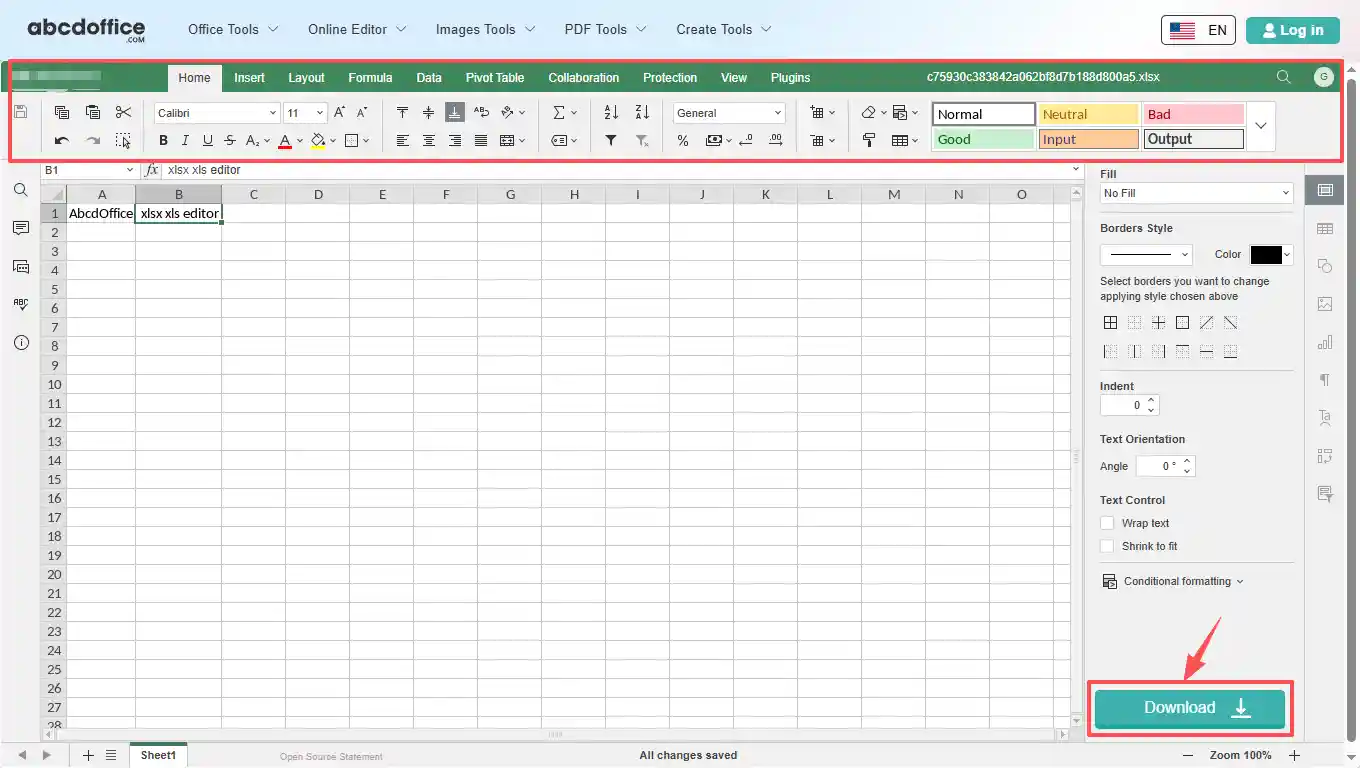
After upload and processing, the excel online editor opens in your browser on abcdoffice.com. Use the ribbon toolbar to change text, tables, images, and formatting.

04
Step 4: Download XLSX or PDF

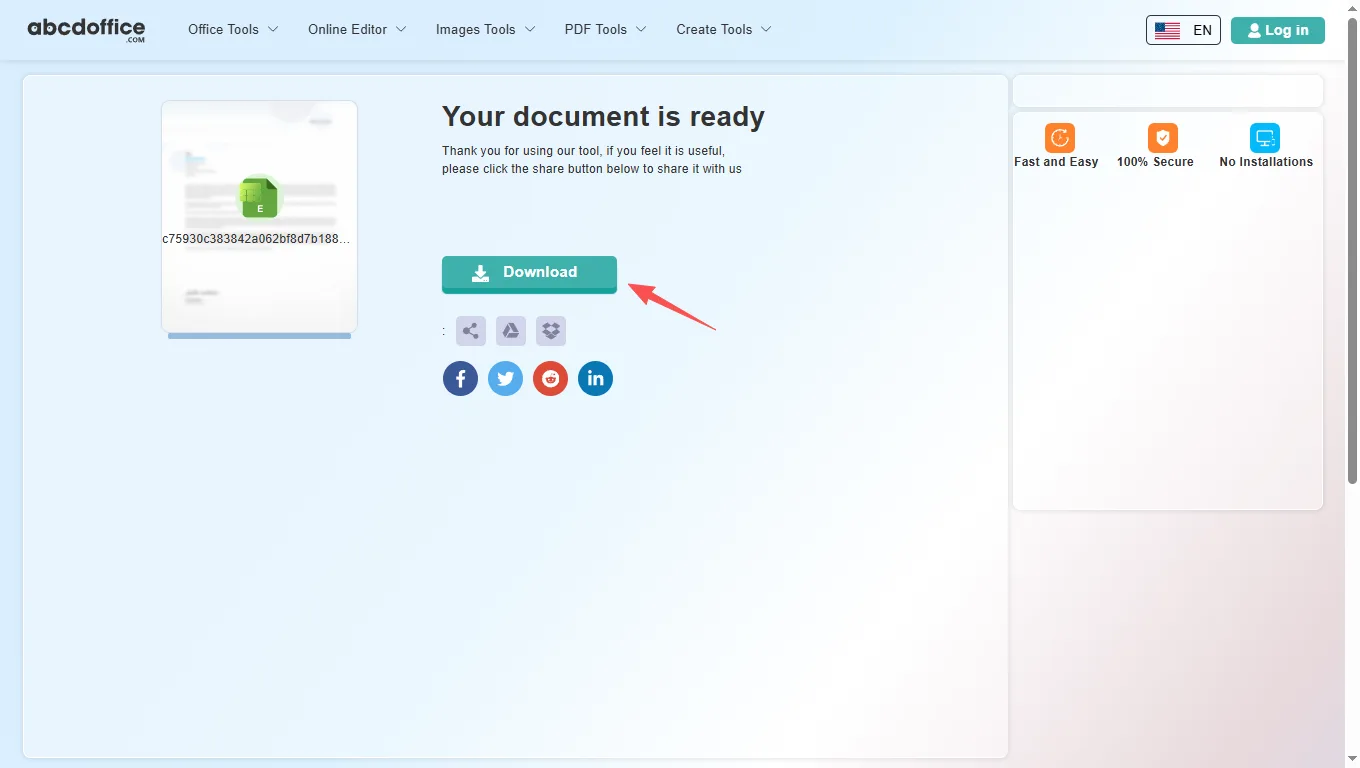
When processing finishes, abcdoffice.com shows a download screen. Click Download to save XLSX or PDF to your computer from this free online excel editor.

Excel editor toolbar — every tab explained

The ABCD Office excel editor online on abcdoffice.com is built on ONLYOFFICE Docs. After your file opens, use the ribbon tabs below — Home, Insert, Layout, Formula, Data, Pivot Table, Collaboration, Protection, View, and Plugins — matching the tools shown in the editor toolbar.

Home
Font, alignment, number formats & cell styles

Font, alignment, number formats & cell styles

The Home tab covers everyday cell editing in our excel online editor — the same core formatting tools people reach for first when they edit xlsx online.

  • Font family (Calibri and others), size, bold, italic, underline, strikethrough, font color, and fill color
  • Alignment, text wrap, merge and center, borders, and text orientation
  • AutoSum, Sort & Filter, number formats (General, Currency, Percentage), and decimal controls
  • Cell Styles gallery — Normal, Good, Bad, Input, Output, Calculation, and more presets
Insert
Tables, charts, images & rich objects

Tables, charts, images & rich objects

Insert tab tools in this excel editor online let you add structure and visuals beyond plain cells — useful for dashboards, reports, and client deliverables on abcdoffice.com.

  • Pivot Table, Table, Image, Shape, Text Box, and Text Art
  • Chart, Sparkline, SmartArt, Comment, and Hyperlink
  • Header & Footer, Equation, Symbol, and Slicer
  • Build polished spreadsheets when you edit xlsx file online without desktop Excel
Layout
Page setup, print area & sheet options

Page setup, print area & sheet options

Control page layout in the excel online editor before you export to XLSX or PDF — margins, orientation, and print settings for clean printouts.

  • Margins, Orientation, Size, Print Area, Header & Footer, Scale To Fit, and Print Titles
  • Print Gridlines and Print Headings checkboxes for worksheet output
  • Bring Forward, Send Backward, Align, and Group for objects on the sheet
  • Color Scheme presets for consistent workbook appearance
Formula
Functions, named ranges & calculation

Functions, named ranges & calculation

Build and audit formulas in the editor excel online — insert functions by category, manage named ranges, and control recalculation.

  • Insert Function (fx), AutoSum, Recently Used, Financial, Logical, and Text and data
  • Date and time, Lookup and reference, Math and trigonometry, and More functions
  • Named ranges and Watch Window for tracking cell values across sheets
  • Calculation options — automatic or manual recalculate
Data
Sort, filter, validation & data tools

Sort, filter, validation & data tools

Organize and clean data in the online excel editor — import links, sort columns, filter rows, and validate entries on abcdoffice.com.

  • Get Data and External Links for connected workbook sources
  • Filter, Clear Filter, Sort A–Z, Sort Z–A, and Custom Sort
  • Text to Columns, Remove Duplicates, and Data Validation rules
  • Group and Ungroup rows or columns for outline views
Pivot Table
Insert, refresh & style pivot tables

Insert, refresh & style pivot tables

Summarize large datasets in the excel editor online — create pivot tables, adjust layout, and refresh data without leaving the browser.

  • Insert Table to create a new pivot table from your data range
  • Report Layout, Blank Rows, Subtotals, and Grand Totals options
  • Refresh and Select tools to update and pick pivot source data
  • Table Style Options — Row Headers, Column Headers, Banded Rows, and Banded Columns
Collaboration
Co-editing, comments & chat

Co-editing, comments & chat

Review team spreadsheets in the excel editor online — co-edit, comment, and chat in the browser on abcdoffice.com.

  • Co-editing Mode for real-time shared editing sessions
  • Add Comment on selected cells; Remove or Resolve comment threads
  • Built-in Chat for quick discussion while you edit xls online
  • Ideal for shared budgets, reports, and team data sheets
Protection
Encrypt, protect sheet & workbook

Encrypt, protect sheet & workbook

Lock sensitive spreadsheets before download from abcdoffice.com — encryption, sheet protection, and editable-range rules for shared files.

  • Encrypt with a password so only authorized readers can open the file
  • Protect Workbook structure and Protect Sheet for editing limits
  • Allow Edit Ranges for exceptions within a protected sheet
  • Locked Cell and Hidden Formulas options for formula security
View
Zoom, freeze panes & display

Zoom, freeze panes & display

Tune the spreadsheet workspace — zoom level, frozen headers, gridlines, and interface themes in the excel online editor.

  • Sheet View — New, Close, and dedicated view modes for focused editing
  • Zoom percentage, Interface Theme, and Freeze Panes
  • Show or hide Formula Bar, Gridlines, Headings, and Show Zeros
  • Always Show Toolbar, Left Panel, and Right Panel toggles
Plugins
OCR, AI, translate & more

OCR, AI, translate & more

Extend the online excel editor free with plugins — automation, AI help, translation, and media tools on abcdoffice.com.

  • Plugin Manager and Macros for custom automation
  • Highlight code, ChatGPT, Photo Editor, Speech, and Thesaurus
  • Translator, YouTube embed, and other productivity add-ins
  • Optional extras when the built-in excel editor online ribbon is not enough

Your guide to the free online excel editor on ABCD Office

How an excel editor online works on abcdoffice.com, what files it supports, and when to choose it over Microsoft Excel — written for searches like online excel editor, excel online editor, and online excel editor free.

What is an online excel editor?

An online excel editor runs in your web browser instead of on your desktop. On abcdoffice.com you upload a spreadsheet, the server prepares it for editing, and you work in a grid similar to Excel for the web. When you are done, Download saves XLSX or PDF to your computer.

Supported formats: XLSX, XLS, and export

This excel editor online accepts modern XLSX files and older XLS workbooks. After editing on abcdoffice.com, choose XLSX to keep working in Excel later, or PDF when you need a fixed layout for email, print, or client delivery.

Need to edit xlsx online after converting from PDF? Use PDF to Excel on abcdoffice.com first, then continue in the excel online editor to fix numbers and layout.

Typical use cases

Analysts update figures on a laptop without Office installed. Teachers fix grade spreadsheets from email attachments. Small teams edit shared inventory lists without waiting for IT. The online excel editor free model on abcdoffice.com fits any quick open–edit–download task — including edit xlsx file online and edit xls file online workflows.

Online excel editor vs Microsoft Excel

Microsoft Excel and Microsoft 365 remain the standard for complex modeling, Power Query, macros, and enterprise collaboration. ABCD Office targets the everyday majority: a free excel editor online that needs no install and finishes simple spreadsheet jobs in minutes at abcdoffice.com.

Privacy and quality

Upload only what you need for the edit task on abcdoffice.com. Review our privacy policy before sending highly confidential files. This editor excel online is built for high-quality XLSX output — so you spend less time fighting software and more time finishing the spreadsheet.

Online excel editor vs desktop Microsoft Excel

See how the ABCD Office online excel editor free workflow on abcdoffice.com compares to desktop Excel on steps, install time, and time to first edit.

Method Typical steps Install required Time to edit
abcdoffice.com excel editor online 3–4 steps None ~1 minute
Microsoft Excel (desktop) 5–7 steps Yes Several minutes
Excel for the web (365 login) 4–6 steps Account required 2–5 minutes
abcdoffice.com online
Quick workflow for upload, edit & download
Desktop Microsoft Excel
More setup, advanced features
Microsoft 365 web login
Account and OneDrive flow

Related excel editor guides — common spreadsheet tasks on ABCD Office

Guides for edit xlsx online, edit xls online, and online excel editor free — all paths start at abcdoffice.com/excel-editor.html.

Guide

Update Q1 numbers in a budget XLSX

Upload the workbook to abcdoffice.com/excel-editor.html and change forecast cells without Excel installed.

Upload a spreadsheet to edit
Guide

Repair a broken formula in a timesheet

Open the shared XLSX online, fix SUM or VLOOKUP errors, and download the corrected sheet.

Upload a spreadsheet to edit
Guide

Add a chart to a sales workbook

Select data in the excel online editor and insert a chart for a slide deck or email snapshot.

Upload a spreadsheet to edit
Guide

Edit an old XLS export

Legacy .xls files use the same upload path as XLSX on excel-editor.html for quick cell updates.

Upload a spreadsheet to edit
Guide

Publish a board pack as PDF

After edits, save as PDF from the spreadsheet editor for directors who should not edit figures.

Upload a spreadsheet to edit
Guide

Sort and filter an inventory list

Use Data tools on abcdoffice.com to reorder SKUs and hide discontinued rows before download.

Upload a spreadsheet to edit

Frequently asked questions

Answers about this excel editor online on abcdoffice.com — each question matches real searches, with steps that include abcdoffice.com/excel-editor.html.

Which free online excel editor supports XLSX and XLS files?

abcdoffice.com/excel-editor.html is a free online excel editor for XLSX and XLS — upload, edit in the browser with a full excel editor online, and download without Microsoft Excel installed.

  1. Open abcdoffice.com/excel-editor.html in your browser.
  2. Click Select File or drag your spreadsheet into the upload area on this excel online editor page.
  3. Edit in the editor excel online after upload completes on abcdoffice.com.
  4. Click Download to save XLSX or PDF from the online excel editor free.
How can I use an excel online editor without installing Microsoft Excel?

The ABCD Office excel online editor runs entirely in your browser at abcdoffice.com — no desktop Excel, no Microsoft 365 install required for standard editing tasks.

  1. Visit abcdoffice.com/excel-editor.html on any modern browser.
  2. Upload your XLSX or XLS file to the excel editor online page.
  3. Wait for the spreadsheet editor to open with your workbook loaded on abcdoffice.com.
  4. Edit and Download — no Office install on your device.
Is there an online excel editor free with no signup for basic edits?

Yes — core upload, edit, and download on abcdoffice.com/excel-editor.html works as an online excel editor free without creating an account for standard spreadsheet tasks.

  1. Go to abcdoffice.com/excel-editor.html.
  2. Upload your file with Select File on this excel editor online — no signup needed to start editing.
  3. Make your changes in the browser-based excel online editor.
  4. Download XLSX or PDF when finished from abcdoffice.com.
How do I edit xlsx file online and download the updated spreadsheet?

The full edit xlsx online workflow on abcdoffice.com/excel-editor.html is upload → edit → Download — the same steps shown in the sidebar how-to panel.

  1. On abcdoffice.com/excel-editor.html, click Select File and upload your XLSX file.
  2. When the excel editor online opens, change cell values, formulas, charts, or formatting.
  3. Click Download in the editor toolbar on abcdoffice.com.
  4. Choose XLSX to keep editing in Excel later, or PDF for a fixed export.
Can I edit xls file online in this excel editor online?

Yes — the excel editor online on abcdoffice.com accepts both XLSX and legacy XLS uploads and opens them in the same browser editor.

  1. On abcdoffice.com/excel-editor.html, upload your .XLS file via Select File or drag-and-drop.
  2. Wait for processing — the online excel editor loads the workbook.
  3. Edit and Download as XLSX or PDF from abcdoffice.com.
How does this excel editor online compare to Microsoft Excel?

Microsoft Excel excels at advanced modeling, macros, and enterprise collaboration. The ABCD Office online excel editor free on abcdoffice.com targets quick edits — upload, change cells, download — without install or subscription.

  1. Use abcdoffice.com/excel-editor.html when you need a fast browser-based editor excel online.
  2. Upload XLSX/XLS, edit standard content in the excel online editor, and export.
  3. Choose Microsoft Excel for complex models, VBA, or tracked changes at scale.
  4. Many users combine both: PDF to Excel on abcdoffice.com, then edit online before exporting PDF again.
Is it safe to upload spreadsheets to this online excel editor?

Files are processed for your edit session on abcdoffice.com. Review our privacy policy and your organization's rules before uploading confidential financial data or personal records to any excel editor online.

  1. On abcdoffice.com/excel-editor.html, upload only the spreadsheet needed for the editing task.
  2. Avoid sending highly sensitive files if your policy restricts cloud processing.
  3. Download your result from the excel online editor when done.
  4. Read the privacy policy linked in the abcdoffice.com site footer for retention details.
Can I export my edited spreadsheet as PDF from the excel online editor?

Yes — after editing on abcdoffice.com, click Download and select PDF to create a shareable, print-ready file from the online excel editor free.

  1. Finish editing your workbook in the excel editor online on abcdoffice.com.
  2. Click Download in the editor header on abcdoffice.com/excel-editor.html.
  3. Select PDF in the format chooser.
  4. Save the PDF to your device for email or print.

Start editing your spreadsheet on abcdoffice.com

Upload an XLSX or XLS file at abcdoffice.com/excel-editor.html — the free online excel editor opens after upload, then Download when you are done.