Login to your account
or
The mailbox user already exists
By clicking 'Download File,' you agree to our Terms and conditions and Privacy policy
pdf_to_png
Save document as
Please select a file to save
docx DOCX
pdf PDF
odt ODT
txt TXT
dotx DOTX
pdfa PDF/A
ott OTT
rtf RTF
docxf DOCXF
oform OFORM
html HTML
fb2 FB2
epub EPUB
xlsx XLSX
pdf PDF
ods ODS
csv CSV
xltx XLTX
pdfa PDF/A
ots OTS
pptx PPTX
pdf PDF
odp ODP
potx POTX
pdf PDF/A
otp OTP
png PNG
jpg JPG
close

PDF to PNG Converter

Convert PDF to PNG in seconds.

Do not close your browser Wait until your files are uploaded and processed! This might take a few minutes. :)
officeedit Next Next
convert_img.zip
enlarge_img
file icon
Size
Ddfdf.pptx
5.2MB
VIEW
edit_file
How to PDF to PNG Converter
Step 1: Upload
Upload files to our online PDF to PNG converter.
add file
Edit
Step 2: Click 'Convert'
Convert PDF to PNG within seconds.
Step 3: Download
Preview, edit, or download your PNG files.
add file

What this free PDF to PNG converter supports

ABCD Office converts PDF pages to PNG images in your browser — upload on abcdoffice.com/pdf-to-png.html, export sharp page images, and download without installing Adobe Acrobat.

Input format

Upload PDF files on abcdoffice.com/pdf-to-png.html — standard PDF documents for conversion to PNG images.

Convert in browser

Click Convert on abcdoffice.com — no desktop Acrobat install for typical pdf to image tasks.

Output

Download PNG images (per page or bundled) ready to share or combine with jpg-to-pdf / png-to-pdf on abcdoffice.com.

No install

Free online converter on desktop or mobile at abcdoffice.com.

How to convert PDF to PNG online on ABCD Office

abcdoffice.com/pdf-to-png.html is the PDF to PNG converter page — upload PDF, click Convert, download PNG files or a ZIP bundle.

Convert

PDF to PNG converter — PDF pages to PNG free

You need crisp PDF page images for documentation, Figma, or wikis — and want convert pdf to png online without lossy screenshots.

  • PDF to PNG for sharp text, diagrams, and UI documentation exports.
  • Convert pdf to png online free when Acrobat is not available.
  • Also use pdf-to-jpg.html, png-to-pdf.html, or split-pdf.html on abcdoffice.com.
01
Step 1: Open PDF to PNG on abcdoffice.com

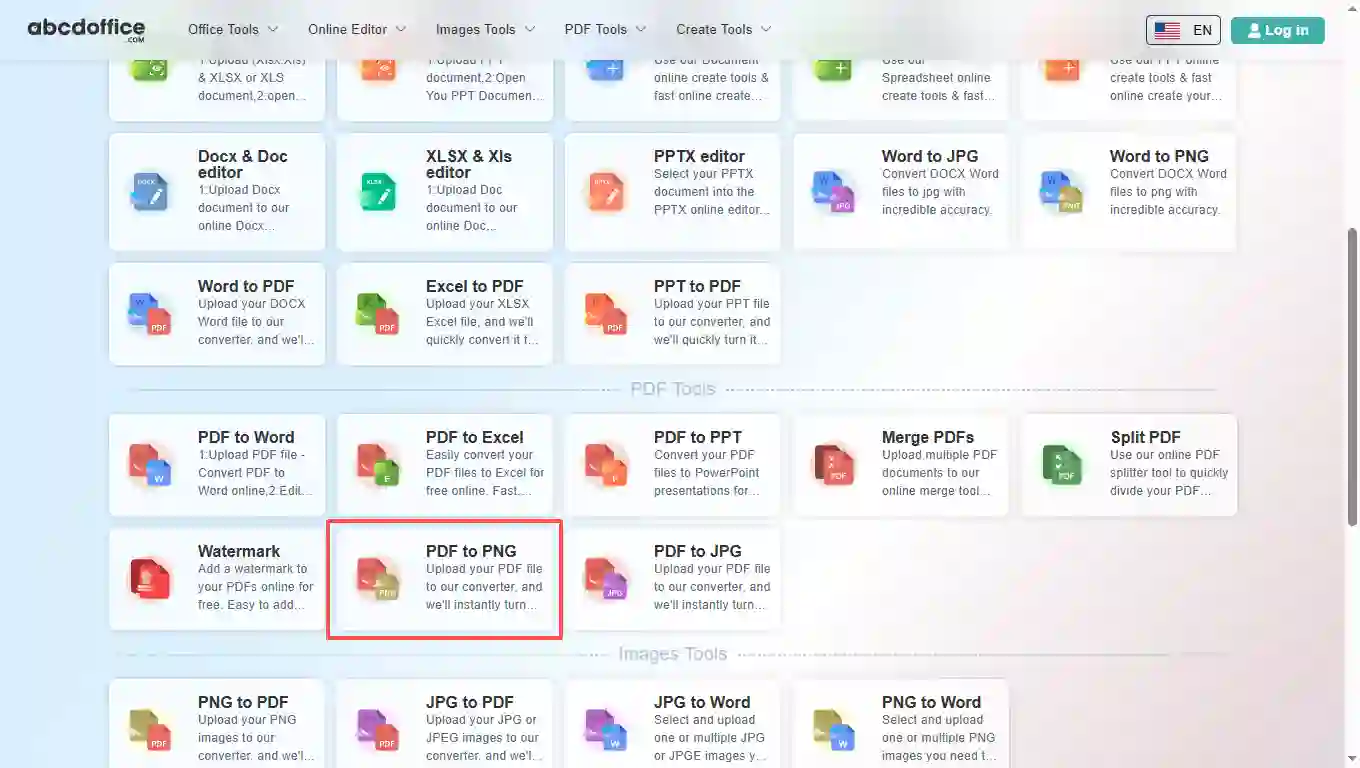
Open abcdoffice.com in your browser. On the homepage tools grid, click PDF to PNG under Online Editor or PDF Tools — or go directly to abcdoffice.com/pdf-to-png.html to open this pdf to png converter page.
02
Step 2: Upload your file

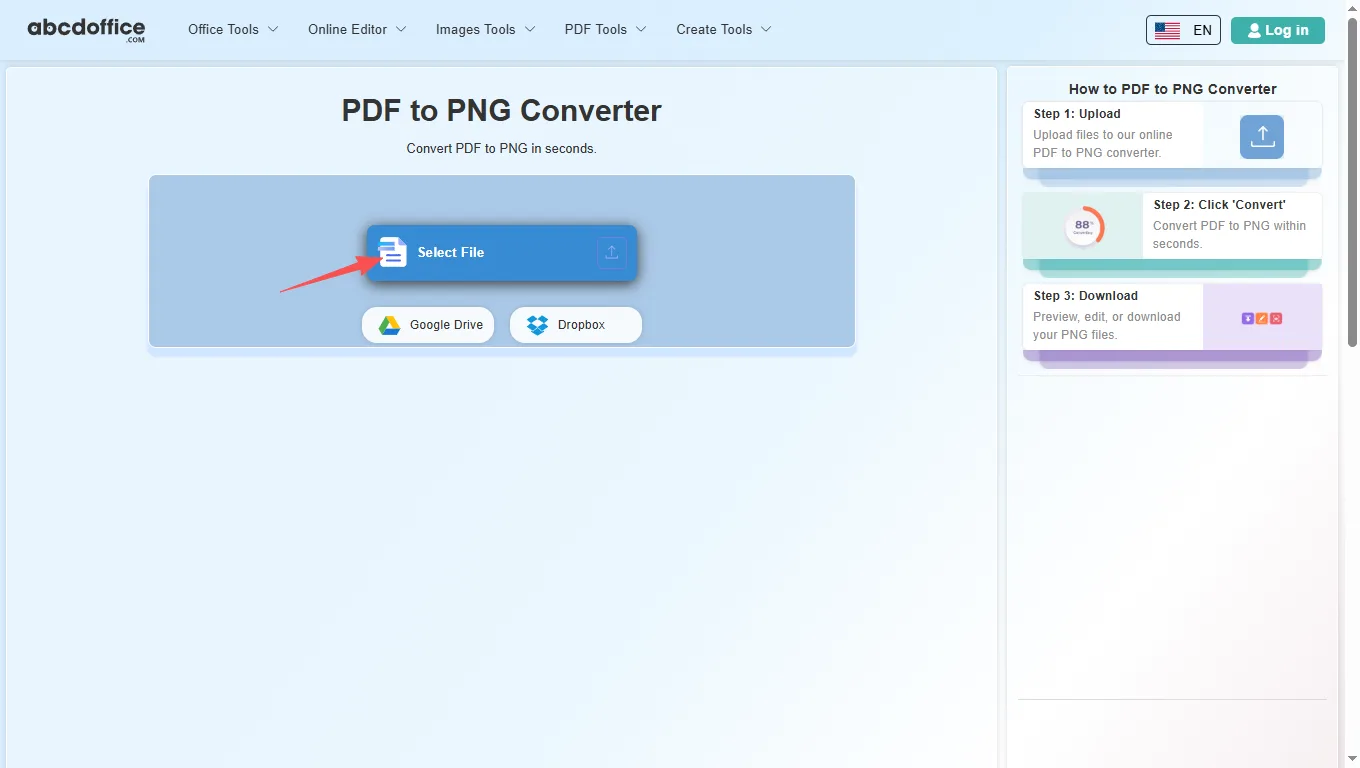
On the upload screen at abcdoffice.com/pdf-to-png.html, click Select File or drag PDF files into the upload area. Google Drive and Dropbox buttons appear below Select File on abcdoffice.com.

03
Step 3: Convert PDF to PNG online

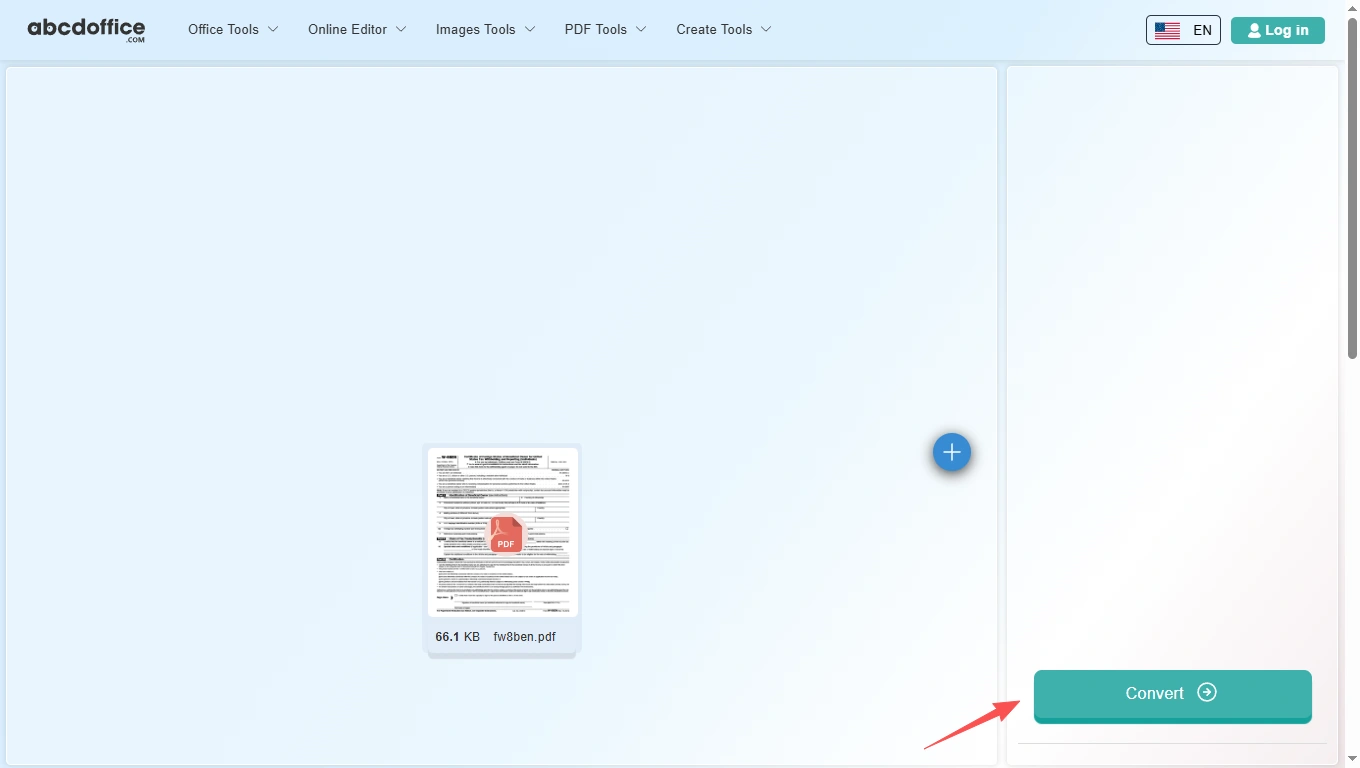
With your file uploaded, click Convert at the bottom of the page and wait a few seconds while abcdoffice.com renders PDF pages as PNG — no extra steps during conversion.

04
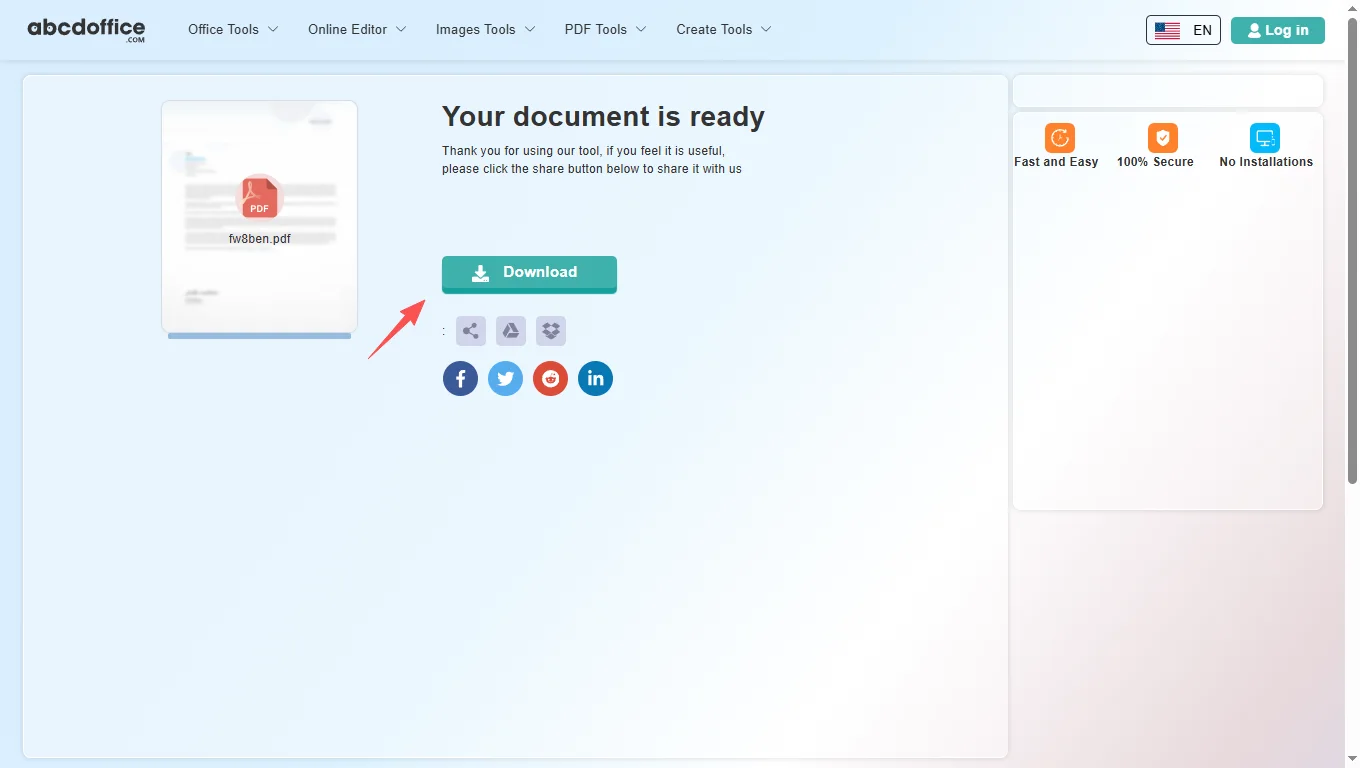
Step 4: Download PNG images

When processing finishes, abcdoffice.com shows a download screen. Click Download to save PNG images to your computer from this free pdf to png converter.

Your guide to PDF to PNG conversion on ABCD Office

How pdf to png conversion works, PNG vs JPG, and vs desktop export — for convert pdf to png, pdf pages to png, and pdf to png online searches.

What is an online PDF to PNG converter?

A PDF to PNG converter exports PDF pages as PNG images in your browser — lossless-friendly for text, charts, and line art compared to JPG.

When to choose PNG over JPG for PDF export

Use pdf to png when you need crisp text, thin lines, or transparent-friendly graphics. Use pdf-to-jpg.html when smaller file size matters more than maximum text sharpness.

Need a PDF again from images? Use png-to-pdf.html on abcdoffice.com to combine PNGs into one document.

Typical use cases

Designers import manual pages into Figma. Technical writers embed PNG pages in wikis. Teams archive policy PDFs as images. The convert pdf to png online path on abcdoffice.com fits quick PDF-to-image export.

PDF to PNG online vs desktop workflows

Desktop Acrobat export plus image tools takes multiple steps. ABCD Office combines upload and convert at abcdoffice.com/pdf-to-png.html in minutes.

Privacy and quality

Review the privacy policy before converting confidential PDFs to images on abcdoffice.com.

PDF to PNG online vs manual capture

See how abcdoffice.com/pdf-to-png.html compares on steps, install time, and time to finished PNG images.

Method Typical steps Install required Time to convert
abcdoffice.com pdf-to-png.html 3–4 steps None ~1 minute
Manual screenshot or scan Many steps Often yes Much longer
Desktop Acrobat export 5–8 steps Yes Several minutes
abcdoffice.com online
Quick workflow for upload, convert & download PNG
Manual screenshot or scan
Slow and error-prone
Desktop Acrobat export
Multiple apps and installs

PDF to PNG guides — common export tasks on ABCD Office

Guides for convert pdf to png, pdf page to png, and pdf to png online free — start at abcdoffice.com/pdf-to-png.html.

Guide

Lossless PNG per PDF page

Use pdf-to-png.html when wireframes or diagrams need sharp edges.

Upload PDF to convert
Guide

Wiki embed from PDF manuals

Convert installation PDF pages to PNG for documentation sites.

Upload PDF to convert
Guide

Compare PNG vs JPG from same PDF

Export PNG for UI screenshots, JPG for photo-heavy pages.

Upload PDF to convert
Guide

Transparent backgrounds where supported

Choose PNG when your downstream tool expects image layers.

Upload PDF to convert
Guide

High-DPI PNG for print proofs

Generate PNG pages designers can place in InDesign proofs.

Upload PDF to convert
Guide

PNG assets from spec PDFs

Engineering PDFs become PNG figures for slide decks or bug tickets.

Upload PDF to convert

Frequently asked questions

PDF to PNG FAQ for abcdoffice.com/pdf-to-png.html — crisp diagrams and wiki figures.

How do I export a PDF diagram as PNG for Confluence?

Use abcdoffice.com/pdf-to-png.html — pdf to png keeps lines sharp for documentation sites.

  1. Open abcdoffice.com/pdf-to-png.html in your browser.
  2. Click Select File or drag your file into the upload area.
  3. Click Convert and wait until abcdoffice.com finishes processing.
  4. Click Download to save the converted file.
Can I convert PDF to PNG without Illustrator?

The pdf to png converter online uploads and downloads in the browser on abcdoffice.com.

  1. Open abcdoffice.com/pdf-to-png.html in your browser.
  2. Click Select File or drag your file into the upload area.
  3. Click Convert and wait until abcdoffice.com finishes processing.
  4. Click Download to save the converted file.
Should I use pdf to png or pdf to jpg for UI specs?

Pick pdf to png for wireframes and text; pdf-to-jpg.html for photo-heavy pages.

  1. Open abcdoffice.com/pdf-to-png.html in your browser.
  2. Click Select File or drag your file into the upload area.
  3. Click Convert and wait until abcdoffice.com finishes processing.
  4. Click Download to save the converted file.
Is pdf to png online free for a manual chapter?

Standard pdf to png free conversion works without an account.

  1. Open abcdoffice.com/pdf-to-png.html in your browser.
  2. Click Select File or drag your file into the upload area.
  3. Click Convert and wait until abcdoffice.com finishes processing.
  4. Click Download to save the converted file.
Can I get one page as PNG from a 200-page PDF?

Upload the full PDF — download the PNG set and pick the page you need, or split the PDF first on split-pdf.html.

  1. Open abcdoffice.com/pdf-to-png.html in your browser.
  2. Click Select File or drag your file into the upload area.
  3. Click Convert and wait until abcdoffice.com finishes processing.
PDF to PNG vs desktop export tools?

pdf to png online is faster when you only need a few figures from a locked PDF.

  1. Open abcdoffice.com/pdf-to-png.html in your browser.
  2. Click Select File or drag your file into the upload area.
  3. Click Convert and wait until abcdoffice.com finishes processing.
  4. Click Download to save the converted file.
Is it safe to convert product PDFs on abcdoffice.com?

Check NDA and data rules before uploading spec PDFs.

  1. Open abcdoffice.com/pdf-to-png.html in your browser.
  2. Click Select File or drag your file into the upload area.
  3. Click Convert and wait until abcdoffice.com finishes processing.
  4. Click Download to save the converted file.
Can I convert PDF pages to PNG on a tablet?

Open pdf-to-png.html in the tablet browser, upload, Convert, save PNGs to Files.

  1. Open abcdoffice.com/pdf-to-png.html in your browser.
  2. Click Select File or drag your file into the upload area.
  3. Click Convert and wait until abcdoffice.com finishes processing.
  4. Click Download to save the converted file.

Convert your PDF to PNG on abcdoffice.com

Upload PDF at abcdoffice.com/pdf-to-png.html — free PDF to PNG converter, then Download your PNG images.