Login to your account
or
The mailbox user already exists
By clicking 'Download File,' you agree to our Terms and conditions and Privacy policy
pdf_to_ppt
Save document as
Please select a file to save
docx DOCX
pdf PDF
odt ODT
txt TXT
dotx DOTX
pdfa PDF/A
ott OTT
rtf RTF
docxf DOCXF
oform OFORM
html HTML
fb2 FB2
epub EPUB
xlsx XLSX
pdf PDF
ods ODS
csv CSV
xltx XLTX
pdfa PDF/A
ots OTS
pptx PPTX
pdf PDF
odp ODP
potx POTX
pdf PDF/A
otp OTP
png PNG
jpg JPG
close

PDF to PowerPoint Converter

Convert your PDF files to PowerPoint (PPTX) with exceptional accuracy.

Do not close your browser Wait until your files are uploaded and processed! This might take a few minutes. :)
officeedit Next Next
File
Open Source Statement
file icon
Size
Ddfdf.pptx
5.2MB
VIEW
edit_file
How to PDF to PowerPoint Converter
Step 1: Upload
Upload files to our online PDF to PPT converter.
add file
Edit
Step 2: Click 'Convert'
Convert PDF to PPT within seconds.
Step 3: Download
Preview, edit, or download your PPT files.
add file

What this free PDF to PPT converter supports

ABCD Office converts PDF to PowerPoint in your browser — upload on abcdoffice.com/pdf-to-ppt.html, turn PDF pages into editable PPTX slides, and download without installing Adobe Acrobat or Microsoft PowerPoint.

Input format

Upload PDF files on abcdoffice.com/pdf-to-ppt.html — standard PDF documents for conversion to PPTX.

Convert in browser

Click Convert on abcdoffice.com — no desktop Acrobat install for typical conversion tasks.

Output

Download PPTX ready to edit in Office or on abcdoffice.com editor pages.

No install

Free online converter on desktop or mobile at abcdoffice.com.

How to convert PDF to PowerPoint online on ABCD Office

abcdoffice.com/pdf-to-ppt.html is the PDF to PPT converter page — upload PDF, click Convert, download PPTX. For convert-then-edit, try pdf-to-ppt-editor.html.

Convert

PDF to PPT converter — PDF to PPTX free online

You have a PDF slide deck or document you need as editable PowerPoint slides — not static PDF pages in a meeting.

  • PDF to PowerPoint for decks, training PDFs, and exported presentations.
  • Convert pdf to pptx online without PowerPoint installed.
  • Refine slides in ppt-editor.html on abcdoffice.com after download.
01
Step 1: Open PDF to PPT on abcdoffice.com

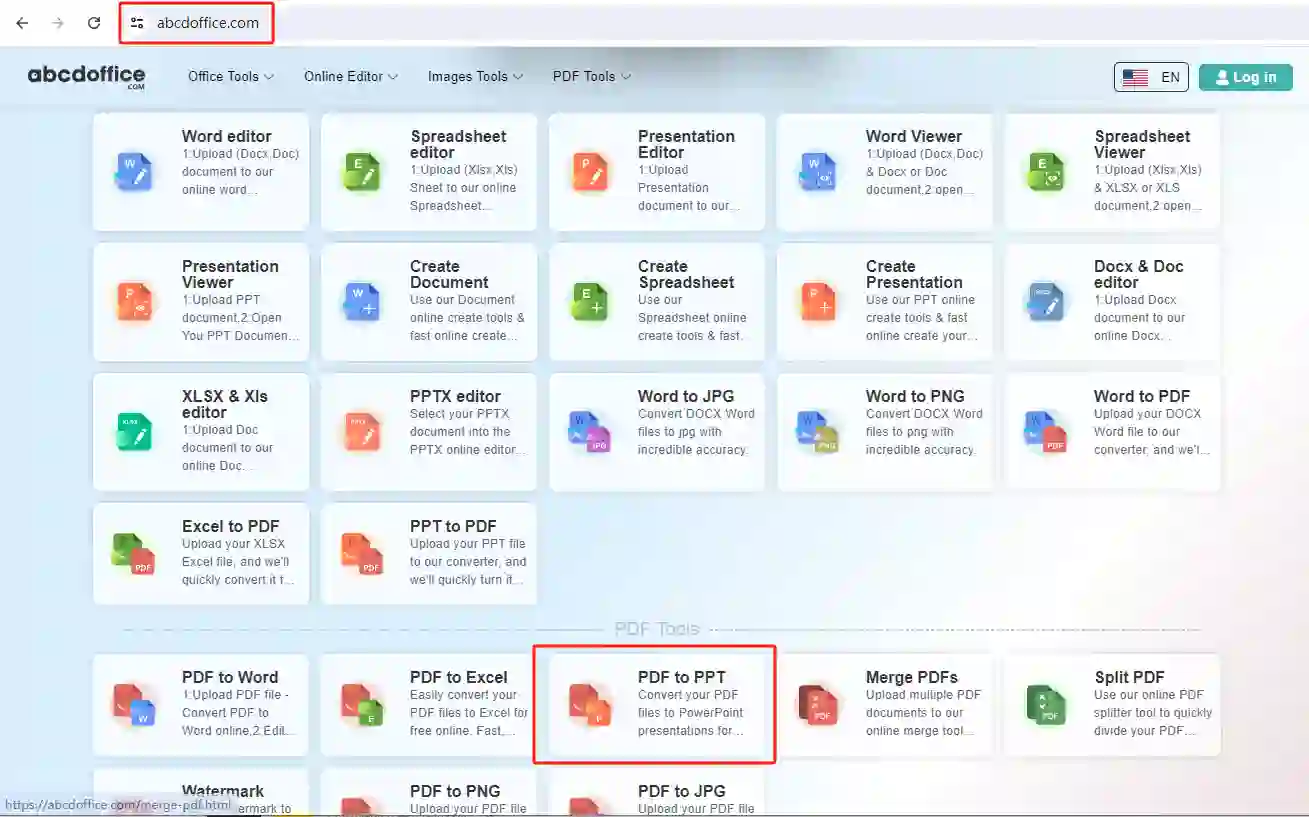
Open abcdoffice.com in your browser. On the homepage tools grid, click PDF to PPT under Online Editor or PDF Tools — or go directly to abcdoffice.com/pdf-to-ppt.html to open this pdf to ppt converter page.
02
Step 2: Upload your file

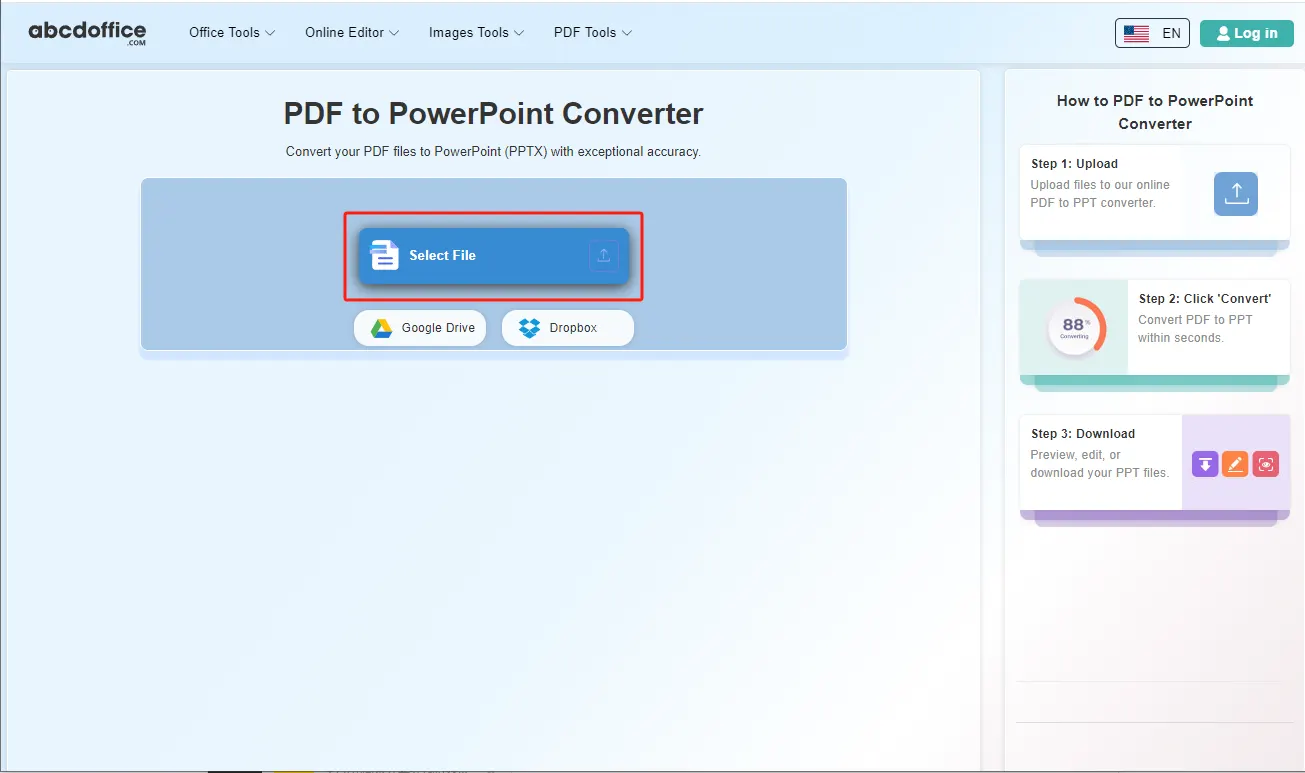
On the upload screen at abcdoffice.com/pdf-to-ppt.html, click Select File or drag PDF files into the upload area. Google Drive and Dropbox buttons appear below Select File on abcdoffice.com.

03
Step 3: Convert PDF to PowerPoint online

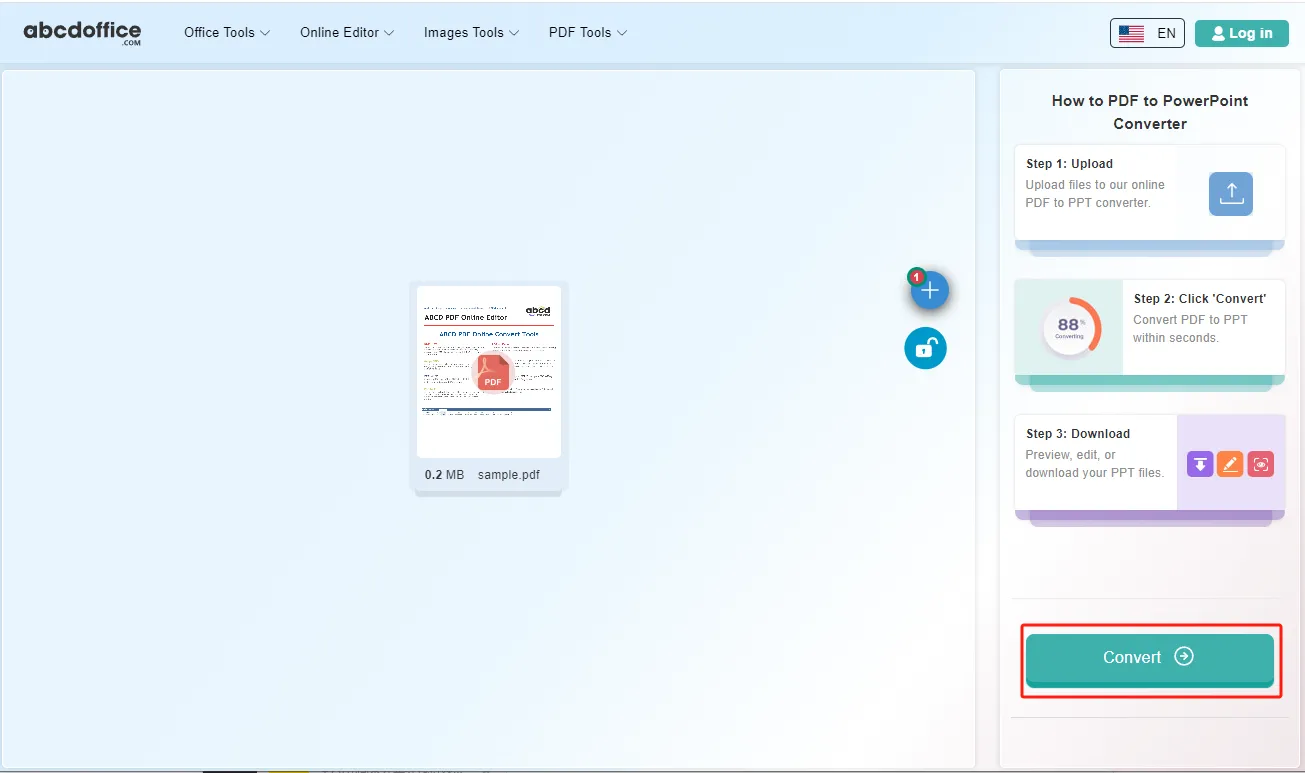
With your file uploaded, click Convert at the bottom of the page and wait a few seconds while abcdoffice.com converts PDF to PowerPoint — no extra steps during conversion.

04
Step 4: Download PPTX or PowerPoint files

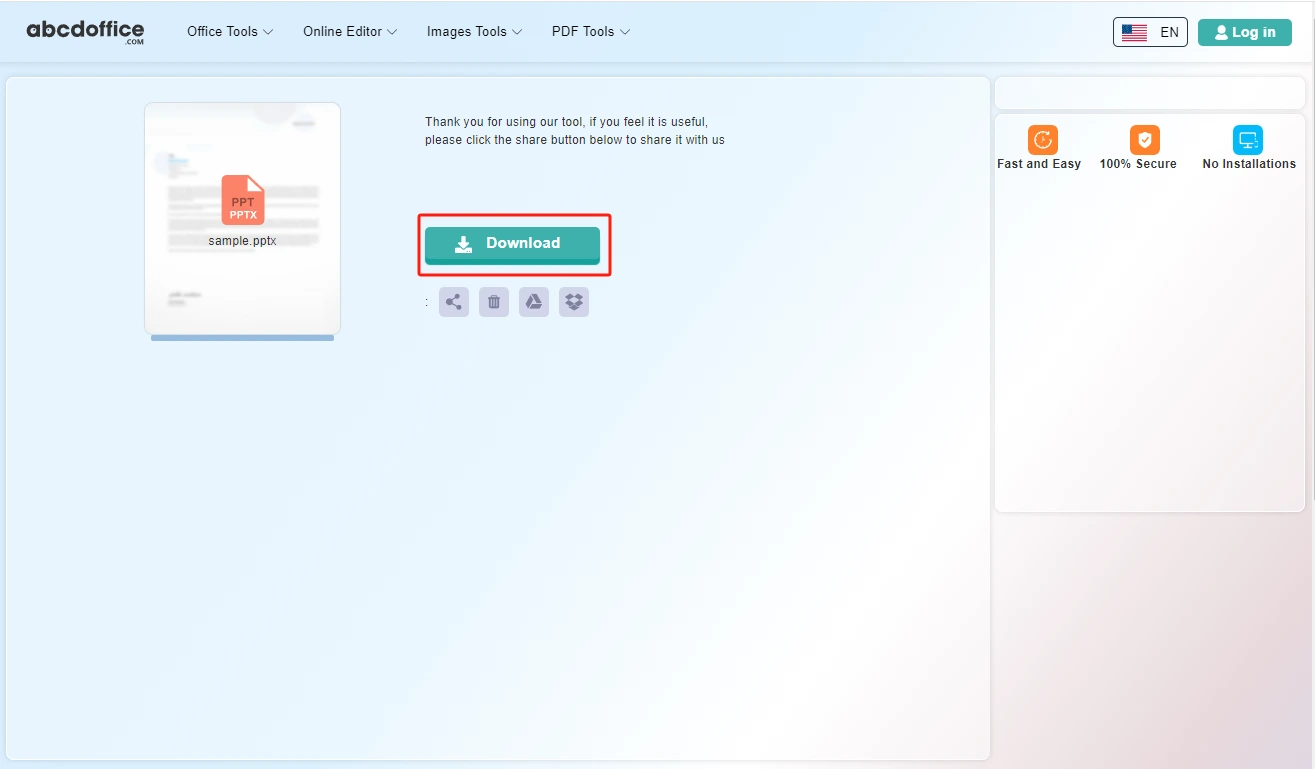
When processing finishes, abcdoffice.com shows a download screen. Click Download to save PPTX or PowerPoint files to your computer from this free pdf to ppt converter.

Your guide to PDF to PowerPoint conversion on ABCD Office

How pdf to ppt works and vs pdf-to-ppt-editor — for convert pdf to ppt, pdf to powerpoint, and pdf to pptx online.

What is an online PDF to PPT converter?

A PDF to PPT converter turns PDF pages into PowerPoint slides in your browser. Upload on abcdoffice.com, convert, and download PPTX to edit transitions and speaker notes in PowerPoint.

PDF to PPT vs PDF to PPT Editor

pdf-to-ppt.html downloads PPTX after conversion. pdf-to-ppt-editor.html converts and opens slides in the browser editor — use when you need immediate online edits.

Starting from PowerPoint? Use ppt-to-pdf.html to export PDF, or pptx-editor.html to edit PPTX directly.

Typical use cases

Trainers convert PDF training packs into editable slides. Sales revives old PDF decks for new pitches. Educators turn PDF readings into lecture slides. The convert pdf to ppt online path on abcdoffice.com fits PDF-to-slide recovery.

PDF to PowerPoint online vs rebuilding slides

Recreating every slide from a PDF is tedious. ABCD Office offers convert pdf to ppt online at abcdoffice.com in minutes.

Privacy and quality

Review the privacy policy before converting confidential presentation PDFs on abcdoffice.com.

PDF to PPT online vs manual slide rebuild

See how abcdoffice.com/pdf-to-ppt.html compares on steps, install time, and time to finished PPTX.

Method Typical steps Install required Time to convert
abcdoffice.com pdf-to-ppt.html 3–4 steps None ~1 minute
Manual slide recreation Many steps Often yes Much longer
Desktop Acrobat + Office 5–8 steps Yes Several minutes
abcdoffice.com online
Quick workflow for upload, convert & download PPTX
Manual slide recreation
Slow and error-prone
Desktop Acrobat export
Multiple apps and installs

PDF to PowerPoint guides — common conversion tasks on ABCD Office

Guides for convert pdf to ppt, pdf to powerpoint, and pdf to pptx online — start at abcdoffice.com/pdf-to-ppt.html.

Guide

Turn a PDF deck into editable slides

Use pdf-to-ppt.html when you only received PDF slides from a vendor.

Upload PDF to convert
Guide

Rebuild marketing PDF as PPTX

Convert, then adjust layouts on ppt-editor.html before your campaign review.

Upload PDF to convert
Guide

Training PDF to PowerPoint

Import PDF chapters as slides instructors can update each quarter.

Upload PDF to convert
Guide

Fix slide text after PDF import

Download PPTX and edit bullet wording in the ppt online editor.

Upload PDF to convert
Guide

No PowerPoint install on venue PC

Convert PDF to PPTX in advance, then present from the browser editor if needed.

Upload PDF to convert
Guide

Combine with PDF export later

Edit PPTX online, then use ppt-to-pdf.html for the final attendee handout.

Upload PDF to convert

Frequently asked questions

PDF to PowerPoint FAQ for abcdoffice.com/pdf-to-ppt.html — rebuild slide decks from PDF sources.

How do I turn a PDF slide deck into editable PPTX?

Upload to abcdoffice.com/pdf-to-ppt.html — pdf to ppt conversion creates PPTX you can fix on ppt-editor.html.

  1. Open abcdoffice.com/pdf-to-ppt.html in your browser.
  2. Click Select File or drag your file into the upload area.
  3. Click Convert and wait until abcdoffice.com finishes processing.
  4. Click Download to save the converted file.
Can I convert PDF to PowerPoint without Acrobat?

The pdf to ppt converter online runs in the browser on abcdoffice.com — upload, Convert, Download PPTX.

  1. Open abcdoffice.com/pdf-to-ppt.html in your browser.
  2. Click Select File or drag your file into the upload area.
  3. Click Convert and wait until abcdoffice.com finishes processing.
  4. Click Download to save the converted file.
Will images from a PDF appear on ppt slides?

Visual PDFs convert to slides you can rearrange — review layout in the ppt online editor after download.

  1. Open abcdoffice.com/pdf-to-ppt.html in your browser.
  2. Click Select File or drag your file into the upload area.
  3. Click Convert and wait until abcdoffice.com finishes processing.
  4. Click Download to save the converted file.
Is pdf to ppt online free for one deck?

Standard pdf to powerpoint conversion on pdf-to-ppt.html works without signup for typical files.

  1. Open abcdoffice.com/pdf-to-ppt.html in your browser.
  2. Click Select File or drag your file into the upload area.
  3. Click Convert and wait until abcdoffice.com finishes processing.
  4. Click Download to save the converted file.
Can I fix speaker notes after pdf to ppt conversion?

Open the PPTX in pptx-editor.html and add notes or bullets before presenting.

  1. Open abcdoffice.com/pdf-to-ppt.html in your browser.
  2. Click Select File or drag your file into the upload area.
  3. Click Convert and wait until abcdoffice.com finishes processing.
PDF to PPT online vs rebuilding slides manually?

Manual rebuilds take hours. pdf to ppt online gives a starting PPTX for marketing PDFs exported from design tools.

  1. Open abcdoffice.com/pdf-to-ppt.html in your browser.
  2. Click Select File or drag your file into the upload area.
  3. Click Convert and wait until abcdoffice.com finishes processing.
  4. Click Download to save the converted file.
Is it safe to convert strategy PDFs on abcdoffice.com?

Upload only decks you are allowed to process in the cloud per company policy.

  1. Open abcdoffice.com/pdf-to-ppt.html in your browser.
  2. Click Select File or drag your file into the upload area.
  3. Click Convert and wait until abcdoffice.com finishes processing.
  4. Click Download to save the converted file.
Can I convert PDF to PPTX on a conference laptop?

Use pdf-to-ppt.html in the browser, download PPTX, rehearse in the online ppt editor without installing PowerPoint.

  1. Open abcdoffice.com/pdf-to-ppt.html in your browser.
  2. Click Select File or drag your file into the upload area.
  3. Click Convert and wait until abcdoffice.com finishes processing.
  4. Click Download to save the converted file.

Convert your PDF to PowerPoint on abcdoffice.com

Upload PDF at abcdoffice.com/pdf-to-ppt.html — free PDF to PPT converter, then Download PPTX.