Login to your account
or
The mailbox user already exists
By clicking 'Download File,' you agree to our Terms and conditions and Privacy policy
edit_pdf
Save document as
Please select a file to save
docx DOCX
pdf PDF
odt ODT
txt TXT
dotx DOTX
pdfa PDF/A
ott OTT
rtf RTF
docxf DOCXF
oform OFORM
html HTML
fb2 FB2
epub EPUB
xlsx XLSX
pdf PDF
ods ODS
csv CSV
xltx XLTX
pdfa PDF/A
ots OTS
pptx PPTX
pdf PDF
odp ODP
potx POTX
pdf PDF/A
otp OTP
png PNG
jpg JPG
close

PDF Editor

Add text, images, shapes, or freehand annotations to a PDF document.

Convert convert
Download
File
Open Source Statement
Do not close your browser Wait until your files are uploaded and processed! This might take a few minutes. :)
file icon
Size
Ddfdf.pptx
5.2MB
VIEW
edit_file

What this free online pdf editor supports

ABCD Office is a pdf editor in your browser — upload a PDF to abcdoffice.com, edit text and add images with a full pdf editor online, then download without installing Adobe Acrobat or desktop software.

File formats

Upload standard PDF files for editing on abcdoffice.com/online-pdf-editor.html. The online pdf editor handles everyday document edits in the browser.

Edit in browser

A true pdf editor online — add or delete text, insert images and shapes, and apply formatting in the editor toolbar after your file loads.

Export options

Click Save or Download to export from the free pdf editor online as PDF — ready for email, print, or sharing.

No install

Use this free online pdf editor on desktop or mobile at abcdoffice.com. No Adobe subscription or software install required for standard PDF edits.

How to edit PDF files online on ABCD Office

abcdoffice.com/online-pdf-editor.html is the pdf editor online page — upload a PDF, edit in the browser, then download. Wondering how to edit a pdf without desktop software? Start here.

Edit

Online pdf editor — edit PDF files free

You need to fix a typo, add a signature block, or insert an image in a PDF contract, form, or report — and you want a free pdf editor that works in the browser.

  • Pdf editor online for everyday edits — forms, invoices, homework, and client PDFs.
  • Edit pdf online when Acrobat is not installed on a school, work, or shared computer.
  • Upload from your device on abcdoffice.com — then download the updated PDF when finished.
01
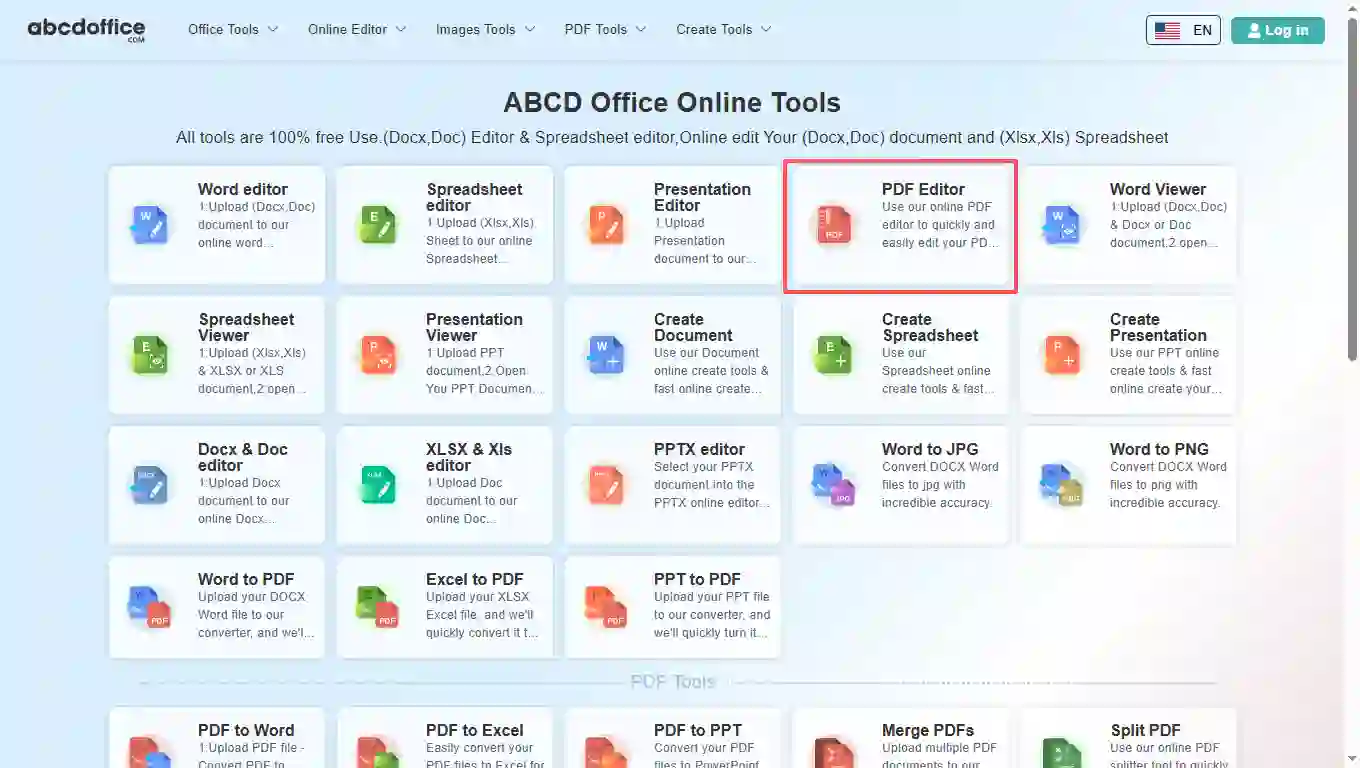
Step 1: Open PDF Editor on abcdoffice.com

Open abcdoffice.com in your browser. On the homepage tools grid, click PDF Editor under Online Editor or PDF Tools — or go directly to abcdoffice.com/online-pdf-editor.html to open this online pdf editor page.

02
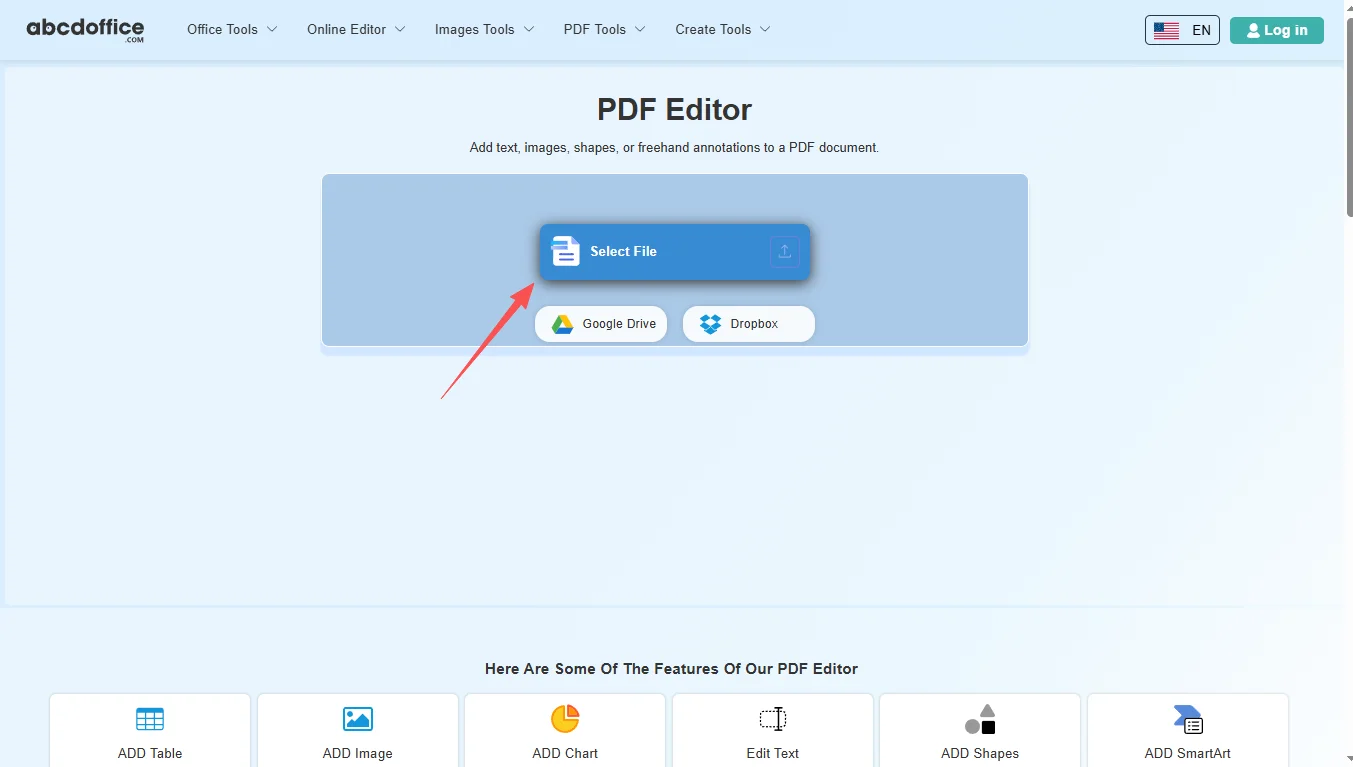
Step 2: Upload your file

On the upload screen at abcdoffice.com/online-pdf-editor.html, click Select File or drag PDF files into the upload area. Google Drive and Dropbox buttons appear below Select File on abcdoffice.com.

03
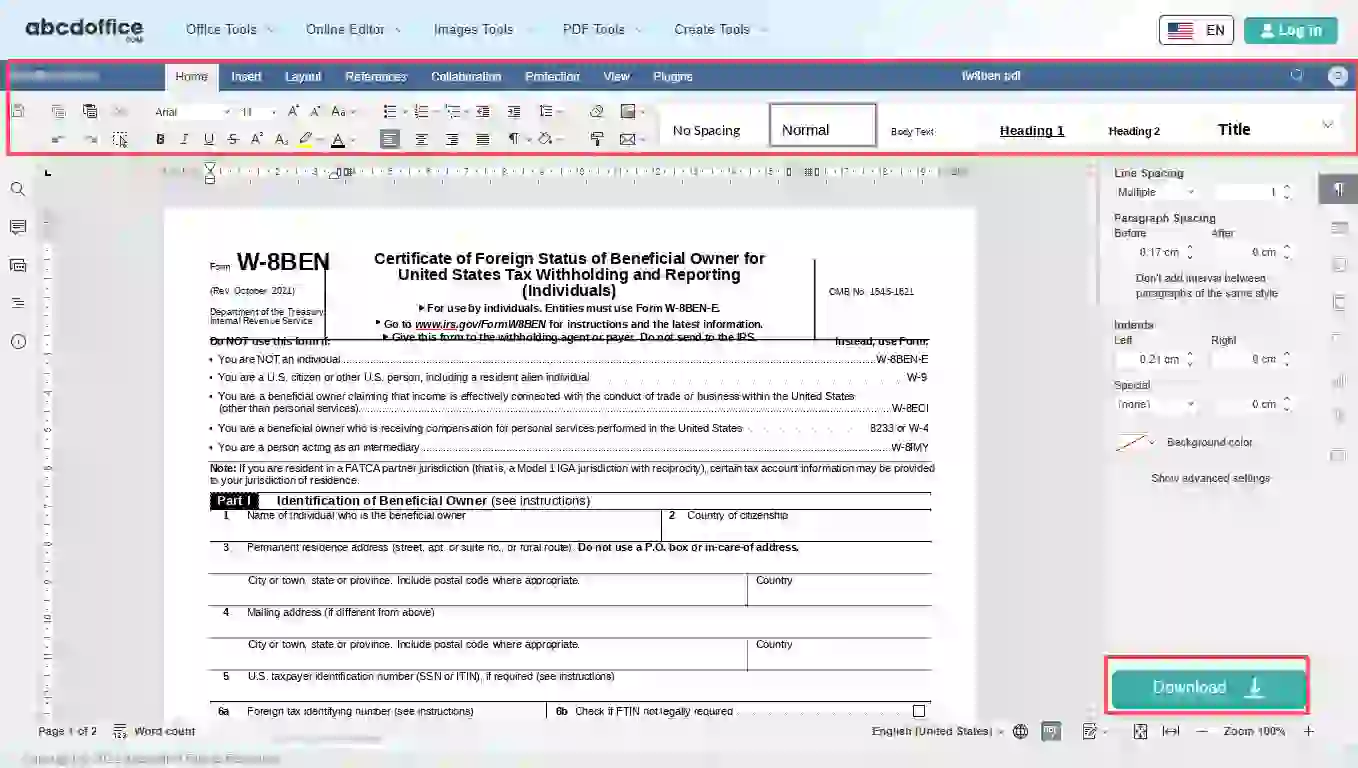
Step 3: Edit in pdf editor online

After upload and processing, the pdf editor online opens in your browser on abcdoffice.com. Use the ribbon toolbar to change text, tables, images, and formatting.

04
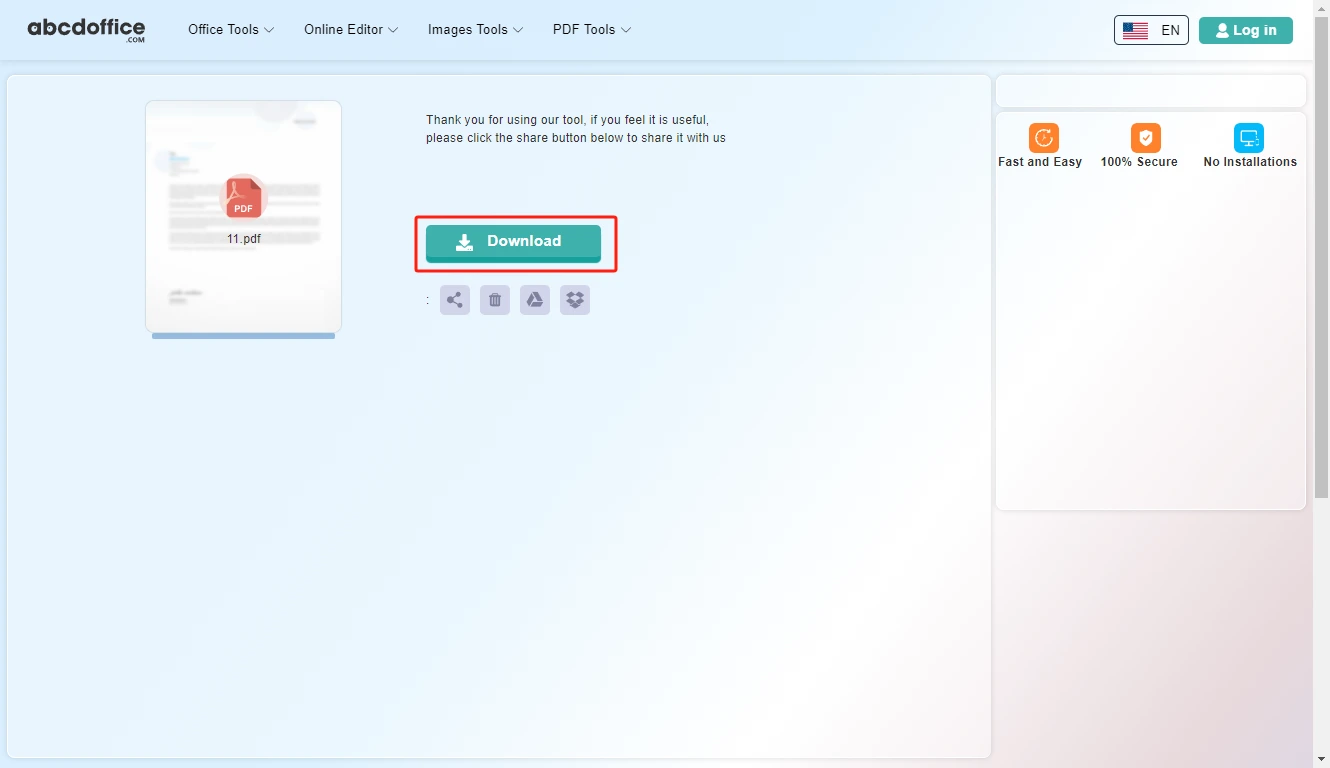
Step 4: Download your updated PDF

When processing finishes, abcdoffice.com shows a download screen. Click Download to save your updated PDF to your computer from this free online pdf editor.

PDF editor toolbar — every tab explained

The ABCD Office pdf editor online on abcdoffice.com uses the same ONLYOFFICE editor toolbar shown below — Home, Insert, Layout, References, Collaboration, Protection, View, and Plugins — for edit pdf tasks in the browser.

Home
Font, paragraph & quick styles

Font, paragraph & quick styles

The Home tab covers everyday text editing in our pdf editor online — change wording, fix typos, and format paragraphs when you edit pdf content.

  • Font family and size, bold, italic, underline, strikethrough, superscript and subscript
  • Text highlight color, font color, lists, indent, and alignment
  • Line spacing, paragraph shading and borders, Clear Formatting and Format Painter
  • Quick Styles for consistent text when you edit pdf online free
Insert
Pages, tables, images & rich objects

Pages, tables, images & rich objects

Insert tab tools in this online pdf editor let you add visuals and structure — images, shapes, text boxes, and tables on abcdoffice.com.

  • Tables, images, charts, shapes, comments and hyperlinks
  • Text boxes, Text Art, equations and symbols for annotated PDFs
  • Headers, footers, and page breaks for multi-page documents
  • Ideal when you need more than plain text in a free pdf editor
Layout
Margins, orientation, columns & watermarks

Margins, orientation, columns & watermarks

Control page layout in the pdf editor online before you export — margins, orientation, and watermarks for drafts or confidential copies.

  • Margins, orientation, and paper size presets
  • Columns, breaks, and line numbers for longer PDF content
  • Text wrapping and object alignment on the page
  • Watermark for DRAFT or confidential markings before download
References
TOC, footnotes, captions & cross-references

TOC, footnotes, captions & cross-references

Long PDF documents benefit from navigation tools — table of contents, footnotes, and linked references in the pdf editor online.

  • Table of contents — insert and update when headings change
  • Footnotes and explanatory notes at the bottom of the page
  • Hyperlinks and bookmarks for in-document jumps
  • Captions, cross-references, and table of figures
Collaboration
Comments, track changes & compare

Comments, track changes & compare

Review shared PDFs in the online pdf editor — add feedback, accept edits, and compare versions in the browser on abcdoffice.com.

  • Co-editing mode and threaded comments on selected text
  • Resolve or remove comments; navigate previous/next comment
  • Track Changes with display modes and accept/reject edits
  • Compare two document versions side by side
Protection
Encrypt & restrict editing

Encrypt & restrict editing

Lock sensitive PDFs before download from abcdoffice.com — password protection and editing restrictions for shared files.

  • Encrypt with a password so only authorized readers can open the file
  • Protect Document to limit editing or set comments-only mode
View
Zoom, rulers, panels & themes

Zoom, rulers, panels & themes

Tune the editing workspace — zoom level, visible rulers, side panels, and light/dark themes in the pdf editor online.

  • Headings navigation pane for long documents
  • Zoom percentage, Fit to Page, Fit to Width
  • Interface theme and optional dark document canvas
  • Toggle toolbar, status bar, left/right panels, and ruler
Plugins
OCR, AI, translate & more

OCR, AI, translate & more

Extend the free pdf editor online with plugins — OCR scanned pages, AI help, translation, and reference tools on abcdoffice.com.

  • Plugin Manager and Macros for automation
  • Highlight code, OCR, Photo Editor, Speech, Thesaurus
  • Translator, ChatGPT, YouTube embed, Mendeley and Zotero citations

Your guide to the free online pdf editor on ABCD Office

How a pdf editor online works on abcdoffice.com, what you can change in a PDF, and when to choose it over desktop Acrobat — written for searches like pdf editor, online pdf editor, and how to edit a pdf.

What is an online pdf editor?

An online pdf editor runs in your web browser instead of on your desktop. On abcdoffice.com you upload a PDF, the server prepares it for editing, and you work in a document canvas with familiar toolbar controls. When you are done, Save or Download exports an updated PDF to your computer.

How to edit a PDF online — step by step

If you are wondering how to edit a pdf, the short answer on abcdoffice.com is: upload your file at online-pdf-editor.html, wait for the editor to open, make your changes, then download. That is the same edit pdf online free path shown in the sidebar how-to and the walkthrough above.

Starting from a scanned PDF? Use OCR plugins after upload, or convert with PDF to Word on abcdoffice.com first, then return to the online pdf editor to finish layout fixes.

Typical use cases

Students fix typos in assignment PDFs on library computers. Freelancers update client contracts from email attachments. Admins add notes to policy PDFs without waiting for IT to install Acrobat. The pdf editor online free model on abcdoffice.com fits any quick open–edit–download task.

Online pdf editor vs Adobe Acrobat

Adobe Acrobat remains the standard for advanced PDF publishing, redaction at scale, and enterprise compliance workflows. ABCD Office targets the everyday majority: a free online pdf editor that needs no install and finishes simple PDF jobs in minutes at abcdoffice.com.

Privacy and quality

Upload only what you need for the edit task on abcdoffice.com. Review our privacy policy before sending highly confidential contracts or personal data to any pdf editor online. This edit pdf online free tool is built for high-quality PDF output — so you spend less time fighting software and more time finishing the document.

Online pdf editor vs desktop Adobe Acrobat

See how the ABCD Office free pdf editor online workflow on abcdoffice.com compares to desktop Acrobat on steps, install time, and time to first edit.

Method Typical steps Install required Time to edit
abcdoffice.com pdf editor online 3–4 steps None ~1 minute
Adobe Acrobat (desktop) 5–7 steps Yes Several minutes
Adobe online (account login) 4–6 steps Account required 2–5 minutes
abcdoffice.com online
Quick workflow for upload, edit & download
Desktop Adobe Acrobat
More setup, advanced features
Adobe account web login
Subscription and sign-in flow

Related PDF editor guides — common editing tasks on ABCD Office

Guides for edit pdf online, edit pdf online free, and how to edit a pdf — all paths start at abcdoffice.com/online-pdf-editor.html.

Guide

Type into a PDF application form

Upload the form to abcdoffice.com/online-pdf-editor.html and add text boxes where fields are blank.

Upload a PDF to edit
Guide

Place an image signature on a contract PDF

Insert a scanned signature image on the signature line using the pdf editor online toolbar.

Upload a PDF to edit
Guide

Remove one page from a PDF packet

Delete an extra blank or duplicate page before you merge or email the file.

Upload a PDF to edit
Guide

Highlight policy clauses in a legal PDF

Use annotation or highlight tools to mark sections reviewers must read.

Upload a PDF to edit
Guide

Combine an edited PDF with an appendix

Edit the main PDF online, download it, then merge with exhibits using merge-pdf.html.

Upload a PDF to edit
Guide

Save a redacted draft as PDF

After removing sensitive text in the browser editor, download the updated PDF for internal review.

Upload a PDF to edit

Frequently asked questions

Answers about this pdf editor online on abcdoffice.com — each question matches real searches, with steps that include abcdoffice.com/online-pdf-editor.html.

Which free pdf editor can I use to edit PDF files online?

abcdoffice.com/online-pdf-editor.html is a free pdf editor for standard PDF edits — upload, edit in the browser with a full pdf editor online, and download without Adobe Acrobat installed.

  1. Open abcdoffice.com/online-pdf-editor.html in your browser.
  2. Click Select File or drag your PDF into the upload area on this online pdf editor page.
  3. Edit in the pdf editor online after upload and processing complete on abcdoffice.com.
  4. Click Save or Download to export from the free online pdf editor.
How can I edit pdf online without installing Adobe Acrobat?

The ABCD Office pdf editor online runs entirely in your browser at abcdoffice.com — no desktop Acrobat install required for standard editing tasks.

  1. Visit abcdoffice.com/online-pdf-editor.html on any modern browser.
  2. Upload your PDF file to the online pdf editor page.
  3. Wait for the editor to open with your document loaded on abcdoffice.com.
  4. Edit and Download — no software install on your device.
Is there a pdf editor free with no signup for basic edits?

Yes — core upload, edit, and download on abcdoffice.com/online-pdf-editor.html works as a pdf editor free without creating an account for standard document tasks.

  1. Go to abcdoffice.com/online-pdf-editor.html.
  2. Upload your PDF with Select File on this free pdf editor online — no signup needed to start editing.
  3. Make your changes in the browser-based online pdf editor.
  4. Download your PDF when finished from abcdoffice.com.
How to edit a pdf online and download the updated file?

Wondering how to edit a pdf? The full edit pdf online workflow on abcdoffice.com/online-pdf-editor.html is upload → edit → Save/Download — the same steps shown in the sidebar how-to panel.

  1. On abcdoffice.com/online-pdf-editor.html, click Select File and upload your PDF.
  2. When the pdf editor online opens, add or delete text, images, shapes, or annotations.
  3. Click Save or Download in the editor toolbar on abcdoffice.com.
  4. Save the updated PDF to your computer.
Can I use this pdf editor online to edit pdf text and images?

Yes — the pdf editor online on abcdoffice.com supports adding and deleting text, inserting images and shapes, and freehand annotations in the browser editor.

  1. On abcdoffice.com/online-pdf-editor.html, upload your PDF via Select File or drag-and-drop.
  2. Wait for processing — the free online pdf editor loads the document.
  3. Edit text and insert images from the Home and Insert tabs on abcdoffice.com.
How does this online pdf editor compare to Adobe Acrobat?

Adobe Acrobat excels at advanced redaction, batch tools, and enterprise compliance. The ABCD Office free pdf editor online on abcdoffice.com targets quick edits — upload, change content, download — without install or subscription.

  1. Use abcdoffice.com/online-pdf-editor.html when you need a fast browser-based pdf editor online.
  2. Upload a PDF, edit standard content in the editor, and export.
  3. Choose Adobe Acrobat for advanced redaction, batch processing, or enterprise policies.
  4. Many users combine both: PDF to Word on abcdoffice.com, edit online, then export PDF again.
Is it safe to upload PDFs to this online pdf editor?

Files are processed for your edit session on abcdoffice.com. Review our privacy policy and your organization's rules before uploading confidential contracts or personal data to any pdf editor online.

  1. On abcdoffice.com/online-pdf-editor.html, upload only the PDF needed for the editing task.
  2. Avoid sending highly sensitive files if your policy restricts cloud processing.
  3. Download your result from the pdf editor online when done.
  4. Read the privacy policy linked in the abcdoffice.com site footer for retention details.
Can I edit pdf online free and save as PDF again?

Yes — after editing on abcdoffice.com, click Save or Download to export an updated PDF from the edit pdf online free tool.

  1. Finish editing your document in the pdf editor online on abcdoffice.com.
  2. Click Save or Download in the editor header on abcdoffice.com/online-pdf-editor.html.
  3. Confirm PDF as the output format.
  4. Save the file to your device for email or print.

Start editing your PDF on abcdoffice.com

Upload a PDF at abcdoffice.com/online-pdf-editor.html — the free online pdf editor opens after upload, then Save or Download when you are done.