Login to your account
or
The mailbox user already exists
By clicking 'Download File,' you agree to our Terms and conditions and Privacy policy
word_online_view
Save document as
Please select a file to save
docx DOCX
pdf PDF
odt ODT
txt TXT
dotx DOTX
pdfa PDF/A
ott OTT
rtf RTF
docxf DOCXF
oform OFORM
html HTML
fb2 FB2
epub EPUB
xlsx XLSX
pdf PDF
ods ODS
csv CSV
xltx XLTX
pdfa PDF/A
ots OTS
pptx PPTX
pdf PDF
odp ODP
potx POTX
pdf PDF/A
otp OTP
png PNG
jpg JPG
close

Onlive Word Viewer

Easy fast online view reading your (Docx,Doc) documents

scicon Select File upload_btn add_upload
1
google-drive Google Drive
dropbox Dropbox
or drag PDF here
Do not close your browser Wait until your files are uploaded and processed! This might take a few minutes. :)
File
Open Source Statement
close
How To online Docx Viewer
Step 1:Upload
1:Upload (Docx,Doc) & Docx or Doc document
add file
Edit
Step 2: Editor
Open you (Docx,Doc) Document Viewer online
Step 3: Download
Edit and Download You (Docx,Doc) document
add file

What this free word viewer supports

ABCD Office is a word viewer in your browser — open DOCX or DOC on abcdoffice.com, view word document online with full formatting, then download without installing Microsoft Word.

File formats

Upload and view .DOCX and .DOC files. Legacy DOC documents use the same word doc viewer workflow as modern DOCX on abcdoffice.com.

View in browser

A true online word viewer — read text, tables, images, and layout in the document canvas. The word viewer opens automatically after upload completes.

Download options

After viewing on abcdoffice.com, click Download to save as DOCX or export to PDF — no Microsoft Word install required.

No install

Use this free word viewer on desktop or mobile at abcdoffice.com. Works as a microsoft word viewer alternative when Office is not installed.

How to view Word documents online on ABCD Office

abcdoffice.com/word-viewer.html is the word viewer online page — upload an existing DOCX or DOC file, open it in the browser, read at your pace, then download if needed.

View

Online word viewer — open DOCX and DOC files free

You received a contract, resume, or report as a Word attachment and need a word document viewer to read it when Microsoft Word is not installed on your device.

  • Word viewer online for everyday reading — letters, forms, homework, and client drafts.
  • View word document online on school, work, or shared computers without Office installed.
  • Upload from your device, Google Drive, or Dropbox on abcdoffice.com — then export as DOCX or PDF after viewing.
01
Step 1: Open Word Viewer on abcdoffice.com

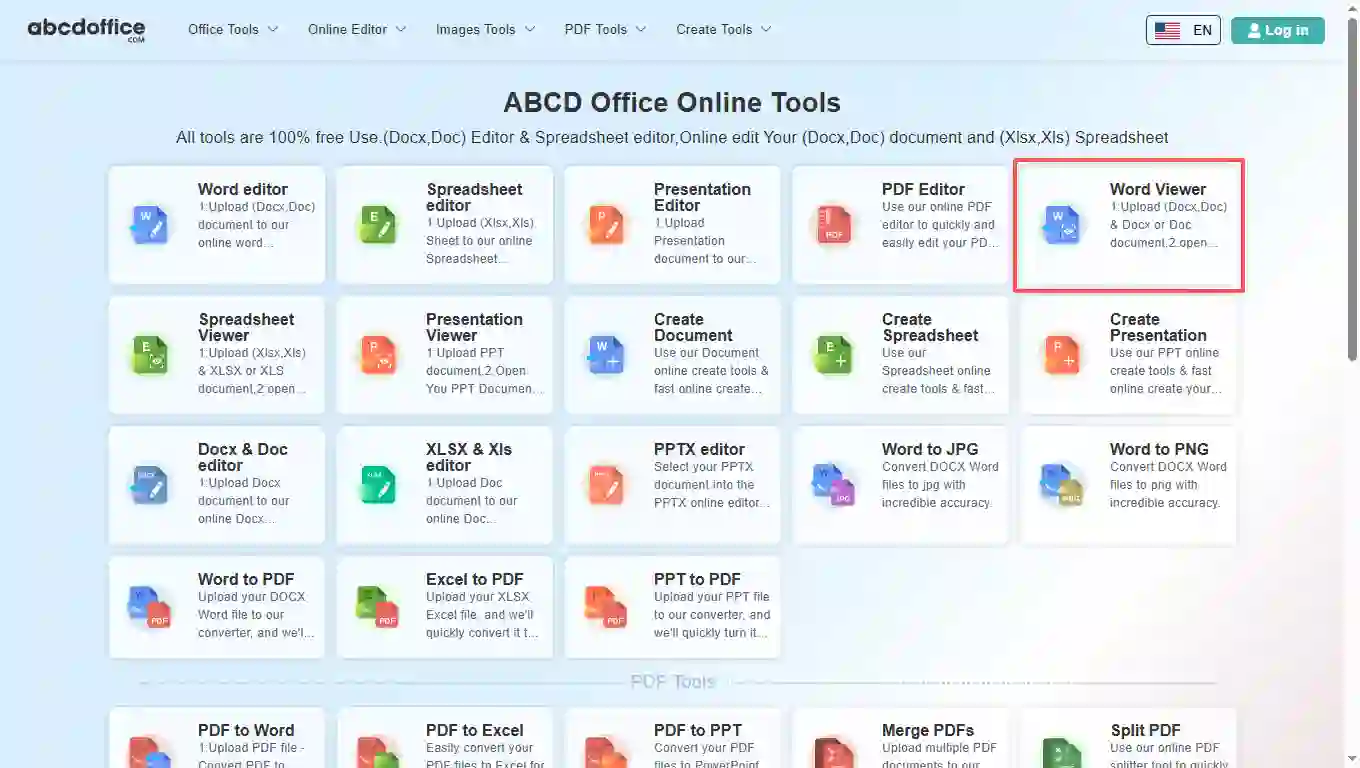
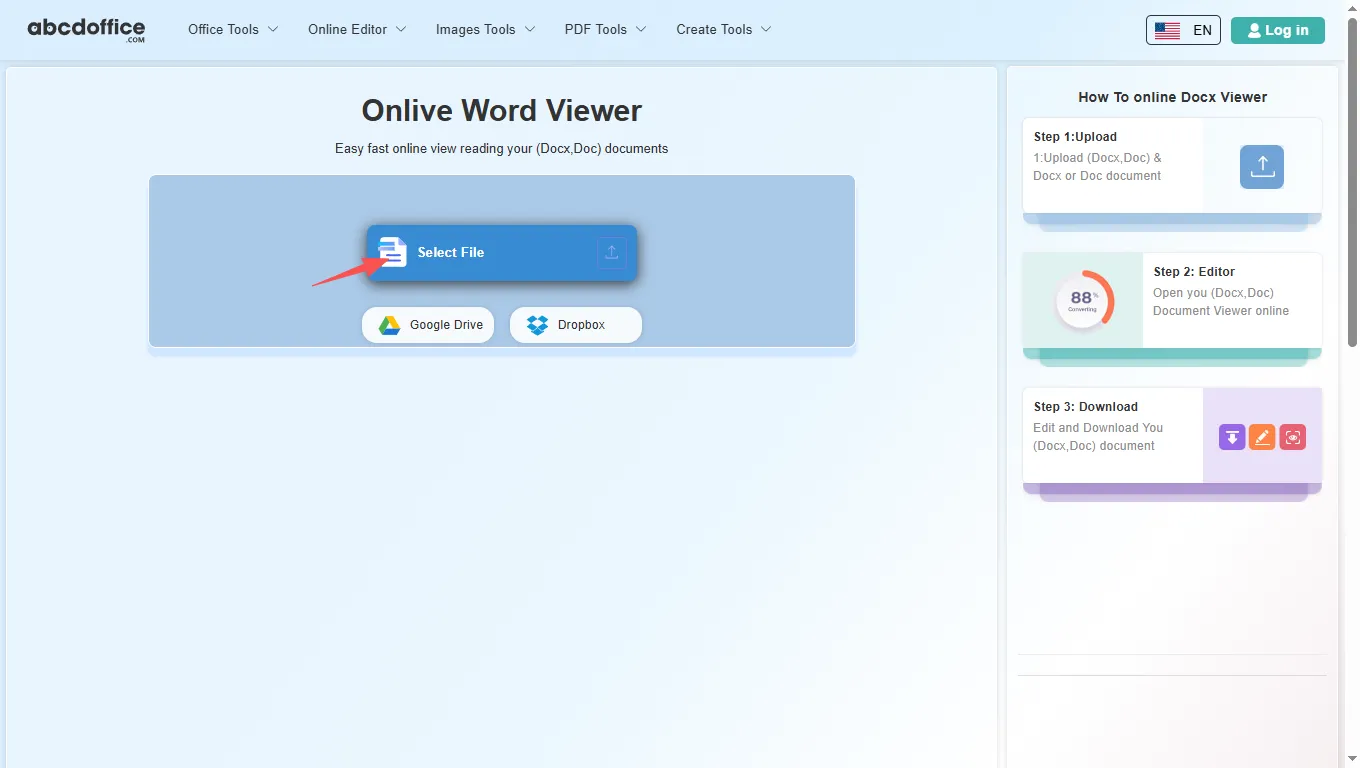
Open abcdoffice.com in your browser. On the homepage tools grid, click Word Viewer under Online Editor or PDF Tools — or go directly to abcdoffice.com/word-viewer.html to open this online word viewer page.

02
Step 2: Upload your file

On the upload screen at abcdoffice.com/word-viewer.html, click Select File or drag DOCX or DOC files into the upload area. Google Drive and Dropbox buttons appear below Select File on abcdoffice.com.

03
Step 3: View document online

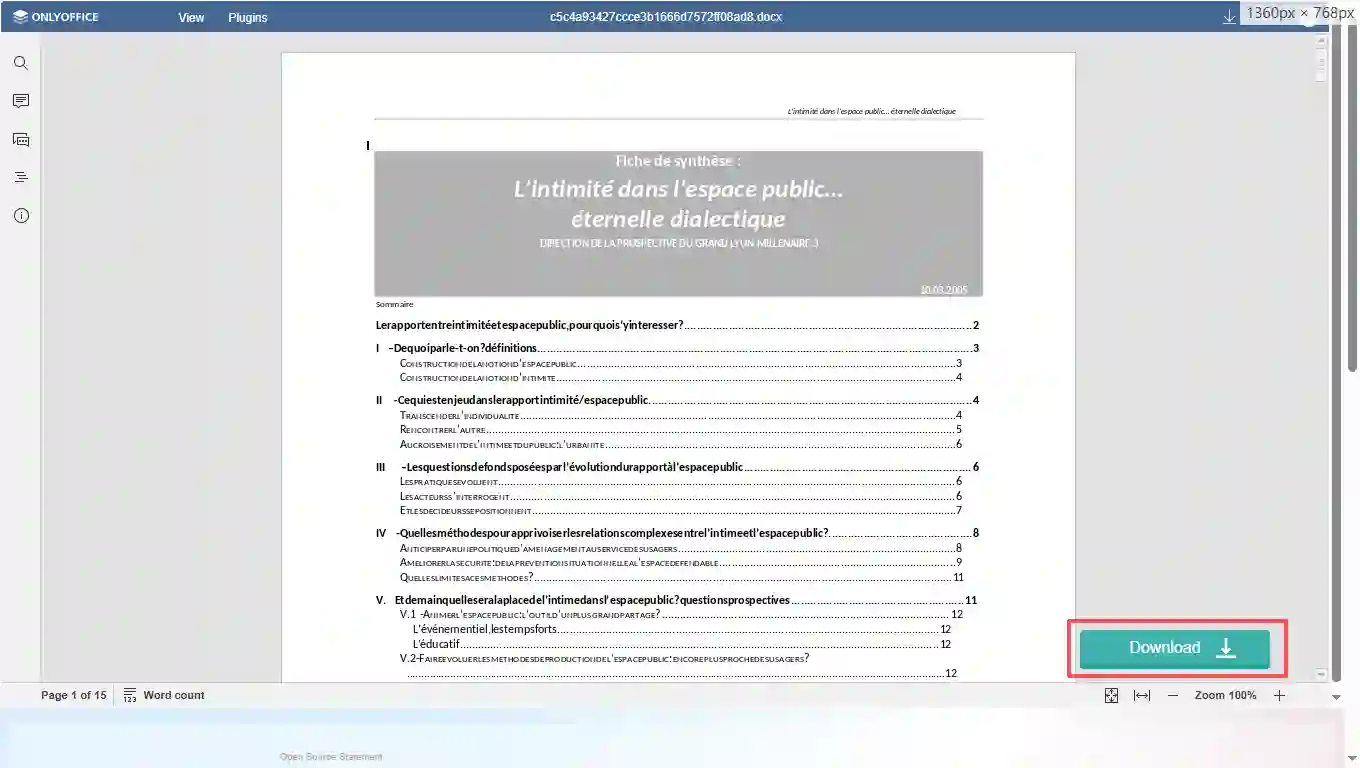
The word viewer online opens with your document loaded on abcdoffice.com. Scroll through pages, zoom, and read content in the browser without installing desktop Office.

04
Step 4: Download DOCX or PDF

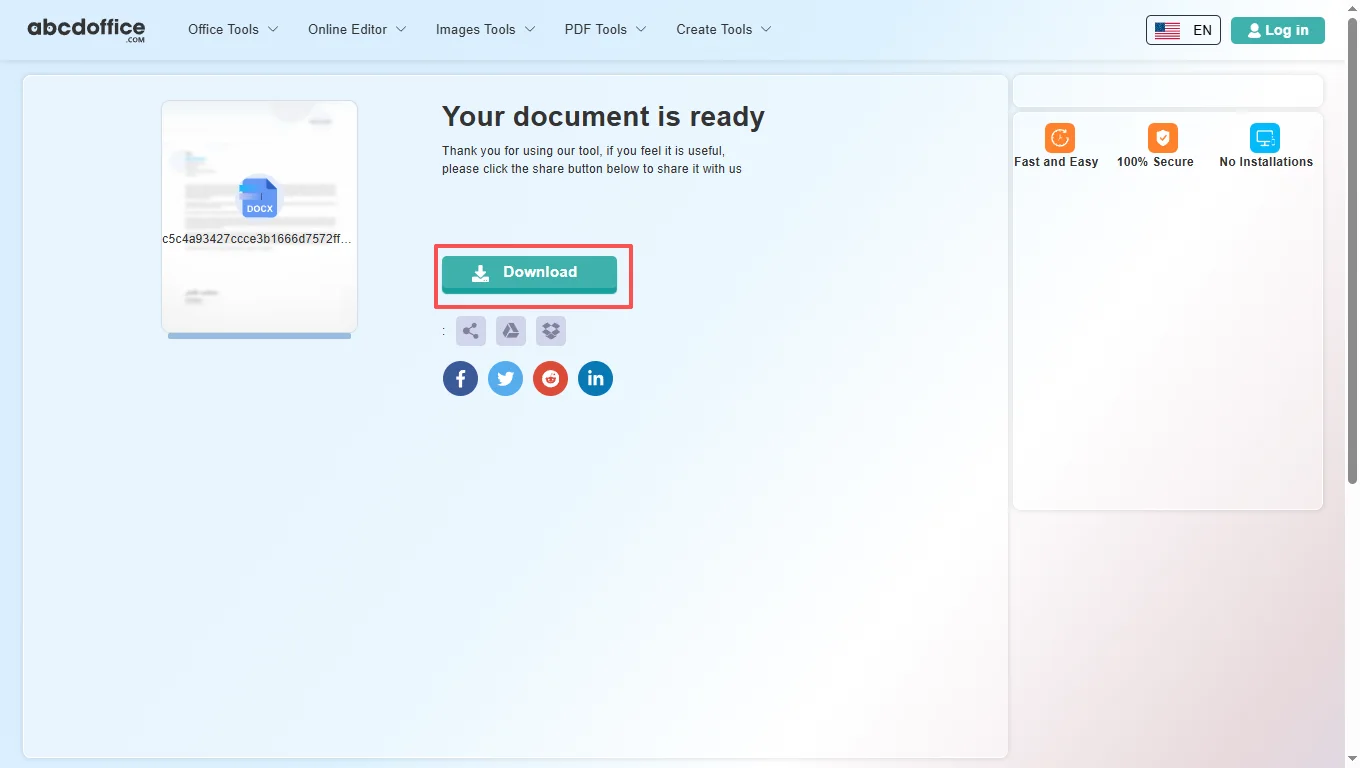
When processing finishes, abcdoffice.com shows a download screen. Click Download to save DOCX or PDF to your computer from this free online word viewer.

Your guide to the free word viewer on ABCD Office

How a word viewer online works on abcdoffice.com, what files it opens, and when to choose it over Microsoft Word — written for searches like view word document online, word viewer, and free word viewer.

What is an online word viewer?

An online word viewer runs in your web browser instead of on your desktop. On abcdoffice.com you upload a Word file, the server prepares it for viewing, and you read in a canvas similar to Word for the web. When you are done, Download saves DOCX or PDF to your computer.

Supported formats: DOCX, DOC, and export

This word viewer online accepts modern DOCX files and older DOC documents. After viewing on abcdoffice.com, choose DOCX to keep the file, or PDF when you need a fixed layout for email, print, or client delivery.

Need to view docx online after converting from PDF? Use PDF to Word on abcdoffice.com first, then open the result in the word doc viewer to read and check layout.

Typical use cases

Students open assignment DOCX files on library computers. Recruiters skim resumes from email attachments. Teams preview shared contracts without waiting for IT to install Office. The free word viewer model on abcdoffice.com fits any quick open–read–download task — including view docx online and open word document online workflows.

Online word viewer vs Microsoft Word

Microsoft Word and Microsoft 365 remain the standard for complex publishing and deep editing. ABCD Office targets readers who need a microsoft word viewer alternative: a free online word viewer that needs no install and opens documents in seconds at abcdoffice.com.

Privacy and quality

Upload only what you need for the viewing task on abcdoffice.com. Review our privacy policy before sending highly confidential files. This word viewer online is built for high-fidelity DOCX display — so you spend less time fighting software and more time reading the document.

Online word viewer vs desktop Microsoft Word

See how the ABCD Office free word viewer workflow on abcdoffice.com compares to desktop Word on steps, install time, and time to first view.

Method Typical steps Install required Time to open
abcdoffice.com word viewer online 2–3 steps None ~1 minute
Microsoft Word (desktop) 4–6 steps Yes Several minutes
Word for the web (365 login) 3–5 steps Account required 2–5 minutes
abcdoffice.com online
Quick workflow for upload, view & download
Desktop Microsoft Word
More setup, full editing suite
Microsoft 365 web login
Account and OneDrive flow

Related word viewer guides — common viewing tasks on ABCD Office

Guides for view word document online, docx viewer online, view docx online, and free word viewer — all paths start at abcdoffice.com/word-viewer.html.

Guide

Read a DOCX contract without Word

Upload to abcdoffice.com/word-viewer.html to scroll and zoom — no editing required for review.

Upload a file to view
Guide

Skim a 40-page DOCX report online

Use the word viewer to jump through headings and pages on a machine without Office installed.

Upload a file to view
Guide

Open an old DOC from a zip archive

View legacy .doc files in the browser viewer before you decide whether to convert or edit.

Upload a file to view
Guide

Snapshot a DOCX as PDF for printing

After viewing, export to PDF from the viewer workflow when you need a print layout.

Upload a file to view
Guide

Preview a Google Drive DOCX link

Download from Drive, upload to word-viewer.html, and read formatting as recipients will see it.

Upload a file to view
Guide

Review a shared policy DOCX read-only

Confirm wording in HR or legal docs without changing track changes or comments in desktop Word.

Upload a file to view

Frequently asked questions

Answers about this word viewer online on abcdoffice.com — each question matches real searches, with steps that include abcdoffice.com/word-viewer.html.

Which free word viewer supports DOCX and DOC files?

abcdoffice.com/word-viewer.html is a free word viewer for DOCX and DOC — upload, view word document online in the browser, and download without Microsoft Word installed.

  1. Open abcdoffice.com/word-viewer.html in your browser.
  2. Click Select File or drag your Word document into the upload area on this word viewer page.
  3. Read in the word document viewer after upload completes on abcdoffice.com.
  4. Click Download to save DOCX or PDF from the free word viewer.
How can I view word document online without installing Microsoft Word?

The ABCD Office word viewer online runs entirely in your browser at abcdoffice.com — no desktop Word, no Microsoft 365 install required to open and read standard documents.

  1. Visit abcdoffice.com/word-viewer.html on any modern browser.
  2. Upload your DOCX or DOC file to the online word viewer page.
  3. Wait for the word doc viewer to open with your content loaded on abcdoffice.com.
  4. Read and Download — no Office install on your device.
Is there a microsoft word viewer alternative that is free with no signup?

Yes — core upload, view, and download on abcdoffice.com/word-viewer.html works as a free word viewer without creating an account for standard document tasks.

  1. Go to abcdoffice.com/word-viewer.html.
  2. Upload your file with Select File on this word viewer online — no signup needed to start viewing.
  3. Read your document in the browser-based word document viewer.
  4. Download DOCX or PDF when finished from abcdoffice.com.
How do I open word document online and download a copy?

The full view word document online workflow on abcdoffice.com/word-viewer.html is upload → view → Download — the same steps shown in the sidebar how-to panel.

  1. On abcdoffice.com/word-viewer.html, click Select File and upload your DOCX or DOC.
  2. When the word viewer online opens, scroll through pages and use zoom or the headings pane.
  3. Click Download in the viewer toolbar on abcdoffice.com.
  4. Choose DOCX to keep the Word file, or PDF for a fixed export.
Can I view older DOC files in this word doc viewer?

Yes — the word viewer on abcdoffice.com accepts both DOCX and legacy DOC uploads and opens them in the same browser viewer.

  1. On abcdoffice.com/word-viewer.html, upload your .DOC file via Select File or drag-and-drop.
  2. Wait for processing — the word viewer online loads the document.
  3. View and Download as DOCX or PDF from abcdoffice.com.
How does this word viewer compare to microsoft word viewer?

Classic microsoft word viewer tools are discontinued on many systems. The ABCD Office word viewer online on abcdoffice.com opens DOCX and DOC in the browser — upload, read, download — without install or subscription.

  1. Use abcdoffice.com/word-viewer.html when you need a fast browser-based word document viewer.
  2. Upload DOCX/DOC, read standard content in the word viewer online, and export if needed.
  3. Choose Microsoft Word when you need advanced editing, VBA macros, or tracked changes at scale.
  4. Many users view on abcdoffice.com, then switch to word-editor.html for deeper edits.
Is it safe to upload documents to this online word viewer?

Files are processed for your viewing session on abcdoffice.com. Review our privacy policy and your organization's rules before uploading confidential contracts or personal data to any word viewer online.

  1. On abcdoffice.com/word-viewer.html, upload only the document needed for the viewing task.
  2. Avoid sending highly sensitive files if your policy restricts cloud processing.
  3. Download your copy from the word document viewer when done.
  4. Read the privacy policy linked in the abcdoffice.com site footer for retention details.
Can I export a viewed document as PDF from the word viewer online?

Yes — after viewing on abcdoffice.com, click Download and select PDF to create a shareable, print-ready file from the free word viewer.

  1. Finish reading your document in the word viewer online on abcdoffice.com.
  2. Click Download in the viewer header on abcdoffice.com/word-viewer.html.
  3. Select PDF in the format chooser.
  4. Save the PDF to your device for email or print.

Start viewing your Word document on abcdoffice.com

Upload a DOCX or DOC file at abcdoffice.com/word-viewer.html — the free word viewer opens after upload, then Download when you need a copy.