Login to your account
or
The mailbox user already exists
By clicking 'Download File,' you agree to our Terms and conditions and Privacy policy
ppt_to_pdf
Save document as
Please select a file to save
docx DOCX
pdf PDF
odt ODT
txt TXT
dotx DOTX
pdfa PDF/A
ott OTT
rtf RTF
docxf DOCXF
oform OFORM
html HTML
fb2 FB2
epub EPUB
xlsx XLSX
pdf PDF
ods ODS
csv CSV
xltx XLTX
pdfa PDF/A
ots OTS
pptx PPTX
pdf PDF
odp ODP
potx POTX
pdf PDF/A
otp OTP
png PNG
jpg JPG
close

PPT to PDF Converter

Convert PPT & PowerPoint to PDF with superior accuracy.

Do not close your browser Wait until your files are uploaded and processed! This might take a few minutes. :)
officeedit Next Next
File
Open Source Statement
file icon
Size
Ddfdf.pptx
5.2MB
VIEW
edit_file
How to PPT to PDF Converter
Step 1: Upload
Upload files to our online PPT to PDF converter.
add file
Edit
Step 2: Click 'Convert'
Convert PPT to PDF within seconds.
Step 3: Download
Preview, edit, or download your PDF files.
add file

What this free PPT to PDF converter supports

ABCD Office converts PPTX and PPT to PDF in your browser — upload on abcdoffice.com/ppt-to-pdf.html, convert online, and download a shareable PDF without installing Microsoft PowerPoint.

Input formats

ABCD Office converts PPTX and PPT to PDF in your browser — upload on abcdoffice.com/ppt-to-pdf.html, convert online, and download a shareable PDF without installing Microsoft PowerPoint.

Convert in browser

Upload, click Convert, and download from abcdoffice.com — no desktop Office install for standard files.

Output

Download converted files ready to share, print, or archive.

No install

Free online converter on desktop or mobile at abcdoffice.com.

How to convert PowerPoint to PDF online on ABCD Office

abcdoffice.com/ppt-to-pdf.html is the PPT to PDF converter page — upload PPTX or PPT, click Convert, then download PDF.

Convert

PPT to PDF converter — PPTX and PPT to PDF free

You need to send slides as PDF for a client or class — but PowerPoint is not installed or you want ppt to pdf online quickly.

  • PPT to PDF converter for pitch decks, lessons, webinars, and reports.
  • Convert pptx to pdf online without Office on shared PCs.
  • Edit the source later in ppt-editor.html after you convert powerpoint to pdf for sharing.
01
Step 1: Open PPT to PDF on abcdoffice.com

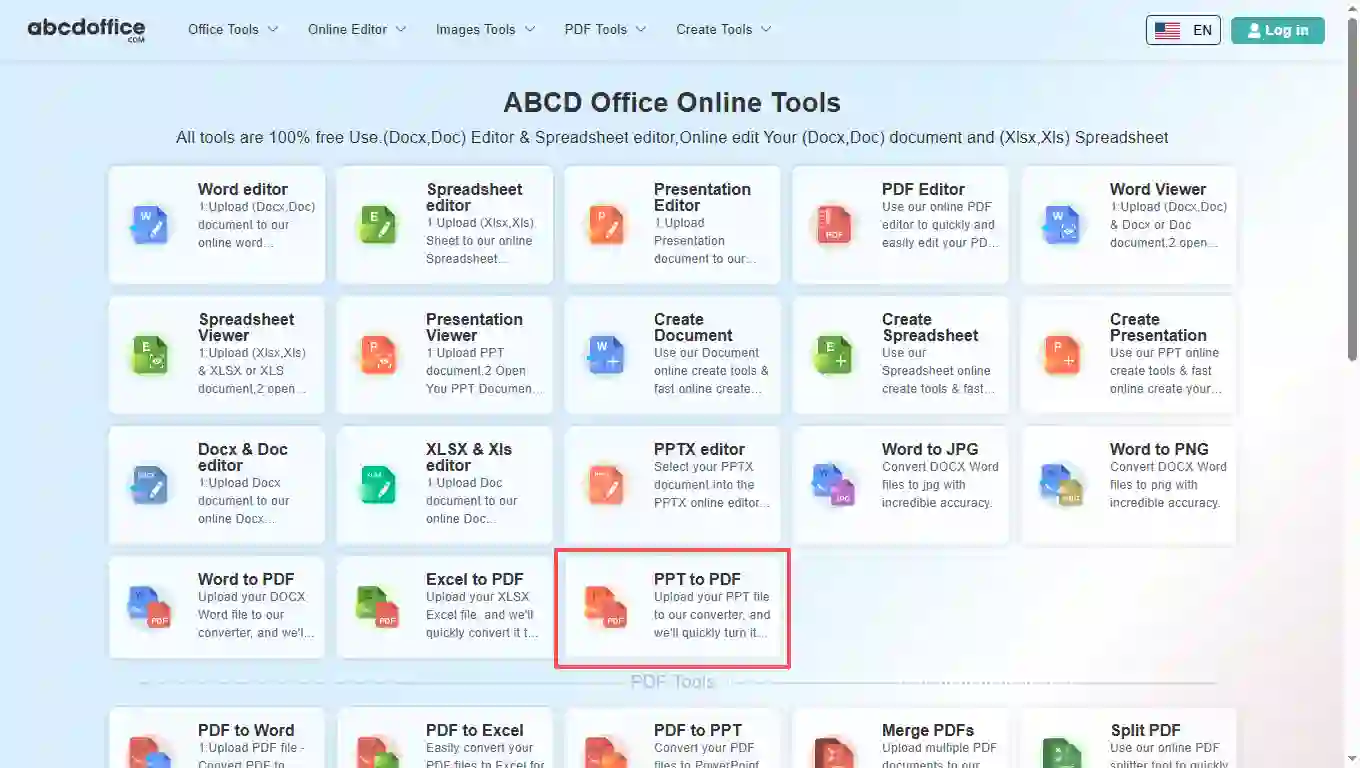
Open abcdoffice.com in your browser. On the homepage tools grid, click PPT to PDF under Online Editor or PDF Tools — or go directly to abcdoffice.com/ppt-to-pdf.html to open this ppt to pdf converter page.
02
Step 2: Upload your file

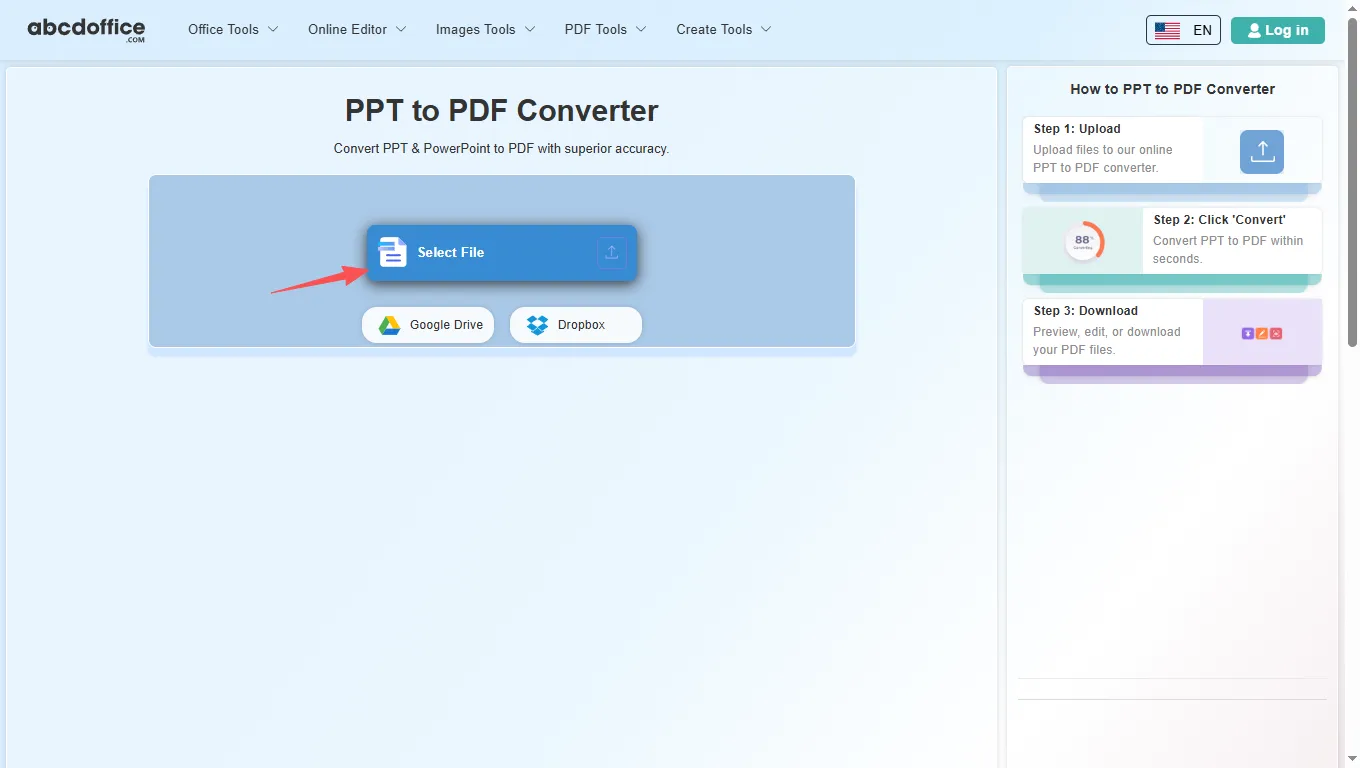
On the upload screen at abcdoffice.com/ppt-to-pdf.html, click Select File or drag PPTX or PPT files into the upload area. Google Drive and Dropbox buttons appear below Select File on abcdoffice.com.

03
Step 3: Convert PPT to PDF online

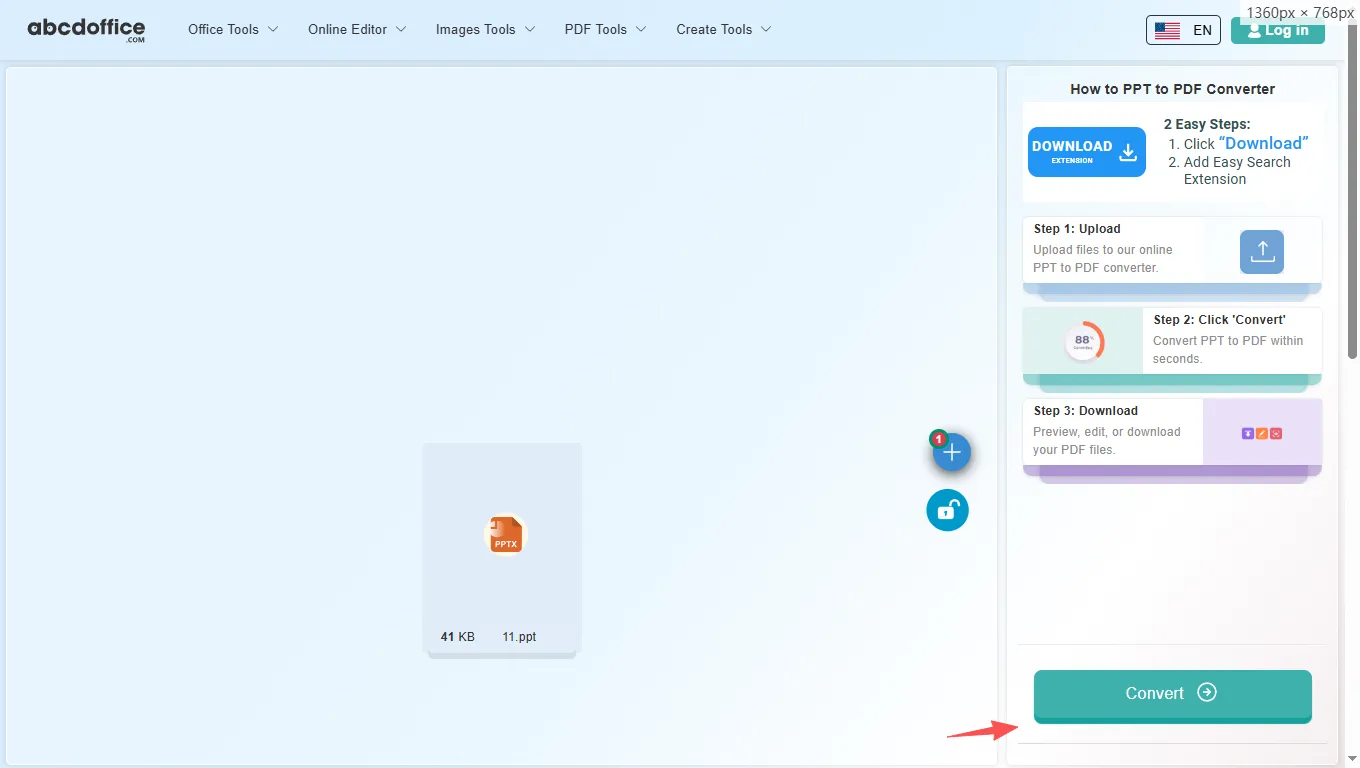
With your file uploaded, click Convert at the bottom of the page and wait a few seconds while abcdoffice.com converts PowerPoint to PDF — no extra steps during conversion.

04
Step 4: Download the converted PDF

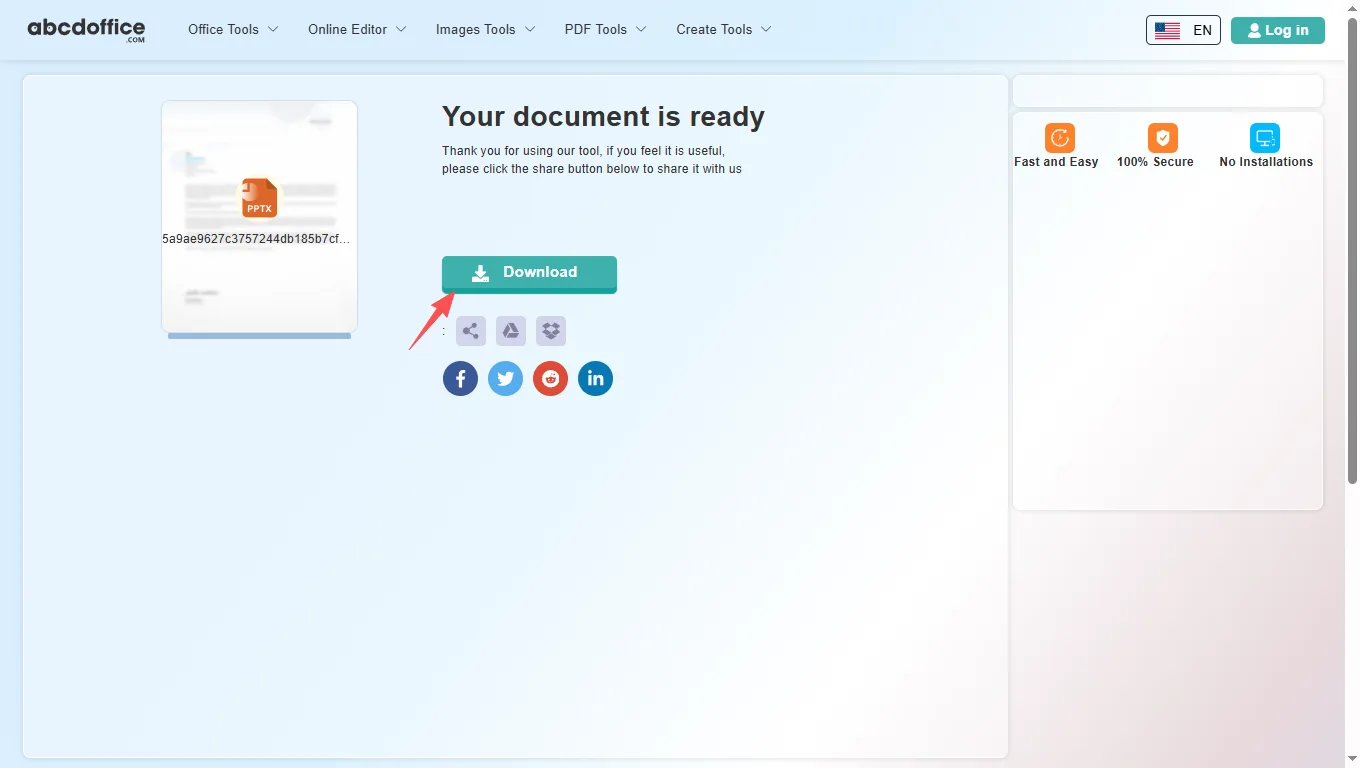
When processing finishes, abcdoffice.com shows a download screen. Click Download to save the converted PDF to your computer from this free ppt to pdf converter.

Your guide to PPT to PDF conversion on ABCD Office

How a ppt to pdf converter works, formats, and vs desktop PowerPoint — for convert ppt to pdf, pptx to pdf, and powerpoint to pdf online.

What is an online PPT to PDF converter?

A PPT to PDF converter runs in your browser. Upload PPTX or PPT on abcdoffice.com, slides render into PDF pages, and you download for email or print.

Supported formats: PPTX, PPT, and PDF output

This ppt to pdf converter accepts PPTX and legacy PPT. PDF locks slides for viewers who should not edit the deck.

Need editable slides again? Use PDF to PPT on abcdoffice.com or keep the PPTX and open ppt-editor.html.

Typical use cases

Sales sends pitch PDFs. Teachers distribute lesson PDFs. Teams archive webinar slides. The convert powerpoint to pdf online workflow fits quick sharing.

Online PPT to PDF vs desktop Microsoft PowerPoint

Desktop PowerPoint Export PDF offers full control. ABCD Office targets fast browser conversion at abcdoffice.com.

Privacy and quality

Upload only needed decks. Review the privacy policy before converting confidential presentations.

PPT to PDF online vs desktop Export PDF

See how abcdoffice.com/ppt-to-pdf.html compares to desktop Office export on steps, install time, and time to finished file.

Method Typical steps Install required Time to convert
abcdoffice.com ppt-to-pdf.html 3–4 steps None ~1 minute
Desktop Microsoft Office 5–7 steps Yes Several minutes
Office for the web (365 login) 4–6 steps Account required 2–5 minutes
abcdoffice.com online
Quick workflow for upload, convert & download
Desktop Office export
More setup, advanced options
Microsoft 365 web
Account and cloud flow

PowerPoint to PDF guides — common conversion tasks on ABCD Office

Guides for convert ppt to pdf, pptx to pdf, and powerpoint to pdf online — start at abcdoffice.com/ppt-to-pdf.html.

Guide

Share slides as PDF for investors

Convert PPTX on ppt-to-pdf.html so the deck layout is fixed for email review.

Upload PowerPoint to convert
Guide

Archive training PPT as PDF

Store compliance slides as PDF after converting from PowerPoint source files.

Upload PowerPoint to convert
Guide

PPT old format to PDF

Upload .ppt decks to the same converter as PPTX on abcdoffice.com/ppt-to-pdf.html.

Upload PowerPoint to convert
Guide

PDF after slide edits online

Polish slides on ppt-editor.html, then run ppt-to-pdf.html for the final send.

Upload PowerPoint to convert

Frequently asked questions

PowerPoint to PDF FAQ for abcdoffice.com/ppt-to-pdf.html — slide decks, handouts, and read-only sharing.

How do I send slide decks as PDF handouts for attendees?

Upload PPTX or PPT to abcdoffice.com/ppt-to-pdf.html, Convert, and distribute a PDF that cannot be rearranged in PowerPoint.

  1. Open abcdoffice.com/ppt-to-pdf.html in your browser.
  2. Click Select File or drag your file into the upload area.
  3. Click Convert and wait until abcdoffice.com finishes processing.
  4. Click Download to save the converted file.
Can I convert PPTX to PDF without PowerPoint on this PC?

The ppt to pdf converter works in the browser — no desktop install required for standard deck exports.

  1. Open abcdoffice.com/ppt-to-pdf.html in your browser.
  2. Click Select File or drag your file into the upload area.
  3. Click Convert and wait until abcdoffice.com finishes processing.
  4. Click Download to save the converted file.
Will animations appear in the PDF from ppt to pdf online?

PDF export captures slide layout and content as static pages — convert, then review the PDF before your webinar or class.

  1. Open abcdoffice.com/ppt-to-pdf.html in your browser.
  2. Click Select File or drag your file into the upload area.
  3. Click Convert and wait until abcdoffice.com finishes processing.
  4. Click Download to save the converted file.
Is ppt to pdf converter free for a single presentation?

Yes — typical convert ppt to pdf jobs on abcdoffice.com run without an account.

  1. Open abcdoffice.com/ppt-to-pdf.html in your browser.
  2. Click Select File or drag your file into the upload area.
  3. Click Convert and wait until abcdoffice.com finishes processing.
  4. Click Download to save the converted file.
Does ppt-to-pdf.html support legacy PPT files?

Upload .ppt or .pptx — both follow the same powerpoint to pdf online path.

  1. Open abcdoffice.com/ppt-to-pdf.html in your browser.
  2. Click Select File or drag your file into the upload area.
  3. Click Convert and wait until abcdoffice.com finishes processing.
PPT to PDF online vs Export PDF in desktop PowerPoint?

Desktop PowerPoint offers broadcast and rehearse tools. ABCD Office ppt to pdf online focuses on fast handout PDFs from the browser.

  1. Open abcdoffice.com/ppt-to-pdf.html in your browser.
  2. Click Select File or drag your file into the upload area.
  3. Click Convert and wait until abcdoffice.com finishes processing.
  4. Click Download to save the converted file.
Is it safe to convert investor decks on abcdoffice.com?

Check internal policy before uploading confidential pitch PPTX files to any ppt to pdf converter.

  1. Open abcdoffice.com/ppt-to-pdf.html in your browser.
  2. Click Select File or drag your file into the upload area.
  3. Click Convert and wait until abcdoffice.com finishes processing.
  4. Click Download to save the converted file.
Can I convert slides to PDF from a tablet?

Use ppt-to-pdf.html in Safari or Chrome on tablet, upload the deck, Convert, save PDF to Files.

  1. Open abcdoffice.com/ppt-to-pdf.html in your browser.
  2. Click Select File or drag your file into the upload area.
  3. Click Convert and wait until abcdoffice.com finishes processing.
  4. Click Download to save the converted file.

Convert your PowerPoint file to PDF on abcdoffice.com

Upload PPTX or PPT at abcdoffice.com/ppt-to-pdf.html — free PPT to PDF converter, then Download your PDF.