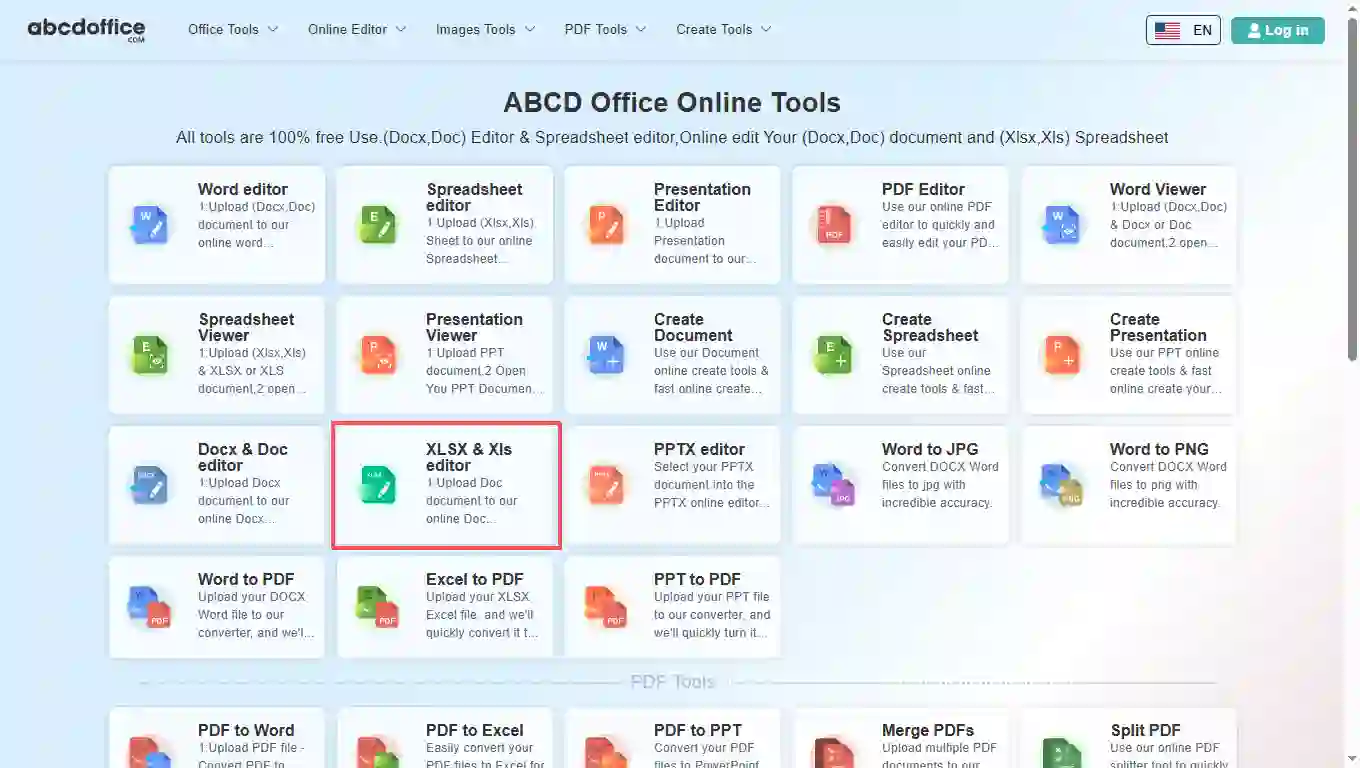
Open abcdoffice.com in your browser. On the homepage tools grid, click XLSX & Xls editor under Online Editor or PDF Tools — or go directly to abcdoffice.com/xlsx-editor.html to open this online xlsx editor page.
This page is the edit xlsx file online entry on abcdoffice.com/xlsx-editor.html — open .xlsx and .xls workbooks, change cells and formulas in the browser, then download without Microsoft Excel installed.
Built for filenames ending in .xlsx. Legacy .xls sheets upload the same way and open in the xlsx editor online workflow on abcdoffice.com.
Edit xlsx file online with multi-tab workbooks, cell edits, common formulas, charts, and ribbon formatting — the xlsx online editor loads after upload completes.
Download the living workbook as XLSX when colleagues need to keep formulas, or export PDF when you only need a read-only snapshot.
Use this xlsx editor online free on guest laptops, Chromebooks, or office PCs where desktop Excel is blocked — no Microsoft 365 subscription required for routine edits.
abcdoffice.com/xlsx-editor.html targets XLSX-specific searches — upload a workbook, edit in the browser, download. For the main spreadsheet hub, see excel-editor.html.
Finance emailed Q4-forecast.xlsx and you need to edit xlsx file online — adjust totals, fix a VLOOKUP, and send the workbook back before the meeting.
Open abcdoffice.com in your browser. On the homepage tools grid, click XLSX & Xls editor under Online Editor or PDF Tools — or go directly to abcdoffice.com/xlsx-editor.html to open this online xlsx editor page.
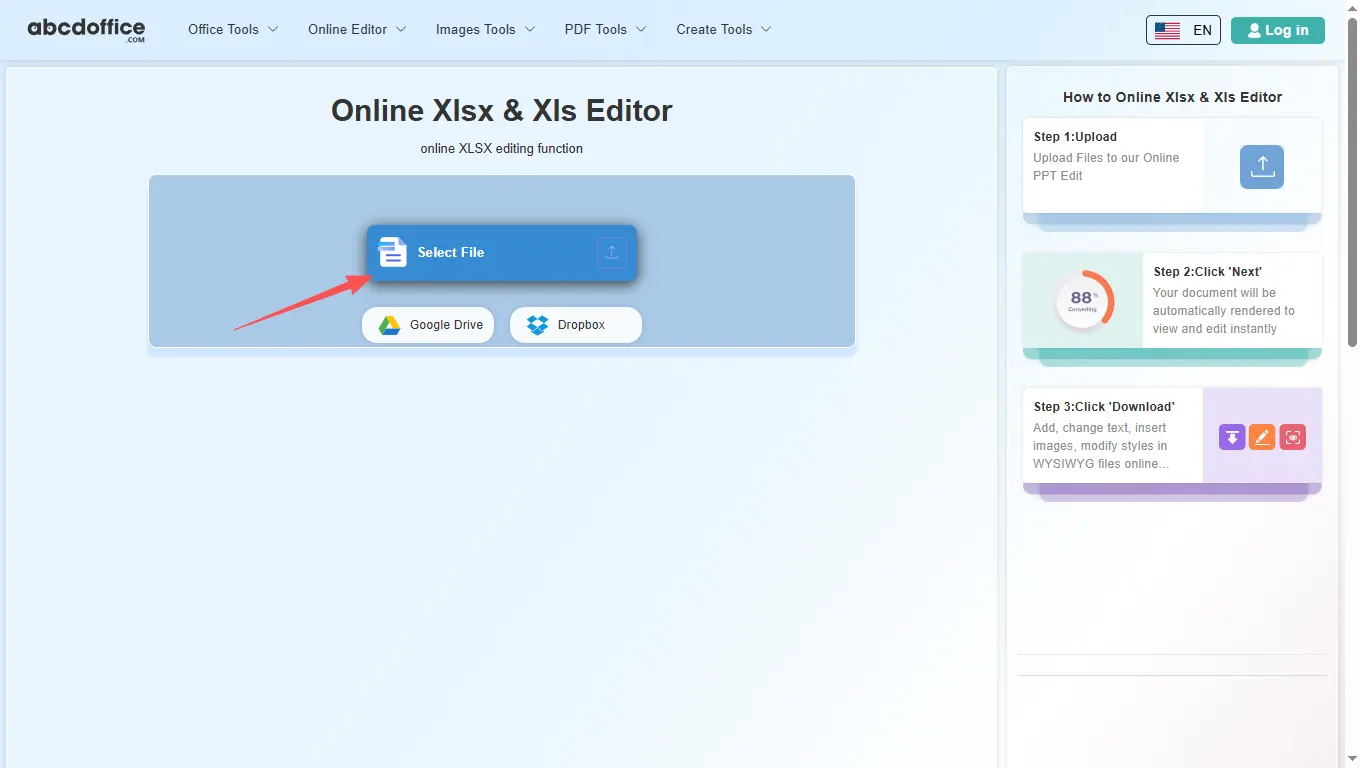
On the upload screen at abcdoffice.com/xlsx-editor.html, click Select File or drag XLSX or XLS files into the upload area. Google Drive and Dropbox buttons appear below Select File on abcdoffice.com.
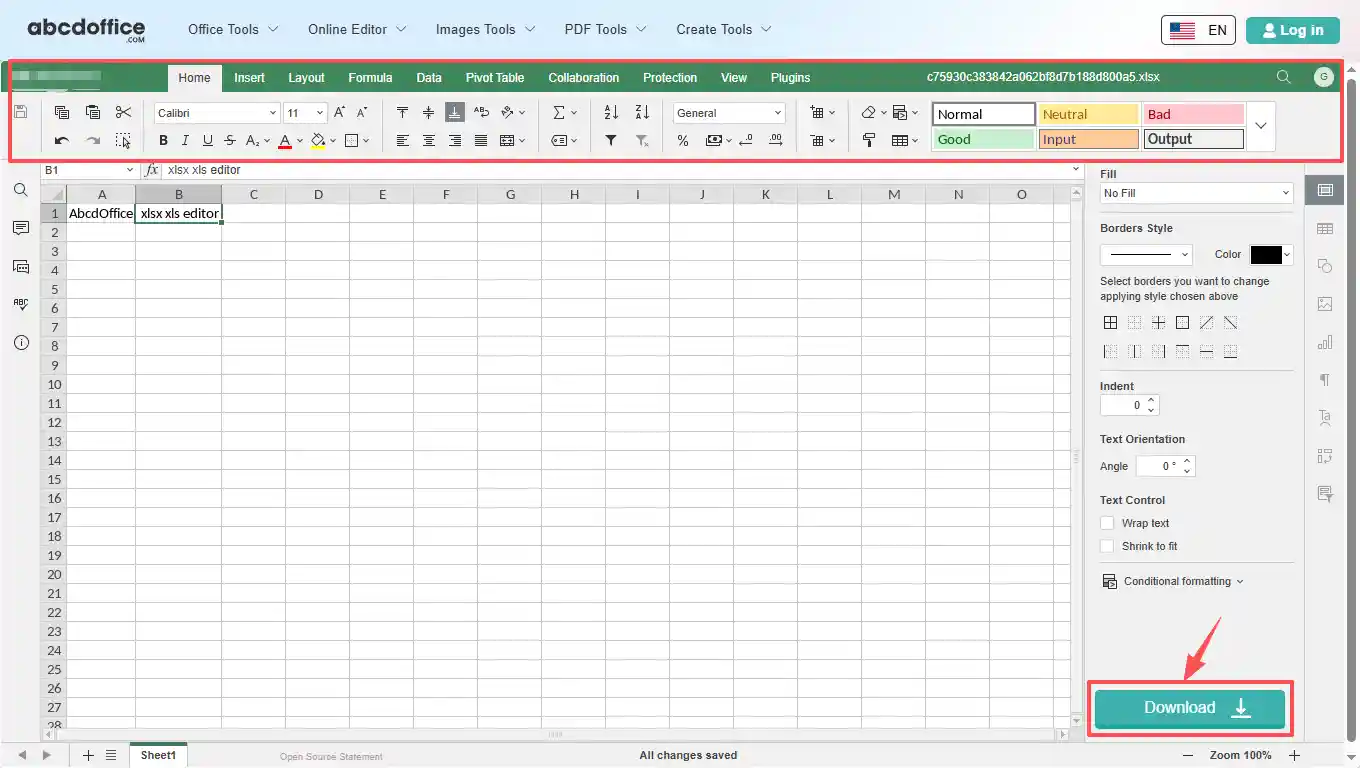
After upload, the xlsx editor online opens on abcdoffice.com. Edit cells, formulas, charts, and sheet tabs from the spreadsheet ribbon.
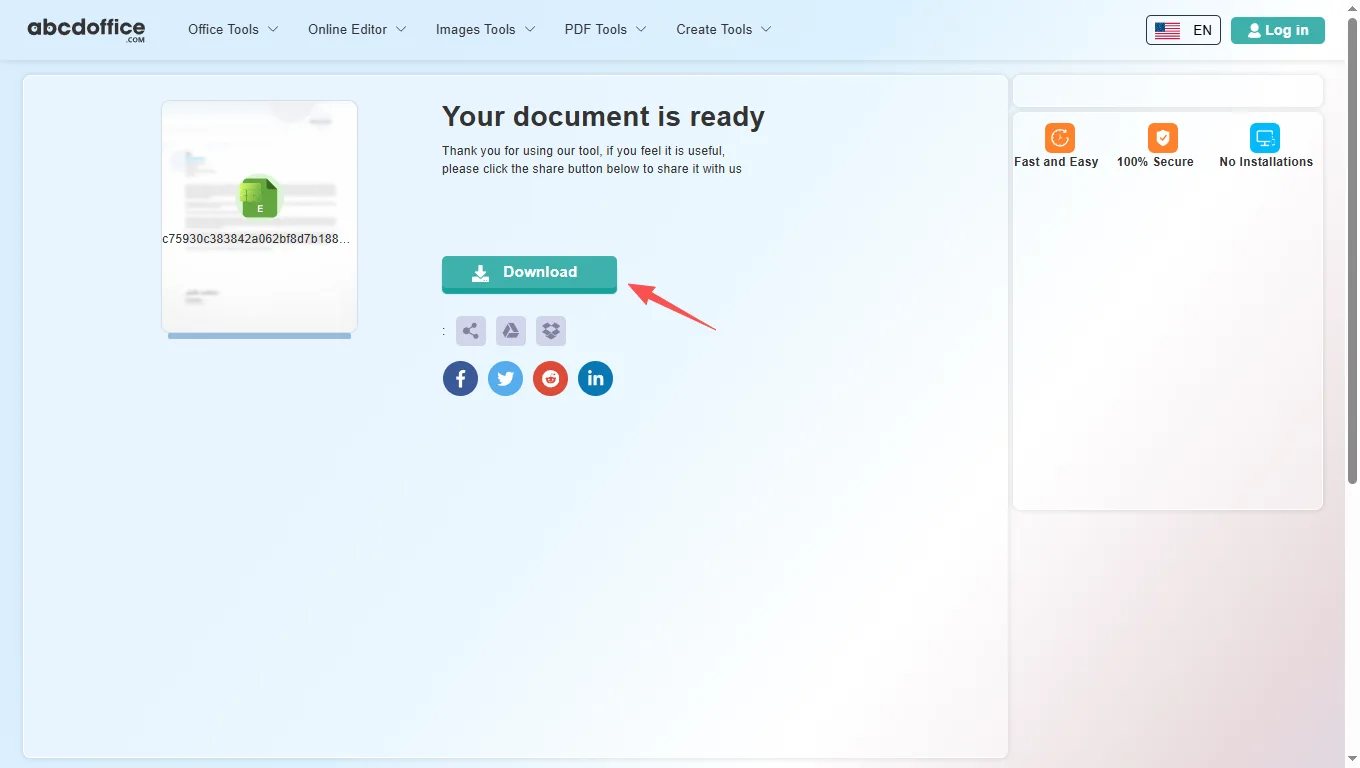
When processing finishes, abcdoffice.com shows a download screen. Click Download to save XLSX or PDF to your computer from this free online xlsx editor.
The ABCD Office xlsx editor online on abcdoffice.com is built on ONLYOFFICE Docs. After your file opens, use the ribbon tabs below — Home, Insert, Layout, Formula, Data, Pivot Table, Collaboration, Protection, View, and Plugins — matching the tools shown in the editor toolbar.
The Home tab covers everyday cell editing in our xlsx online editor — the same core formatting tools people reach for first when they edit xlsx online.
Insert tab tools in this xlsx editor online let you add structure and visuals beyond plain cells — useful for dashboards, reports, and client deliverables on abcdoffice.com.
Control page layout in the xlsx online editor before you export to XLSX or PDF — margins, orientation, and print settings for clean printouts.
Build and audit formulas in the xlsx editor online — insert functions by category, manage named ranges, and control recalculation.
Organize and clean data in the online xlsx editor — import links, sort columns, filter rows, and validate entries on abcdoffice.com.
Summarize large datasets in the xlsx editor online — create pivot tables, adjust layout, and refresh data without leaving the browser.
Review team spreadsheets in the xlsx editor online — co-edit, comment, and chat in the browser on abcdoffice.com.
Lock sensitive spreadsheets before download from abcdoffice.com — encryption, sheet protection, and editable-range rules for shared files.
Tune the spreadsheet workspace — zoom level, frozen headers, gridlines, and interface themes in the xlsx online editor.
Extend the xlsx editor online free with plugins — automation, AI help, translation, and media tools on abcdoffice.com.
When to open the XLSX editor URL instead of excel-editor.html, what .xlsx files behave like in the browser, and how edit xlsx file online fits your workflow.
Search engines and users often type the file extension literally — “xlsx editor”, “open xlsx online”, “edit xlsx online”. abcdoffice.com/xlsx-editor.html matches that intent. excel-editor.html remains the broader spreadsheet editor entry; both open the same grid after upload, but the copy and examples on this page focus on XLSX attachments.
Modern .xlsx workbooks and legacy .xls sheets upload through the same flow. Download XLSX to preserve formulas and sheet tabs for colleagues using Excel. Choose PDF when you need a frozen snapshot for approvers who should not change cells.
Converted data from PDF to Excel often lands with merged headers or broken columns — open that file on xlsx-editor.html, not the Word or PDF tools, to correct structure before sharing.
Operations updates a supplier price tab the same day RFQ responses arrive. HR fixes bonus columns on a locked-down laptop. Founders tweak a cap-table XLSX before a board call. Teachers adjust a grade export from their LMS. Each case needs edit xlsx online once, not a full Excel install.
Pick xlsx-editor.html when the filename, email subject, or ad keyword already says XLSX. Pick excel-editor.html when you describe the tool as a spreadsheet editor or Excel alternative in general. For Microsoft 365 modeling, macros, and enterprise governance, desktop Excel is still the right long-term home.
Upload only the XLSX required for the task on abcdoffice.com. Review the privacy policy before loading payroll, revenue, or customer lists. The xlsx editor online path is built to return clean XLSX downloads — finish edits, download, and close the tab when the spreadsheet is approved.

See how the ABCD Office xlsx editor online free workflow on abcdoffice.com compares to desktop Excel on steps, install time, and time to first edit.
| Method | Typical steps | Install required | Time to edit |
|---|---|---|---|
| abcdoffice.com xlsx editor online | 3–4 steps | None | ~1 minute |
| Microsoft Excel (desktop) | 5–7 steps | Yes | Several minutes |
| Excel for the web (365 login) | 4–6 steps | Account required | 2–5 minutes |
Guides for edit xlsx online, edit xls online, and xlsx editor online free — all paths start at abcdoffice.com/xlsx-editor.html.
Download the channel file and upload to abcdoffice.com/xlsx-editor.html — the XLSX-focused editor page.
Upload an XLSX filexlsx-editor.html matches .xlsx filenames and SEO; excel-editor.html is the main spreadsheet editor hub.
Upload an XLSX fileConvert PDF to Excel, then fix headers and merged cells on xlsx-editor.html before sharing.
Upload an XLSX fileSwitch sheet tabs at the bottom of the xlsx online editor to update status per workstream.
Upload an XLSX fileExport the workbook to PDF from xlsx-editor.html when viewers should not change formulas.
Upload an XLSX fileChange unit prices and totals in a procurement sheet and download the new XLSX the same day.
Upload an XLSX fileXLSX-focused answers for abcdoffice.com/xlsx-editor.html — spreadsheet format tips and how this page differs from abcdoffice.com/excel-editor.html.
XLSX is the default Excel workbook format (.xlsx). abcdoffice.com/xlsx-editor.html lets you upload .xlsx or legacy .xls files, edit cells in the browser, and download XLSX or PDF without installing Microsoft Excel.
abcdoffice.com/excel-editor.html is the main Excel editor page for general spreadsheet editing. abcdoffice.com/xlsx-editor.html is tuned for XLSX-specific searches — budget .xlsx attachments, exports from other apps, and filenames that already use the .xlsx extension.
Download the shared .xlsx from Teams, Slack, or email, then upload it to abcdoffice.com/xlsx-editor.html. You can update figures, labels, and tabs in the browser and send back the corrected workbook.
Common formulas, number formats, and charts in typical business XLSX files usually survive edit and download on abcdoffice.com. Very large models, VBA macros, or rare Excel features may need desktop Excel for full fidelity.
Yes — convert with pdf-to-excel.html, then open the output XLSX on xlsx-editor.html to correct columns, labels, or tables before sharing.
Yes — standard multi-sheet workbooks open in the xlsx editor with sheet tabs, cell editing, sorting, filtering, and chart tools available in the ONLYOFFICE spreadsheet ribbon on abcdoffice.com.
Workbooks are processed for your browser session on abcdoffice.com. Follow your finance or IT policy before uploading payroll, revenue, or customer lists to any online xlsx editor.
Click Save in the editor, choose PDF in the Save document as dialog, then continue to the download screen — useful for reports that should not be changed.
Upload an XLSX or XLS file at abcdoffice.com/xlsx-editor.html — the free online xlsx editor opens after upload, then Download when you are done.